
Mazda 3 Owners Manual: Exterior Overview (4-Door)
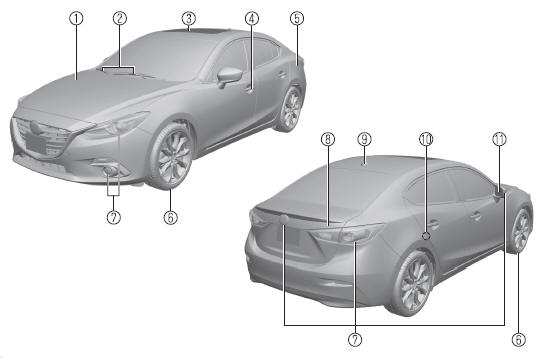
- Hood
- Windshield wiper blades
- Moonroof
- Doors and keys
- Fuel-filler lid
- Wheels and Tires
- Exterior lights
- Trunk lid
- Antenna
- Child safety locks
- Outside mirror

 Exterior Overview (5-Door)
Hood
Windshield wiper blades
Moonroof
Doors and keys
Fuel-filler lid
Wheels and Tires
Exterior lights
Rear window wiper blade
Liftgate
Antenna
Child safety locks
Out ...
Other materials:
Crankshaft Position (CKP) Sensor Removal/Installation [Mzr 2.0, Mzr 2.5]
Removal
CAUTION:
When foreign material such as an iron chip is on the CKP sensor, it can cause
abnormal output from the sensor because of flux turbulence and adversely affect
the engine control. Be sure there is no foreign material on the CKP sensor when
replacing.
Do not a ...
Spark Plug Inspection [Mzr 2.0, Mzr 2.5]
Specification
Spark plug type
LFJD-18110, L3Y2-18110
Plug Gap Inspection
CAUTION:
To avoid possible damage to the tip, do not adjust the spark plug gap. (L3Y2-18110)
To prevent damaging the tip, use a wire type plug gap gauge when inspecting
the spark plug gap. (L3 ...
SRS airbags
The SRS airbag system in the Subaru Solterra is engineered to deploy
during specific types of severe impacts that may otherwise cause serious harm to
vehicle occupants. These advanced airbags function in combination with seat belts
to significantly reduce the risk of fatal or severe injuries.
...
