
Mazda 3 Service Manual: Front Seat Rail Guide Cover Removal/Installation
WARNING:
-
Handling a front seat (with built-in side air bag) improperly can accidentally operate (deploy) the air bag, which may seriously injure you. Read the service warnings before handling a front seat (with built-in side air bag)..
CAUTION:
-
After removing a front seat, do not operate the slider lever. If the slider lever is operated, the left and right slide positions will deviate, and the slide adjuster may be damaged after the front seat is installed.
-
Verify that there are no malfunctions in the sliding mechanism after installing a front seat.
-
When performing the procedure with a front seat removed from the vehicle, perform the procedure on a clean rag so as not to damage or soil the seat.
-
When the passenger's seat is removed, perform the seat weight sensor inspection using the M-MDS after installing the passenger's seat..
-
When the passenger's seat is replaced with a new one, perform the seat weight sensor calibration using the M-MDS..
Vehicles Without Power Seat System
1. Switch the ignition to off.
2. Remove the battery cover..
3. Disconnect the negative battery cable and wait 1 min or more
..
4. Remove the front seat..
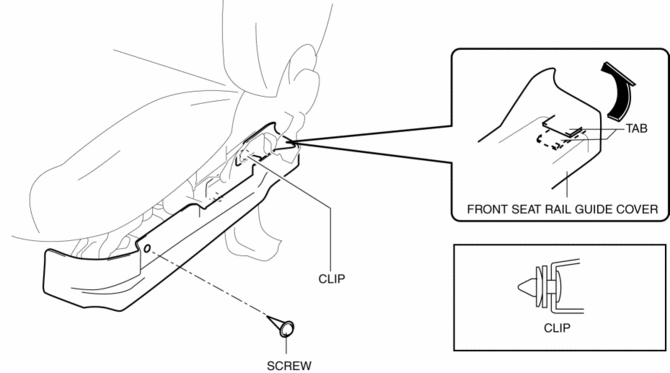
5. Remove the screw, clip and disengage the tab, remove the front seat rail guide cover.
6. Install in the reverse order of removal.
Vehicles With Power Seat System
1. Switch the ignition to off.
2. Remove the battery cover..
3. Disconnect the negative battery cable and wait 1 min or more
..
4. Remove the front seat..
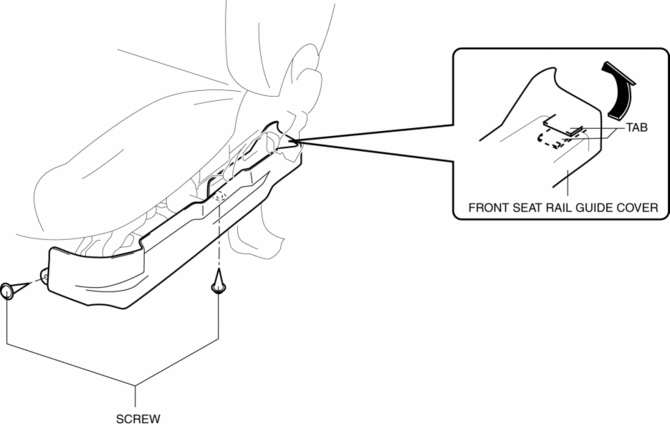
5. Remove the screws and disengage the tab, remove the front seat rail guide cover.
6. Install in the reverse order of removal.
 Front Seat Cushion Trim Removal/Installation
WARNING:
Handling a front seat (with built-in side air bag) improperly can accidentally
operate (deploy) the air bag, which may seriously injure you. Read the service
warnings before han ...
 Front Seat Removal/Installation
WARNING:
Handling a front seat (with built-in side air bag) improperly can accidentally
operate (deploy) the air bag, which may seriously injure you. Read the service
warnings before han ...
Other materials:
Winter driving tips
When operating the Subaru Solterra in winter conditions, it is essential
to carry out thorough preparation and regular inspections before driving. Always
adapt your driving style to current weather and road conditions to ensure maximum
safety, efficiency, and vehicle performance.
Pre-winter p ...
Fuel Injector Inspection [Mzr 2.0, Mzr 2.5]
Resistance Inspection
1. Remove the battery cover..
2. Disconnect the negative battery cable..
3. Disconnect the fuel injector connector.
4. Inspect the resistance between fuel injector terminals A and B.
Fuel injector resistance
11.4—12.6 ohms [20 °C {68 °F}]
If ...
Restraints SST [Standard Deployment Control System]
49 H066 002
Deployment tool
49 D066 002
Adapter harness
49 L066 002
Adapter harness
49 B066 004
Adapter harness
49 N088 0A0
Fuel and Therm ...
