
Subaru Solterra 2023-2026 Owner's Manual: Garage door opener
The integrated HomeLink system in the Subaru Solterra allows seamless programming and control of various devices such as garage doors, entry gates, home lighting, security systems, and other compatible automation equipment, providing enhanced convenience and smart functionality directly from your vehicle.
■ HomeLink programming procedure
Detailed programming instructions for the HomeLink system in the Subaru Solterra are also available online for additional guidance and up-to-date compatibility information.
Website: https://homelink.com/subaru
For further assistance, you may contact HomeLink customer support using the information below.
Help Line: 1-800-355-3515
System components
The Subaru Solterra is equipped with a HomeLink wireless control system featuring three programmable buttons, allowing you to operate up to three separate devices. To ensure proper setup, refer to the appropriate programming procedure depending on the type of device being connected.
Vehicles with auto anti-glare inside rear view mirror
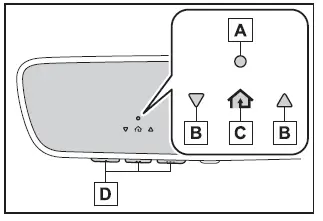
- HomeLink indicator light
- Garage door operation indicators
- HomeLink icon
The indicator light illuminates whenever the HomeLink system in the Subaru Solterra is actively transmitting a signal.
- Buttons
Vehicles with Digital inner mirror
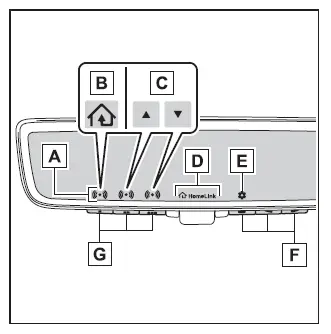
- HomeLink indicator light
Illuminates above the selected button during operation. - HomeLink icon
- Garage door operation indicators
- HomeLink logo
Displayed while the HomeLink system is transmitting.
The logo may temporarily disappear when a HomeLink button is pressed even though the system continues operating. - Setting icon
Accessed via the menu button to adjust HomeLink settings. - Menu buttons
- HomeLink buttons
■ Codes stored in the Home- Link memory
- Stored HomeLink codes in the Subaru Solterra remain محفوظ even if the 12-volt battery is disconnected, ensuring long-term reliability.
- If an attempt to register a new code fails, the previously stored code will remain unchanged and will not be deleted.
WARNING
■ When programming a garage door or other remote control device
Be aware that devices such as garage doors or gates may activate during programming in the Subaru Solterra, so always ensure that no people, animals, or objects are in the operating area to avoid injury or damage.
■ Conforming to federal safety standards
Do not use the HomeLink system in the Subaru Solterra with any garage door opener or device that does not include safety stop and reverse functionality, as required by safety regulations.
Devices lacking these features may not detect obstacles, increasing the risk of serious injury or fatal accidents.
■ When operating or programming HomeLink
Never allow children to interact with or operate the HomeLink buttons in the Subaru Solterra, as unintended activation of connected systems may lead to dangerous situations.
Programming HomeLink
■ Before programming Home- Link
- During setup in the Subaru Solterra, connected systems such as garage doors or gates may activate unexpectedly, so always verify that the surrounding area is clear to prevent accidents.
- For best results, install a fresh battery in the handheld remote control transmitter before starting the programming process.
- Garage door systems manufactured after 1995 often feature rolling code technology; in such cases, access to the "Learn" or "Smart" button on the motor unit may be required, and a stable step ladder may be necessary.
■ Programming HomeLink
For successful programming in the Subaru Solterra, steps 2 through 4 must be completed within 60 seconds; otherwise, the indicator light will stop flashing and the procedure will need to be restarted.
1. Vehicles with Digital inner mirror: Press the HomeLink button or the menu button to initiate the process.
When the HomeLink button is pressed:
The HomeLink Training Tutorial will automatically appear on the display, providing guided instructions for programming within the Subaru Solterra system.
Follow the on-screen instructions carefully to complete the setup process successfully and ensure reliable operation of your connected devices.
When the menu button is pressed: Press the menu button
 and select the "Set Up >" option to access the configuration menu. The HomeLink
Training Tutorial will then appear on the display of the Subaru Solterra, providing
step-by-step visual guidance to simplify the programming process and ensure accurate
setup.
and select the "Set Up >" option to access the configuration menu. The HomeLink
Training Tutorial will then appear on the display of the Subaru Solterra, providing
step-by-step visual guidance to simplify the programming process and ensure accurate
setup.
Once the HomeLink Training Tutorial is displayed, carefully follow the on-screen instructions to complete programming within the Subaru Solterra system efficiently and correctly.
2. Press and release the desired HomeLink button that you intend to program, and confirm that the HomeLink indicator light begins flashing in orange, indicating that the Subaru Solterra system is ready to learn a new signal.
3. Position the remote control transmitter for your device so that it is aimed at the rear view mirror, maintaining a distance of approximately 1 to 3 inches (25 to 75 mm) from the HomeLink buttons to ensure optimal signal transmission.
Keep the HomeLink indicator light clearly visible throughout the programming procedure in the Subaru Solterra to monitor progress and status.
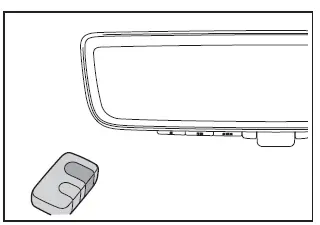
4. Proceed with programming the selected device using the appropriate method for your system.
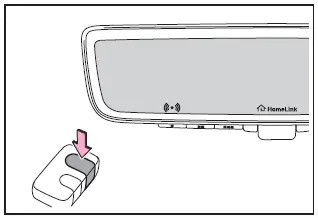
Programming a device other than an entry gate (for U.S.A. owners)
Press and hold the button on the remote control transmitter until the HomeLink indicator light in the Subaru Solterra changes from a slow flashing orange to either a rapidly flashing green (indicating a rolling code system) or a steady green light (indicating a fixed code system), then release the button to complete this stage.
Programming an entry gate (for U.S.A. owners)/Programming a device in the Canadian market
Press and release the remote control transmitter button repeatedly at approximately 2-second intervals until the HomeLink indicator light transitions from a slow flashing orange to a rapidly flashing green (rolling code) or a solid green (fixed code), confirming successful signal recognition by the Subaru Solterra system.
5. Test the HomeLink operation by pressing the newly programmed button and observing the indicator light behavior:
- HomeLink indicator light illuminates steadily: This indicates that programming
of a fixed code device has been successfully completed.
The connected garage door or other device should now operate normally when the HomeLink button in the Subaru Solterra is pressed and released.
- HomeLink indicator light flashes rapidly: This indicates that the device
uses a rolling code system.
To finalize programming, press and hold the HomeLink button firmly for approximately 2 seconds, then release it.
- If the garage door or device does not respond, continue with the procedure described under "Programming a rolling code system".
6. Repeat the above steps as needed to program additional devices to the remaining HomeLink buttons in the Subaru Solterra, allowing full customization of multiple systems.
■ Programming a rolling code system
Programming rolling code systems in the Subaru Solterra may require assistance from a second person due to the coordination needed between the vehicle and the garage door motor unit.
1. Locate the "Learn" or "Smart" button on the garage door opener motor inside your garage.
This button is typically positioned near the antenna wire connection on the motor housing. Its label and color may vary depending on the manufacturer, so consult the garage door opener’s manual if necessary.
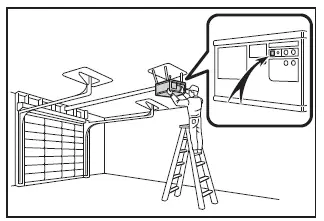
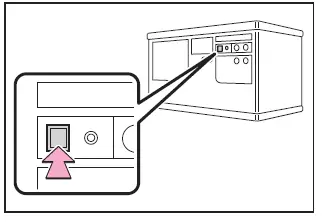
2. Press and release the "Learn" or "Smart" button on the motor unit.
Ensure that step 3 is completed within 30 seconds after performing this step to maintain synchronization with the Subaru Solterra system.
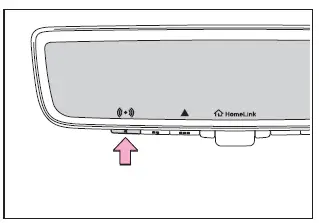
3. Inside the Subaru Solterra, press and hold the selected HomeLink button for approximately 2 seconds, then release it. Repeat this press-hold-release sequence up to three times until the system completes programming successfully.
If the garage door opener motor activates when the HomeLink button is pressed, this confirms that the Subaru Solterra has successfully synchronized with the device.
■ Enabling 2-way communication with a garage door (only available for compatible devices)
When supported, 2-way communication in the Subaru Solterra allows the driver to monitor the real-time status of the garage door (open or closed) directly through in-vehicle indicators, enhancing convenience and safety.
This feature is available only with compatible garage door opener systems. To verify compatibility, visit www.homelink.com.
1. Within 5 seconds after completing programming, if the garage door opener motor has successfully paired with the Subaru Solterra, both garage door operation indicators will flash rapidly in green, and the motor unit light will blink twice, confirming that 2-way communication has been successfully enabled.
If the indicators in the Subaru Solterra do not begin flashing as expected, repeat steps 2 and 3 within the first 10 presses of the HomeLink button immediately after completing the programming process, as timing plays a critical role in establishing proper communication with the system.
2. Press any previously programmed HomeLink button in the Subaru Solterra to initiate operation of the connected garage door or device.
3. Within 1 minute after pressing the HomeLink button—and once the garage door has stopped moving—press the "Learn" or "Smart" button on the garage door opener motor. Within approximately 5 seconds after successful synchronization, both garage door operation indicators inside the Subaru Solterra will flash rapidly in green, while the indicator light on the garage door opener motor will blink twice, confirming that secure 2-way communication has been successfully established.
■ Reprogramming a single HomeLink button
The Subaru Solterra allows individual HomeLink buttons to be overwritten without affecting the other stored functions, making it easy to update or replace connected devices.
1. Press and hold the HomeLink button that you wish to reprogram.
2. When the HomeLink indicator light begins flashing in orange, release the button and immediately follow the initial programming procedure (step 1 of "Programming HomeLink"). Note that it may take up to 20 seconds before the indicator begins flashing, indicating readiness for new input.
■ Before programming
- For optimal results in the Subaru Solterra, install a fresh battery in the remote transmitter before beginning the programming process.
- Ensure that the battery side of the transmitter is facing away from the HomeLink buttons during programming to maintain proper signal direction.
Operating HomeLink
To operate a programmed device using the Subaru Solterra HomeLink system, simply press the corresponding HomeLink button. The indicator light will illuminate to confirm signal transmission.
The Subaru Solterra also provides visual feedback regarding the status of the garage door through dedicated operation indicators.
Vehicles with auto anti-glare inside rear view mirror
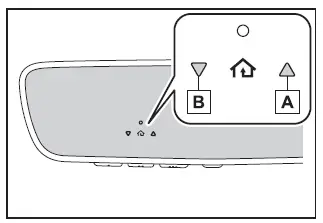
- Opening
- Closing
Vehicles with Digital inner mirror
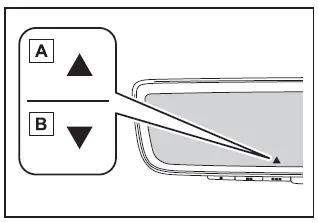
- Opening
- Closing
This advanced functionality in the Subaru Solterra is only available when used with compatible garage door opener systems. To verify compatibility, refer to www.homelink.com.
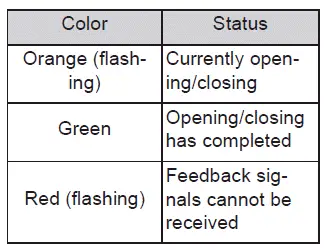
The HomeLink system in the Subaru Solterra typically operates within a range of approximately 820 ft. (250 m) from the garage door. However, physical obstacles such as buildings, walls, or dense vegetation may weaken or block the signal, preventing the vehicle from receiving accurate feedback.
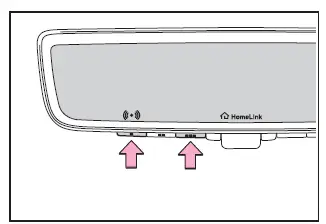
To recall the last recorded garage door status in the Subaru Solterra, press
and release either HomeLink buttons
 and
and
 or
or
 and
and
 (vehicles with auto anti-glare inside rear view mirror),
 and
and
 or
or
 and
and
 (vehicles with Digital inner mirror) simultaneously.
The previously recorded garage door status will be displayed for approximately 3 seconds within the Subaru Solterra system, allowing quick verification without reactivating the door.
Erasing the entire Home- Link memory (all three codes)
To completely clear all stored HomeLink data in the Subaru Solterra, press and hold the two outer HomeLink buttons simultaneously for about 10 seconds until the indicator light changes from a steady orange to a rapidly flashing green, confirming that all codes have been erased.
If you plan to sell or transfer ownership of your Subaru Solterra, it is strongly recommended to erase all stored HomeLink codes to protect your personal access settings and ensure privacy.
 Other interior features
Sun visors
In the Subaru Solterra, position the sun visor forward by simply flipping
it downward to block sunlight from the front.
For side protection, lower the visor, unclip it from i ...

Other materials:
Heating
Set the mode selector dial to the
position.
Set the air intake selector to the outside
air position.
Set the temperature control dial to the
hot position.
Set the fan control dial to the desired
speed.
If dehumidified heating is desired, turn
on the air conditioner.
NOTE
...
Trunk Lid Removal/Installation
WARNING:
Removing the trunk lid stay damper without supporting the trunk lid can be
dangerous. The trunk lid may fall and injure you. Be sure to open the trunk
lid completely and support it securely before removing the trunk lid stay damper.
1. Disconnect the negative battery cab ...
Restraints SST [Standard Deployment Control System]
49 H066 002
Deployment tool
49 D066 002
Adapter harness
49 L066 002
Adapter harness
49 B066 004
Adapter harness
49 N088 0A0
Fuel and Thermometer checker
...
