
Subaru Solterra 2023-2026 Owner's Manual: Other interior features
Sun visors
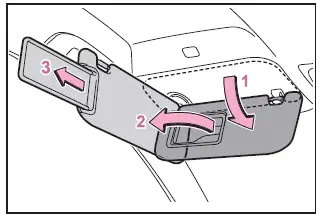
- In the Subaru Solterra, position the sun visor forward by simply flipping it downward to block sunlight from the front.
- For side protection, lower the visor, unclip it from its holder, and rotate it toward the side window to shield against glare.
- To extend coverage, slide the visor backward once it is in the side position, allowing improved shading for the driver or front passenger.
Vanity mirrors
In the Subaru Solterra, access the vanity mirror by sliding the protective cover open.
Once opened, the integrated light automatically turns on, providing clear illumination for visibility.
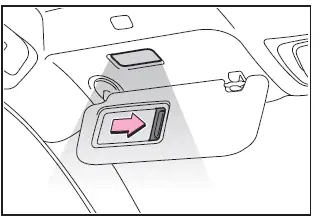
■ Vanity lights
If the vanity lights in the Subaru Solterra remain on after the power switch is turned off, they will automatically shut off after approximately 20 minutes to protect the battery.
NOTICE
■ To prevent 12-volt battery discharge
Avoid leaving vanity lights illuminated for long periods when the Subaru Solterra EV system is not active, as this may drain the 12-volt battery.
Power outlet (12 VDC)
The Subaru Solterra is equipped with a 12 VDC power outlet suitable for electronic devices with a maximum rating of 12 V and 10 A (120 W total consumption).
When using multiple devices, ensure that the combined power consumption does not exceed 120 W to prevent system overload.
■ Front
Open the protective lid to access the front power outlet in the Subaru Solterra.
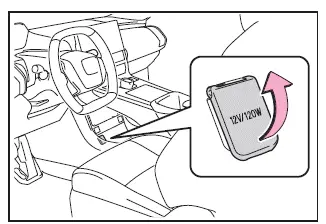
■ The power outlet can be used when
The Subaru Solterra power switch is in ACC or ON mode.
■ When stopping the EV system
Before turning off the Subaru Solterra EV system, disconnect any devices with built-in batteries, such as portable chargers or power banks.
If left connected, these devices may interfere with proper system shutdown.
NOTICE
■ When power outlet is not in use
Always close the outlet lid in the Subaru Solterra when not in use to prevent debris or liquid from entering, which could cause short circuits or damage.
■ To prevent 12-volt battery discharge
Do not operate the power outlet unnecessarily when the Subaru Solterra is powered off, as this may lead to battery drain.
■ To prevent incorrect operation of the vehicle
Ensure that all charging accessories are disconnected from the Subaru Solterra before switching the power off.
If devices remain connected, the following may occur:
- The doors may not lock properly
- The startup screen may remain active on the display
- Interior and instrument lighting may stay illuminated
USB Type-C charging ports
The Subaru Solterra is equipped with USB Type-C charging ports that supply up to 3 A at 5 V for compatible external devices.
These ports are designed exclusively for charging purposes and do not support data transfer or device communication functions.
Depending on the device connected, charging performance may vary.
Always consult the device manufacturer’s manual before use.
For USB Type-A ports, refer to the "MULTIMEDIA OWNER'S MANUAL".
■ Using the USB Type-C charging ports
Center console
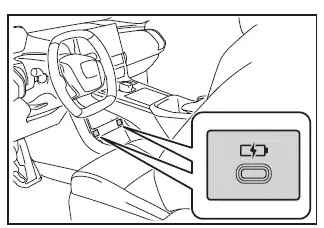
Rear
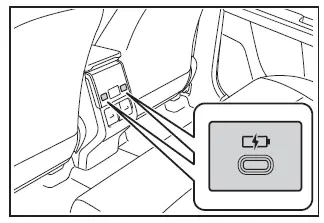
■ The USB Type-C charging ports can be used when
The Subaru Solterra power switch is set to ACC or ON.
■ Situations in which the USB
Type-C charging ports may not operate correctly
- If a connected device exceeds 3 A at 5 V power requirements
- If a device intended for data communication (such as USB storage) is connected
- If the connected device is powered off or incompatible
- If the interior temperature of the Subaru Solterra is excessively high, such as after prolonged exposure to direct sunlight
The interior convenience features of the Subaru Solterra are designed to provide practicality, safety, and modern usability, ensuring a comfortable and efficient driving experience for all occupants.
■ About connected external devices
When using external devices with the Subaru Solterra, it is important to understand that charging behavior may vary depending on the device itself; in some cases, the charging process may temporarily pause and then resume automatically, which is considered normal operation and not a system fault. This characteristic is typical for modern smart devices interacting with the Subaru Solterra’s intelligent power management system, which dynamically adjusts energy delivery to ensure stable performance and device safety.
NOTICE
■ To prevent damage to the USB Type-C charging ports
- Avoid inserting any foreign objects into the USB Type-C ports of your Subaru Solterra, as this can lead to internal damage or malfunction.
- Keep all liquids away from the ports; even small amounts of moisture can compromise electrical components.
- Do not apply excessive pressure or impact to the ports, as physical stress may reduce their lifespan or cause connectivity issues.
- Never attempt to disassemble or modify the USB Type-C ports, as this may void warranties and damage the vehicle’s electrical system.
■ To prevent damage to external devices
- Do not leave connected devices inside the Subaru Solterra for extended periods, especially in hot conditions, as interior temperatures can rise significantly and damage sensitive electronics.
- While a device is connected, avoid applying pressure to it or pulling on its cable, as this may damage both the device and the vehicle’s connection interface.
■ To prevent 12-volt battery discharge
Refrain from using the USB Type-C charging ports for prolonged periods when the EV system of the Subaru Solterra is turned off, as this may lead to unnecessary discharge of the 12-volt battery.
Wireless charger (if equipped)
The Subaru Solterra is equipped with an advanced wireless charging system that allows compatible portable devices to be charged simply by placing them on the designated charging surface; this system supports Qi-standard devices certified by the Wireless Power Consortium, including modern smartphones and portable battery packs, making everyday usage more convenient and cable-free.
The compatible portable devices can be found on the following Wireless Power Consortium website.
https://www.wirelesspowerconsortium.com/
Please note that devices exceeding the size of the charging tray may not function properly, and in some cases, even supported devices may behave inconsistently depending on their internal coil positioning or case thickness; always refer to your device’s manual for optimal usage within the Subaru Solterra environment.
■ The "Qi" symbol
The "Qi" symbol represents a globally recognized trademark of the Wireless Power Consortium and indicates compatibility with standardized wireless charging technologies used in the Subaru Solterra.

■ Name for all parts
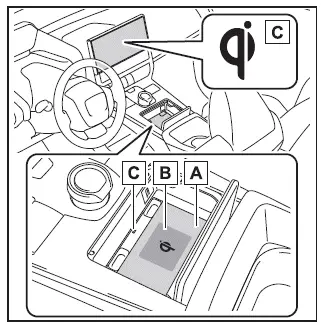
- Charging tray
- Charging area*
- Operation indicator light
*: Both portable devices and the Subaru Solterra wireless charger utilize internal charging coils to transfer energy efficiently.
Inside the Subaru Solterra, the wireless charging system is designed with a movable internal coil that actively aligns with the coil inside your portable device; once detected within the optimal charging zone, the system automatically adjusts position to initiate charging, ensuring maximum efficiency and reliability during use.
If the device shifts outside the designated charging area, charging will stop automatically to prevent inefficiencies or overheating, highlighting the importance of correct placement within the Subaru Solterra charging tray.
Placing multiple devices simultaneously may interfere with coil detection, which can prevent proper charging, so it is recommended to charge one device at a time for best results.
■ Using the wireless charger
1. Open the lid.
2. Place the portable device on the charging tray.
Position the device with its charging surface facing downward and align its center with the center of the charging area within the Subaru Solterra to ensure optimal performance.
Because internal charging coils vary by manufacturer, some devices may require slight repositioning to achieve proper alignment within the Subaru Solterra charging system.
When charging begins, the operation indicator light illuminates in orange, confirming active charging status.
If charging does not start, adjust the device closer to the center; if unsuccessful, the indicator may alternate between green and orange while internal adjustments occur, sometimes accompanied by subtle mechanical sounds from the coil alignment system.
Once the device is fully charged, the indicator light will switch to green, signaling completion.
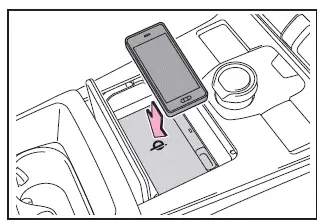
■ Recharging function
- After a device reaches full charge and remains on the tray, the Subaru Solterra system may automatically resume charging after a preset interval to maintain battery level.
- If the device is moved within the charging area, charging may briefly stop due to coil disconnection; however, the system will quickly realign and resume charging once the coil is detected again, ensuring continuous usability in real-world conditions.
■ Rapid charging function
- The Subaru Solterra wireless charging system supports advanced rapid charging
capabilities for compatible portable devices, allowing users to benefit from
faster and more efficient power delivery during everyday use.
- Devices that comply with the Wireless Power Consortium standard WPC Ver1.2.4 and support fast charging profiles can take full advantage of this feature within the Subaru Solterra.
- Apple iPhone models начиная з iPhone 8 і новіші, які працюють на iOS з підтримкою 7.5 W бездротової зарядки, також автоматично використовують прискорений режим заряджання в Subaru Solterra.
- When a compatible portable device is placed on the charging tray of the Subaru Solterra, the system intelligently detects its capabilities and seamlessly switches to rapid charging mode without requiring any manual input, ensuring optimal charging performance.
■ Lighting conditions of operation indicator light
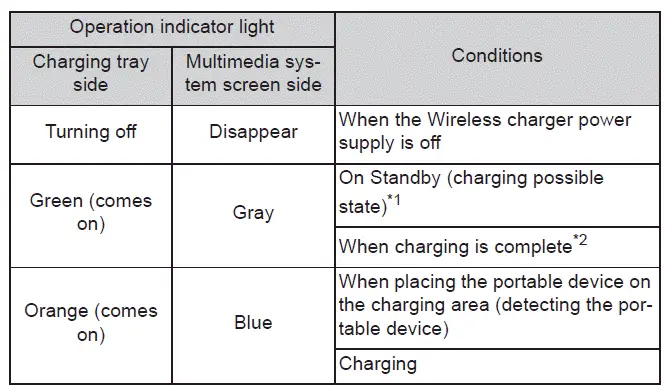
*1: When the system is in standby mode, no charging power is supplied; placing
metallic objects on the Subaru Solterra charging tray in this state will not cause
heating or damage.
*2: Depending on the characteristics of certain portable devices, the operation
indicator light may remain illuminated in orange even after charging has completed,
which is a normal behavior specific to device communication protocols.
■ The wireless charger is not working properly
The Subaru Solterra wireless charging system may occasionally not operate as expected due to various environmental or device-related factors; below are typical situations along with possible causes and solutions to ensure proper functionality.
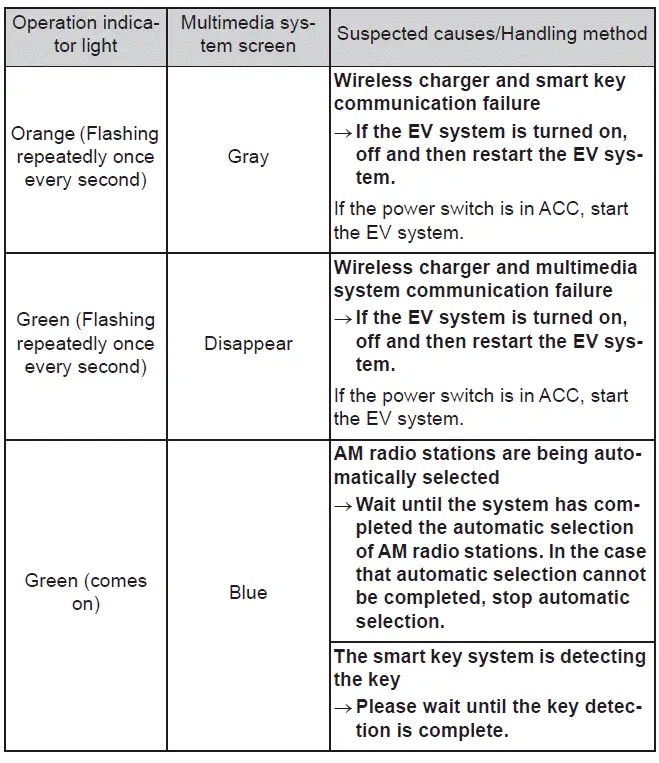
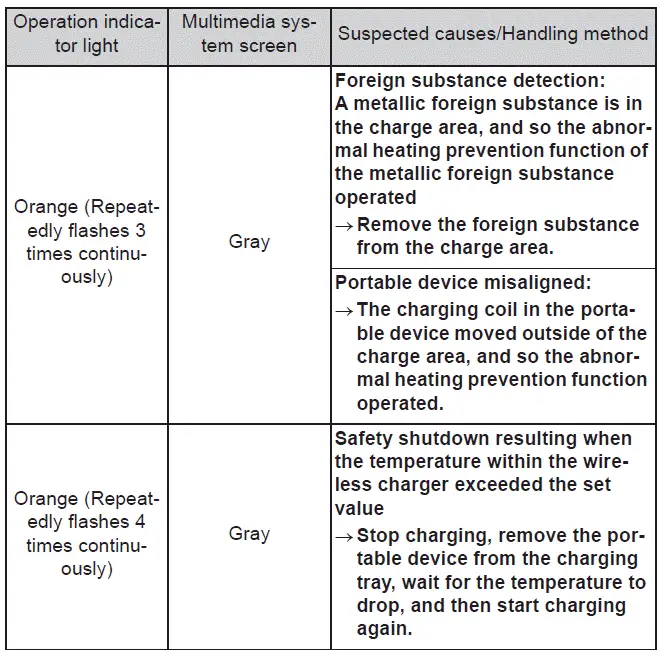
■ The wireless charger can be operated when
The wireless charging feature in the Subaru Solterra becomes active only when the vehicle power switch is set to ACC or ON, ensuring that energy is supplied safely and efficiently through the system.
■ Portable devices that can be charged
- The Subaru Solterra wireless charger is designed to support devices compatible with the Qi standard; however, compatibility across all versions such as Qi Ver. 1.0, 1.2.4, and newer cannot be universally guaranteed due to manufacturer-specific differences.
- Under normal conditions, the system delivers low-power charging (up to 5 W) suitable for smartphones and similar portable electronics, maintaining safe thermal conditions.
- Higher power charging is supported for specific devices, enhancing usability
in the Subaru Solterra:
- iPhones with 7.5 W wireless charging capability can receive up to 7.5 W.
- Devices compliant with WPC Ver 1.2.4 Extended Power Profile can receive up to 10 W for faster charging performance.
■ When covers and accessories are attached to portable devices
Charging performance in the Subaru Solterra may be affected when protective covers or accessories are attached to a device, particularly if they are not Qi-compatible or are excessively thick, as they can interfere with coil alignment.
If charging does not initiate, even when the device is correctly placed on the charging area, remove any case or accessory and try again to restore normal operation within the Subaru Solterra charging system.
■ AM radio cooperation function during charging
- While using the wireless charger in the Subaru Solterra, the system automatically adjusts its charging frequency if interference with AM radio reception is detected, minimizing unwanted noise.
- During automatic AM radio station scanning, wireless charging may be temporarily paused to avoid interference, and will resume automatically once the scanning process is completed.
■ Charging precautions
- If the electronic key is not detected inside the Subaru Solterra cabin, the wireless charging function will not operate; additionally, opening and closing doors may briefly interrupt charging due to system resets.
- It is normal for both the wireless charging pad and the portable device
to become warm during charging; this is part of standard operation within the
Subaru Solterra.
If the device temperature rises excessively and triggers its internal protection system, charging may stop automatically; allow the device to cool down before resuming charging.
- Depending on how the portable device is being used (for example, running applications or navigation), it may not reach full charge even while connected; this behavior is expected and does not indicate a malfunction in the Subaru Solterra.
■ Important points of the wireless charger
- The Subaru Solterra requires the electronic key to be present inside the
vehicle for the wireless charger to function properly.
Opening or closing a door may momentarily interrupt charging due to system safety checks and power redistribution.
- During operation, both the charging unit and the portable device may heat up; this is normal, but if the temperature becomes too high, the device may automatically stop charging as a protective measure. Once cooled, charging can be resumed without issue in the Subaru Solterra environment.
In the Subaru Solterra, an internal cooling fan may automatically activate to regulate the temperature within the wireless charging module, ensuring stable and safe operation during extended use; this behavior is completely normal and does not indicate any malfunction of the system.
■ Sound generated during operation
While operating the Subaru Solterra wireless charging system, you may occasionally hear subtle mechanical or electronic sounds, particularly when the power supply is switched on or when the system is identifying a compatible portable device; these sounds are part of the normal operation process and reflect internal system adjustments designed to optimize charging efficiency.
■ Trademark information
- iPhone is a trademark of Apple Inc., registered in the United States and other countries and regions.
- Galaxy is a trademark or registered trademark of Samsung Electronics Co., Ltd.
WARNING
■ Caution while driving
When using the wireless charging feature in the Subaru Solterra, the driver must avoid interacting with the portable device during vehicle operation, as this may distract attention from the road and increase the risk of accidents.
■ Caution while in motion
Do not attempt to charge extremely lightweight devices, such as wireless earbuds or small accessories, while the Subaru Solterra is in motion, as their low weight makes them prone to shifting or being displaced from the charging area, which could create hazardous situations.
■ Caution regarding interference with electronic devices
Individuals using medical devices such as implantable cardiac pacemakers, cardiac resynchronization therapy pacemakers, implantable cardioverter-defibrillators, or similar electronic medical equipment should consult their healthcare provider before using the wireless charger in the Subaru Solterra to avoid potential interference.
■ To prevent malfunctions or burns
Please strictly follow the precautions below when using the Subaru Solterra wireless charging system.
Ignoring these recommendations may result in equipment damage, overheating, risk of fire, electrical shock, or personal injury.
- Do not place metallic objects between the charging area and the portable device during charging.
- Avoid attaching metallic stickers or conductive materials directly onto the charging surface.
- Do not attach metallic elements to the rear side of the portable device or its case where it contacts the charging surface.
- Do not use the wireless charging tray of the Subaru Solterra as a storage compartment for small items.
- Avoid applying excessive force or subjecting the charging unit to impacts.
- Never disassemble, modify, or remove any components of the wireless charging system.
- Only charge compatible portable devices intended for wireless charging.
- Keep magnetic objects away from the charging surface to prevent interference.
- Ensure the charging area is clean and free of dust before use.
- Do not cover the charging tray with fabric or other insulating materials while in use.
NOTICE
■ Situations in which the function may not operate normally
Under certain conditions, the wireless charging system in the Subaru Solterra may not function as expected due to environmental factors or device-related limitations.
- If the portable device battery is already fully charged, charging will not start.
- If the device is simultaneously connected to a cable charger, wireless charging may be disabled.
- Presence of foreign materials between the device and the charging area can interrupt charging.
- If the device becomes excessively warm, charging may pause automatically for safety reasons.
- High ambient temperatures (above 35°C / 95°F) inside the Subaru Solterra may reduce charging efficiency or stop charging.
- If the device is placed incorrectly, such as with the charging side facing upward, charging will not occur.
- Improper alignment with the charging area may prevent coil detection and charging activation.
- Devices that exceed the physical size of the charging tray cannot be charged effectively.
- Compact or foldable devices may require precise positioning to function correctly.
- Devices with protruding camera modules (3 mm or more) may not align properly with the charging surface.
- Strong electromagnetic environments, such as near broadcast towers, airports, or power facilities, may interfere with charging performance.
- Charging may be affected if thick or uneven cases, decorations, or accessories
(such as rings or straps) are attached to the device.
- Thick protective cases
- Cases with uneven surfaces or poor contact alignment
- Decorative elements increasing device thickness
- Accessories like rings or straps attached to the device
- Contact with metallic objects can disrupt charging, including:
- Cards containing metal layers (e.g., foil)
- Metal wallets or bags
- Coins or small metal objects
- Heating pads or electronic warming devices
- Optical discs such as CDs or DVDs
- Metal accessories or covers
- Cases containing magnetic components
- Nearby wireless remote control devices may interfere with the system.
- The wireless charger in the Subaru Solterra will not operate if the electronic key is not detected inside the vehicle.
- Devices equipped with built-in styluses, such as certain Galaxy Note models, may not charge correctly when the stylus is inserted.
- Placing multiple devices simultaneously on the charging tray will prevent proper charging operation.
If any irregularities occur during charging in the Subaru Solterra, or if the operation indicator light continues flashing for an extended period without stopping, this may indicate a potential issue with the wireless charging system. In such cases, it is recommended to discontinue use and have the system inspected to ensure proper functionality and safety.
Contact your authorized SUBARU dealer for professional diagnosis and assistance.
■ To prevent malfunctions and data corruptions
- When using the wireless charging feature in the Subaru Solterra, avoid placing credit cards, magnetic cards, or magnetic storage media near the charging area, as the electromagnetic field may erase stored data. Similarly, precision devices such as wristwatches should be kept away to prevent malfunction or damage.
- Do not attempt to charge a portable device while a contactless IC card (such as a transit card) is positioned between the device and the charging surface. The IC chip may overheat significantly, potentially damaging both the card and the device. This is especially important when the card is stored inside a phone case.
- Avoid leaving portable electronic devices inside the Subaru Solterra for long periods, particularly in hot weather conditions, as elevated cabin temperatures may lead to overheating or permanent damage.
■ If the smartphone OS has been updated
Following an operating system update on your smartphone, its wireless charging behavior or compatibility may change, which can affect performance when used with the Subaru Solterra wireless charging system.
To ensure optimal compatibility, always consult the official manufacturer’s website for updated specifications and recommendations.
■ To prevent 12-volt battery discharge
To protect the 12-volt battery of the Subaru Solterra, avoid using the wireless charger for extended durations when the EV system is turned off, as this may gradually drain the battery.
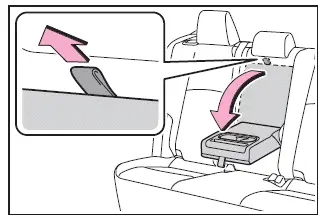
Armrest
The armrest in the Subaru Solterra is designed to enhance passenger comfort and can be easily folded down for use, providing additional support during longer journeys and improving overall cabin ergonomics.
NOTICE
■ To prevent damage to the armrest
Avoid placing excessive weight or applying strong pressure to the armrest in the Subaru Solterra, as this may lead to structural damage or reduced durability over time.
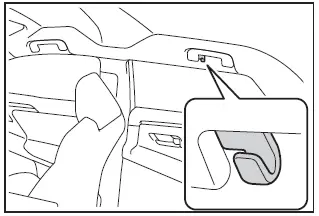
Coat hooks
The Subaru Solterra is equipped with convenient coat hooks integrated into the rear assist grips, allowing passengers to hang lightweight garments neatly and maintain an organized interior environment.
WARNING
■ Items that must not be hanged on the hook
For safety reasons, do not hang rigid, heavy, or sharp objects such as coat hangers on the hooks in the Subaru Solterra. In the event of SRS curtain shield airbag deployment, such objects could be propelled into the cabin and cause severe injury or fatal consequences.
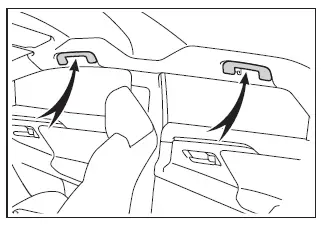
Assist grips
The assist grips mounted on the ceiling of the Subaru Solterra are intended to provide additional support for passengers while seated, helping maintain stability and comfort, especially during cornering or uneven road conditions.
WARNING
■ Assist grips
Do not use the assist grips in the Subaru Solterra as a support when entering or exiting the vehicle, or when rising from the seat, as they are not designed to bear full body weight and misuse may lead to injury.
NOTICE
■ To prevent damage to the assist grip
Do not hang heavy items or apply excessive load to the assist grips in the Subaru Solterra, as this may compromise their integrity and functionality over time.
 Electronic sunshade
In the Subaru Solterra, the electronic sunshade is conveniently operated
using the overhead control switches, allowing you to regulate sunlight and cabin
brightness with ease and precision.
Opera ...
 Garage door opener
The integrated HomeLink system in the Subaru Solterra allows seamless
programming and control of various devices such as garage doors, entry gates, home
lighting, security systems, and other compa ...
Other materials:
Air Bag Module And Pre Tensioner Seat Belt Deployment Procedures [Standard Deployment
Control System]
WARNING:
A live (undeployed) air bag module or pre-tensioner seat belt may accidentally
operate (deploy) when it is disposed of and cause serious injury. Do not dispose
of a live (undeployed) air bag module and pre-tensioner seat belt. If the SSTs
(Deployment tool and Adapter harnes ...
Knock Sensor (Ks) Inspection [Mzr 2.0, Mzr 2.5]
Resistance Inspection
1. Remove the battery cover..
2. Disconnect the negative battery cable..
3. Disconnect the KS connector.
4. Measure the resistance between KS terminals A and B.
If not as specified, replace the KS..
Specification
Approx. 4.87 megohms [normal tem ...
Rear Window Glass Removal
4SD
1. Disconnect the negative battery cable.
2. Remove the following parts:
a. Rear seat cushion.
b. Rear scuff plate.
c. Rear side seat back.
d. C–pillar trims.
e. Rear package trim.
f. Tire house trims.
3. Remove the fasteners.
4. Set the headliner out of the way.
5. Di ...
