
Mazda 3 Service Manual: Power Outer Mirror Inspection
Mirror Glass Adjustment Motor
1. Disconnect the negative battery cable..
2. Remove the inner garnish..
3. Disconnect the power outer mirror connector.
4. Remove the front door trim..
5. Apply battery positive voltage and connect the ground to the power outer mirror terminals and inspect the power outer mirror operation.
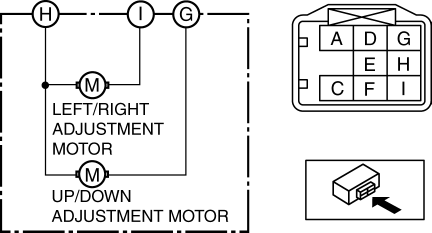
-
If the power outer mirror does not operate as indicated in the table, replace it.
|
Mirror operation direction |
Terminal |
|
|
B+ |
Ground |
|
|
Up |
G |
H |
|
Down |
H |
G |
|
Left |
I |
H |
|
Right |
H |
I |
Vehicles With Heated Outer Mirror
1. Disconnect the negative battery cable..
2. Remove the inner garnish..
3. Disconnect the power outer mirror connector.
4. Remove the front door trim..
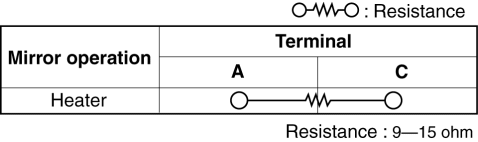
5. Verify that the resistance is as indicated in the table.
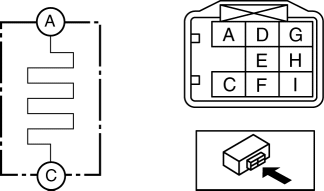
-
If not as indicated in the table, inspect the outer mirror glass..
-
If there is no malfunction in the outer mirror glass, replace the power outer mirror..
Vehicles With BSM System
1. Disconnect the negative battery cable..
2. Remove the inner garnish..
3. Disconnect the power outer mirror connector.
4. Remove the front door trim..
5. Apply battery voltage to power outer mirror connector terminal D, and connect terminal F to ground.
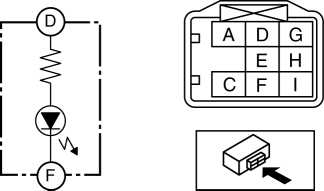
-
Verify that the BSM indicator light illuminates.
-
If there is any malfunction, inspect the outer mirror glass..
-
If there is no malfunction in the outer mirror glass, replace the power outer mirror. .
 Outer Mirror Glass Removal
1. Disconnect the negative battery cable.
2. Press area B of the mirror glass so that area A moves outward.
3. Detach pin B while lifting up the inside of the mirror glass holder.
4. Pul ...
 Power Outer Mirror Removal/Installation
1. Disconnect the negative battery cable..
2. Remove the inner garnish..
3. Remove the front door trim..
4. Disconnect the power outer mirror connector.
5. Remove the bolts.
6. Remove th ...
Other materials:
Rear Door Latch And Lock Actuator Inspection
1. The following actuator and switch are integrated with the rear door latch
and lock actuator. Inspect the rear door latch and lock actuator according to each
inspection procedure for the following items.
Rear door lock actuator.
Rear door latch switch.
Rear door lock-li ...
Radiator Drain Plug Replacement [Mzr 2.0, Mzr 2.5]
WARNING:
Never remove the cooling system cap or loosen the radiator drain plug while
the engine is running, or when the engine and radiator are hot. Scalding engine
coolant and steam may shoot out and cause serious injury. It may also damage
the engine and cooling system.
Tu ...
Cleaning and protecting the vehicle interior
For the Subaru Solterra, interior cleaning should always be performed
according to the specific material of each component in order to preserve durability,
appearance, and long-term comfort.
Protecting the vehicle interior
In the Subaru Solterra, begin cleaning by removing dust and debris u ...
