
Mazda 3 Service Manual: Hazard Warning Switch Inspection
1. Disconnect the negative battery cable..
2. Remove the center panel..
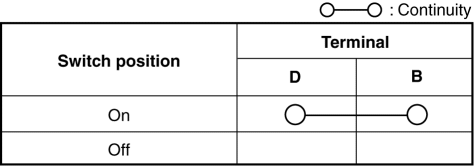
3. Verify that the continuity between the hazard switch terminals is as indicated in the table.
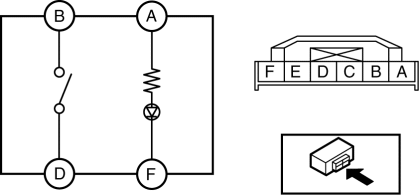
-
If not as indicated in the table, replace the hazard warning switch.
4. Apply battery voltage to hazard switch terminal A, and connect terminal F to ground.
5. Verify that the LED illuminates.
-
If there is any malfunction, replace the hazard warning switch.
 Front Fog Light Switch Inspection
1. Disconnect the negative battery cable..
2. Remove the column cover..
3. Remove the light switch..
4. Verify that the continuity between the front fog light switch terminals is
as indicated ...
 Hazard Warning Switch Removal/Installation
1. Disconnect the negative battery cable..
2. Remove the center panel..
3. Remove in the order indicated in the table.
1
Screw
2
Hazard wa ...
Other materials:
Direct Mode
Direct mode can be used for temporarily
switching gears by operating the steering
shift switch while the vehicle is being
driven with the selector lever in the D
range.
While in direct mode, the D and M
indication illuminate and the gear position
in use is illuminated.
Direct mode is can ...
Checking Tire Pressure
When you check the air pressure, make sure the tires are cold —meaning
they are not hot
from driving even a mile.
Remove the cap from the valve on one tire.
Firmly press a tire gauge onto the valve.
Add air to achieve recommended air pressure.
If you overfill the tire, release air ...
Engine Tune Up [Mzr 2.3 Disi Turbo]
NOTE:
If the accelerator pedal is depressed continuously for a specified time,
the engine speed may decrease to the idle speed. This is due to the fuel cut
control operation, which prevents overheating, and it does not indicate a malfunction.
Engine Tune-up Preparation
1. Verify ...
