
Mazda 3 Owners Manual: Rear Window Defogger
The rear window defogger clears fog from the rear window.
The ignition must be switched ON to use the defogger.
Press the switch to turn on the rear window defogger. The rear window defogger operates for about 15 minutes and then turns off automatically.
The indicator light illuminates when the defogger is operating.
To turn off the rear window defogger before the 15 minutes has elapsed, press the switch again.
Manual Climate Control
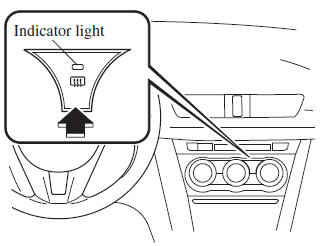
Automatic Climate Control
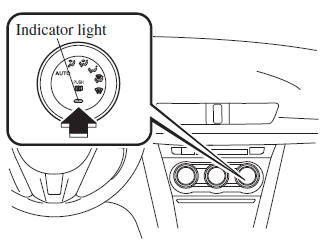
Dual-Zone Automatic Climate Control
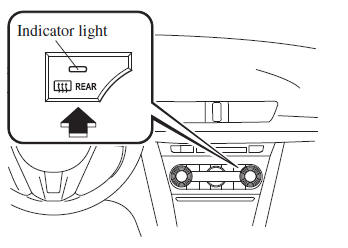
| CAUTION Do not use sharp instruments or window cleaners with abrasives to clean the inside of the rear window surface. They may damage the defogger grid inside the window. |
NOTE This defogger is not designed for melting snow. If there is an accumulation of snow on the rear window, remove it before using the defogger.
Mirror Defogger *
To turn on the mirror defoggers, switch the ignition ON and press the rear window defogger switch .
Horn
To sound the horn, press the mark on the steering wheel.
 Rear Window Wiper and
Washer
Rear Window Wiper and
Washer
The ignition must be switched ON to use
the wiper.
Rear Window Wiper
Turn the wiper on by turning the rear
wiper/washer switch
Rear Window Washer
To spray washer fluid, turn the rear wip ...
 Hazard Warning Flasher
The hazard warning lights should always
be used when you stop on or near a
roadway in an emergency.
The hazard warning lights warn other
drivers that your vehicle is a traffic hazard
and that ...
Other materials:
Front Seat Cover Removal/Installation [Vehicles Without Power Seat System]
WARNING:
Handling a front seat (with built-in side air bag) improperly can accidentally
operate (deploy) the air bag, which may seriously injure you. Read the service
warnings before handling a front seat (with built-in side air bag)..
CAUTION:
After removing a front seat ...
General Procedures (Steering)
Wheel and Tire Installation
1. When installing the wheels and tires, tighten the wheel nuts in a criss-cross
pattern to the following tightening torque.
Tightening torque
88—118 N·m {9.0—12 kgf·m, 65—87 ft·lbf}
Connector Disconnection
1. Disconnect the negative batte ...
Power Window Subswitch Inspection
Passenger's Side
1. Disconnect the negative battery cable..
2. Remove the inner garnish..
3. Remove the front door trim..
4. Remove the power window subswitch..
5. Verify that the continuity is as indicated in the table using a tester.
If not as indicated in the table, repl ...
