
Mazda 3 Service Manual: Ignition Switch Inspection [Without Advanced Keyless Entry And Push Button Start System]
1. Disconnect the negative battery cable..
2. Remove the column cover..
3. Remove the ignition switch..
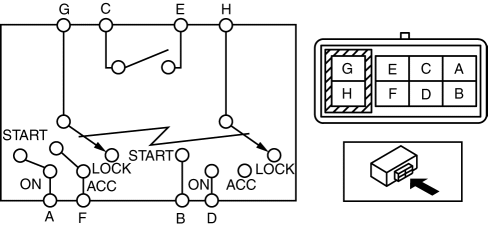
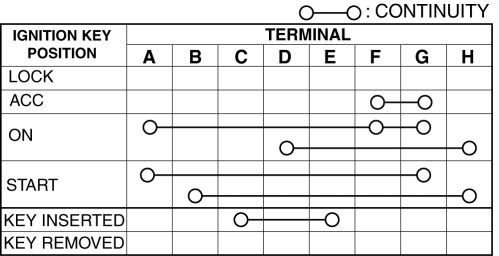
4. Verify that the continuity between the ignition switch terminals is as indicated in the table.
-
If not as indicated in the table, replace the ignition switch.
 Spark Plug Removal/Installation [Skyactiv G 2.0]
CAUTION:
If a spark plug that is not as specified is installed, engine performance
will be deteriorated. Install only the specified spark plug when replacing.
1. Remove the battery co ...
 Ignition Switch Removal/Installation [Without Advanced Keyless Entry And Push
Button Start System]
Ignition Switch Removal/Installation [Without Advanced Keyless Entry And Push
Button Start System]
1. Disconnect the negative battery cable..
2. Remove the column cover..
3. Detach the tab.
4. Pull the pin in the direction of the arrow shown in the figure and release
the lock.
5. ...
Other materials:
Combination Switch Disassembly/Assembly
CAUTION:
Handling the air bag module improperly can accidentally deploy the air bag
module, which may seriously injure you. Read the air bag system service warnings
and cautions before handling the air bag module..
1. Switch the ignition to off.
2. Disconnect the negative batte ...
A/C Unit Removal/Installation
1. Set the air mix mode to MAX COLD.
2. Disconnect the negative battery cable..
3. Discharge the refrigerant..
4. Drain the engine coolant..
5. Remove the plug hole plate.
6. Remove the charge air cooler cover. (MZR 2.3 DISI Turbo).
7. Remove the insulator. (MZR 2.3 DISI Turbo)
8. ...
Things to know before charging
Before charging the traction battery of the Subaru Solterra, it is
essential to carefully review the following precautions to ensure safe, efficient,
and reliable charging operations.
■ Safety functions
The Subaru Solterra is equipped with built-in safety mechanisms that prevent
the EV ...
