
Mazda 3 Owners Manual: Interior Equipment (View C)
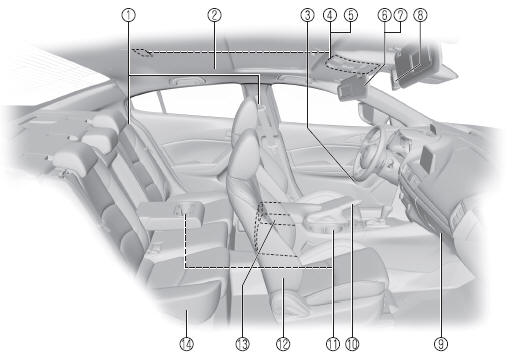
- Seat belts
- SRS air bag
- Bottle holder
- Overhead lights
- Moonroof switch
- Sunvisor
- Vanity mirror
- Rearview mirror
- Glove compartment
- Parking brake
- Cup holders
- Front seat
- Center console
- Rear seat
 Interior Equipment (View B)
SRS air bags
Active driving display
Climate control system
Rear window defogger switch
Audio system
CD player
Accessory sockets
External input terminal
Commander switch
Shift ...

Other materials:
Voice Recognition Learning
Function (Speaker Enrollment)
(Type A)
The voice recognition learning function enables voice recognition appropriate
to the characteristics of the user's voice. If the recognition of the voice
input commands to the system is not adequate, this function can largely improve
the system's voice recognition of the user. If your voice ca ...
Climate Control Unit Removal/Installation [Manual Air Conditioner]
1. Disconnect the negative battery cable..
2. Remove the following parts:
a. Upper panel.
b. Shift lever knob (MTX).
c. Selector lever knob (ATX).
d. Shift panel.
e. Side wall.
f. Console.
g. Front scuff plate.
h. Front side trim.
i. Dashboard under cover.
j. Glove compartment. ...
Wrench Indicator Light
When the ignition is switched ON, the
wrench indicator light is illuminated and
then turns off after a few seconds.
The wrench indicator light is illuminated
when the preset maintenance period
arrives. Verify the content and perform
maintenance.
Refer to Maintenance Monitor on .
Low ...
