
Mazda 3 Owners Manual: Interior Equipment (View B)
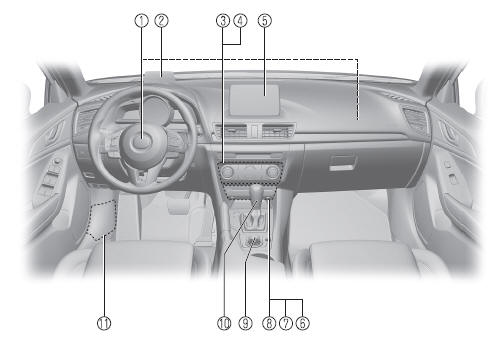
- SRS air bags
- Active driving display
- Climate control system
- Rear window defogger switch
- Audio system
- CD player
- Accessory sockets
- External input terminal
- Commander switch
- Shift lever/Selector lever
- Fuse block (Left side)
 Interior Equipment (View A)
Door-lock knob
Turn and lane-change signal
Lighting control
Wiper and washer lever
DSC OFF switch
Tire pressure monitoring system set switch
LDWS switch
AFS OFF switch
BSM OFF ...
 Interior Equipment (View C)
Seat belts
SRS air bag
Bottle holder
Overhead lights
Moonroof switch
Sunvisor
Vanity mirror
Rearview mirror
Glove compartment
Parking brake
Cup holders
Front seat
Ce ...
Other materials:
Starter Interlock Switch Removal/Installation [C66 M R]
1. Remove the battery cover..
2. Disconnect the negative battery cable..
3. Disconnect the starter interlock switch connector.
4. Remove the starter interlock switch from the pedal bracket.
5. Insert a new starter interlock switch into the pedal bracket hole in the direction
indicated ...
Antenna Feeder No.7 Inspection
1. Disconnect the negative battery cable..
2. Remove the liftgate upper trim..
3. Disconnect the connector A and B..
4. Verify that the continuity between antenna feeder No.7 terminals is as indicated
in the table.
If not as indicated in the table, replace antenna feeder No.7.
...
Rear Speaker Removal/Installation
4SD
1. Disconnect the negative battery cable..
2. Remove the following parts:
a. Rear seat cushion.
b. Rear scuff plate.
c. Tire house trim.
d. C-pillar trim.
e. Rear package trim.
3. Remove the screw.
4. Disconnect the connector.
5. Remove the rear speaker.
6. Install in th ...
