
Subaru Solterra 2023-2026 Owner's Manual: Keys
Key types
The Subaru Solterra is supplied with a set of advanced keys designed to ensure convenience, security, and seamless interaction with the vehicle’s smart systems.
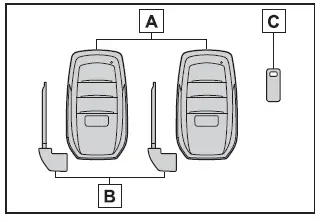
- Electronic keys
- Enable operation of the Subaru Solterra smart key system for keyless entry and start
- Allow use of the wireless remote control functions
- Provide access to the Remote Air Conditioning System for pre-conditioning the cabin
- Mechanical keys
- Key number plate
■ When riding in an aircraft
When carrying a Subaru Solterra electronic key onboard an aircraft, avoid pressing any buttons while inside the cabin. If the key is stored in a bag or luggage, ensure it is positioned in a way that prevents accidental activation. Unintended button presses may cause the key to emit radio signals that could interfere with aircraft systems.
■ Electronic key battery depletion
- The typical battery life for a Subaru Solterra electronic key ranges from 1 to 2 years depending on usage.
- When the battery level becomes low, a warning tone will sound and a message will appear on the multi-information display after the EV system is turned off.
- To extend battery life when the key is not used for long periods, activate the battery-saving mode available for the Subaru Solterra key.
- Because the electronic key continuously receives radio signals, battery
depletion may occur even without active use. The following signs indicate that
the battery may need replacement:
- The smart key system or remote control functions stop responding.
- The detection range becomes noticeably shorter.
- The LED indicator on the key no longer illuminates.
While battery replacement can be performed manually, it is recommended to have it done by an authorized SUBARU dealer to avoid potential damage to the Subaru Solterra key.
- To prevent rapid battery degradation, avoid placing the Subaru Solterra
electronic key within 3 ft. (1 m) of devices that generate strong electromagnetic
fields, such as:
- Televisions
- Computers and laptops
- Mobile phones, cordless phones, and chargers
- Charging devices for portable electronics
- Table lamps
- Induction cooktops
- Leaving the electronic key near the Subaru Solterra for extended periods may also accelerate battery discharge, even if the system is not actively used.
■ If a message regarding the state of the electronic key or power switch mode, etc. is shown
The Subaru Solterra may display alerts related to key detection or power mode to prevent situations such as locking the key inside the vehicle or leaving the vehicle without turning the power off properly. These messages are designed to enhance safety and prevent inconvenience.
Always follow the instructions displayed on the screen immediately.
■ If "Key Battery Low Replace Key Battery" is displayed on the multi-information display
This message indicates that the Subaru Solterra electronic key battery is nearing depletion and should be replaced promptly to maintain proper operation.
■ Confirmation of the registered key number
The number of keys registered to the Subaru Solterra can be verified through your SUBARU dealer.
■ If "A New Key has been Registered Contact Your Dealer for Details" is displayed on the multi-information display
This message will appear each time the driver’s door is opened after unlocking from the outside for approximately 10 days following the registration of a new key.
If this notification appears unexpectedly, contact your SUBARU dealer to confirm that no unauthorized keys have been added to your Subaru Solterra system.
NOTICE
■ To prevent key damage
- Avoid dropping or exposing Subaru Solterra keys to strong impacts or bending forces.
- Do not leave the keys in high-temperature environments for extended periods.
- Keep the keys dry and never clean them using ultrasonic equipment.
- Avoid attaching metallic or magnetic materials to the keys or placing them near such objects.
- Do not disassemble the electronic key.
- Do not place stickers or coverings on the key surface.
- Keep the keys away from magnetic field sources such as televisions, speakers, or induction devices.
- Avoid placing keys near medical electrical equipment or undergoing treatment while carrying the keys.
■ Carrying the electronic key on your person
Keep the Subaru Solterra electronic key at least 3.9 in. (10 cm) away from active electronic devices.
Signals emitted from nearby devices may interfere with the key and cause improper operation.
Wireless remote control
The Subaru Solterra electronic key includes an integrated wireless remote control system with the following functions:
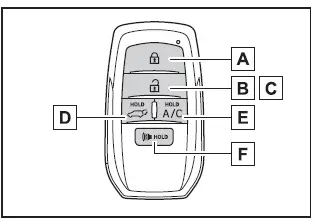
- Locks all doors
- Unlocks all doors
- Opens side windows*1
- Opens and closes the power back door*2
- Activates the Remote Air Conditioning System
- Triggers the vehicle alarm
*1: These functions must be configured by your SUBARU dealer.
*2: Available on equipped Subaru Solterra models.
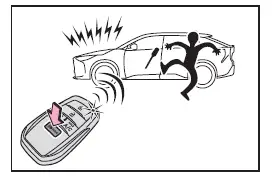
■ Theft deterrent panic mode
Pressing
 for more than one second will activate the Subaru Solterra panic mode. The horn
will sound intermittently and exterior lights will flash to deter theft or suspicious
activity.
for more than one second will activate the Subaru Solterra panic mode. The horn
will sound intermittently and exterior lights will flash to deter theft or suspicious
activity.
To deactivate the alarm, press any button on the electronic key.
Using the mechanical key
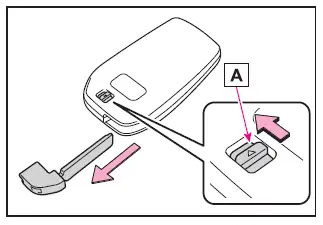
To remove the mechanical key from the Subaru Solterra electronic key, slide release lever A and pull the key out.
The mechanical key is designed to fit only one orientation. If insertion fails, rotate it and try again.
After use, return the mechanical key to the electronic key housing and carry both together. The mechanical key is essential if the electronic key battery is depleted or if the smart entry system is not functioning.
■ If a wrong key is used
When an incorrect key is inserted, the cylinder of the Subaru Solterra will rotate freely to protect the internal locking mechanism.
 Key information
...
 Digital key
In the Subaru Solterra, a compatible smartphone can function as a
fully integrated replacement for the traditional electronic key when the dedicated
Digital Key App is installed. This advanced fea ...
Other materials:
Rear Oil Seal Replacement [Mzr 2.0, Mzr 2.5]
1. Remove the transaxle..
2. Remove the flywheel (MTX) or the drive plate (ATX)..
3. Remove in the order indicated in the table.
4. Install in the reverse order of removal.
1
Bolt
2
Rear oil seal
(See Rear Oil Seal Installation Note. ...
PCM Removal/Installation [Mzr 2.0, Mzr 2.5]
1. Remove the battery cover..
2. Disconnect the negative battery cable..
3. Remove the following items:.
Battery
PCM cover No.1
4. Disconnect the PCM connector..
5. Remove the battery tray and PCM component..
6. Remove in the order indicated in the table.
...
Transaxle Oil Replacement [G66 M R]
1. Park the vehicle on level ground.
2. Remove the aerodynamic under cover No.2..
3. Remove the drain plug and washer.
4. Drain the oil into a suitable container.
5. Install a new washer and the drain plug.
Tightening torque
39—59 N·m {4.0—6.0 kgf·m, 29—43 ft·lbf}
...
