
Mazda 3 Service Manual: Oil Control Valve (OCV) Inspection [Mzr 2.3 Disi Turbo]
Coil Resistance Inspection
1. Remove the battery cover..
2. Disconnect the negative battery cable..
3. Disconnect the OCV connector.
4. Measure the coil resistance between terminals A and B using a tester.
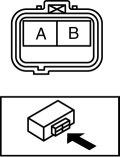
-
If not as specified, replace the OCV..
-
OCV coil resistance
-
6.9—7.9 ohms [20°C {68°F}]
5. Install in the reverse order of removal.
Spool Valve Operation Inspection
1. Remove the OCV..
2. Verify that the spool valve in the OCV is in the maximum valve timing retard position as shown in the figure.
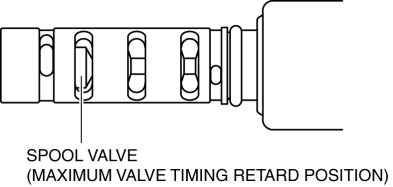
-
If not as specified, replace the OCV..
3. Verify that the battery is fully charged..
-
Recharge it if necessary..
4. Apply battery positive voltage between the OCV terminals and verify that the spool valve operates and moves to the maximum valve timing advance position.
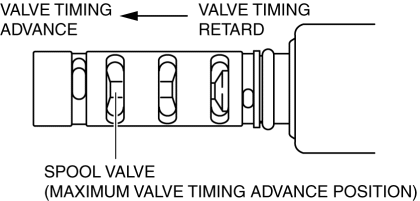
-
If not as specified, replace the OCV..
NOTE:
-
When applying battery positive voltage between the OCV terminals, the connection can be either of the following:
-
Positive battery cable to terminal A, negative battery cable to terminal B
-
Positive battery cable to terminal B, negative battery cable to terminal A
5. Stop applying battery positive voltage and verify that the spool valve returns to the maximum valve timing retard position.
-
If not as specified, replace the OCV..
6. Install the OCV..
 Oil Control Valve (OCV) Inspection [Mzr 2.0, Mzr 2.5]
Coil Resistance Inspection
1. Remove the battery cover..
2. Disconnect the negative battery cable..
3. Remove the plug hole plate..
4. Disconnect the OCV connector.
5. Measure the resistance ...
 Oil Control Valve (OCV) Inspection [Skyactiv G 2.0]
Coil Resistance Inspection
1. Remove the battery cover..
2. Disconnect the negative battery cable..
3. Remove the plug hole plate..
4. Disconnect the OCV connector.
5. Measure the resistance ...
Other materials:
Front Outer Handle Removal/Installation
1. To access the glass installation bolt, position the front door glass so that
the distance from the top of the front door glass to the upper part of the front
beltline molding is approx. 80 mm {3.1 in}.
2. Disconnect the negative battery cable..
3. Remove the following parts:
a. Inne ...
Audio Unit Removal/Installation
Without Display
CAUTION:
When installing the audio unit, make sure that the wiring harness and antenna
feeder are not caught between the unit and dashboard. If the wiring harness
or the antenna feeder is caught between the unit and dashboard, it may cause
malfunctions.
Pres ...
Shift Panel Removal/Installation
ATX
1. Remove the upper panel..
2. Remove the selector lever knob..
3. Pull the shift panel in the direction of the arrow shown in the figure and
remove it while detaching the clips A, hook B and guides C.
4. Pull the shift panel in the direction of the arrow (1), (2), (3) while remove ...
