
Mazda 3 Service Manual: Oil Control Valve (OCV) Inspection [Mzr 2.0, Mzr 2.5]
Coil Resistance Inspection
1. Remove the battery cover..
2. Disconnect the negative battery cable..
3. Remove the plug hole plate..
4. Disconnect the OCV connector.
5. Measure the resistance between terminals A and B using an ohmmeter.
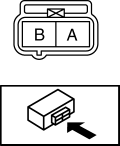
-
OCV coil resistance
-
6.9—7.9 ohms [20°C {68°F}]
-
If not as specified, replace the OCV..
6. Install in the reverse order of removal.
Spool Valve Operation Inspection
1. Remove the OCV..
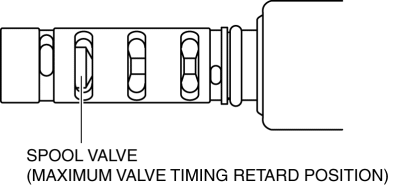
2. Verify that the spool valve in the OCV is in the maximum valve timing retard position as indicated in the figure.
-
If not as specified, replace the OCV..
3. Verify that the battery is fully charged..
-
If not as specified, recharge the battery..
NOTE:
-
When applying battery positive voltage between the OCV terminals, the connection can be either of the following:
-
Positive battery cable to terminal A, negative battery cable to terminal B
-
Positive battery cable to terminal B, negative battery cable to terminal A
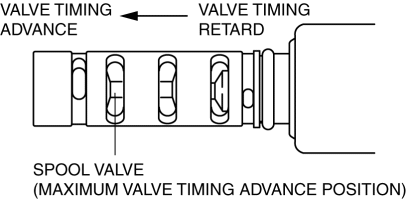
4. Apply battery positive voltage between the OCV terminals and verify that the spool valve operates and moves to the maximum valve timing advance position.
-
If not as specified, replace the OCV..
5. Stop applying battery positive voltage and verify that the spool valve returns to the maximum valve timing retard position.
-
If not as specified, replace the OCV..
6. Install the OCV..
 Electro Hydraulic Power Assist Steering (EHPAS) Control Module Inspection
Terminal Voltage Table (Reference)
Terminal
Signal name
Connected to
Measured item
Measured terminal (measured condition)
...
 Oil Control Valve (OCV) Inspection [Mzr 2.3 Disi Turbo]
Coil Resistance Inspection
1. Remove the battery cover..
2. Disconnect the negative battery cable..
3. Disconnect the OCV connector.
4. Measure the coil resistance between terminals A and B usi ...
Other materials:
Spark Plug Removal/Installation [Mzr 2.0, Mzr 2.5]
CAUTION:
If a spark plug that is not as specified is installed, engine performance
will be deteriorated. Install only the specified spark plug when replacing.
1. Remove the battery cover..
2. Disconnect the negative battery cable..
3. Remove the plug hole plate..
4. Remove the ...
Rear Lower Arm Removal/Installation
1. Disconnect the auto leveling sensor link lower side. (Vehicles with AFS).
2. Remove in the order indicated in the table.
3. Install in the reverse order of removal.
4. Inspect the wheel alignment and adjust it if necessary..
1
Rear coil spring component
.
...
Electro Hydraulic Power Assist Steering (EHPAS) Control Module Configuration
CAUTION:
If the EHPAS CM configuration is not completed, the EHPAS will not operate
properly. If the EHPAS CM is replaced, always carry out the EHPAS CM configuration
so that the EHPAS operates properly.
1. Connect the M-MDS (IDS) to the DLC-2.
2. After the vehicle is ident ...
