
Mazda 3 Service Manual: Oil Control Valve (OCV) Removal/Installation [Mzr 2.0, Mzr 2.5]
1. Remove the battery cover..
2. Disconnect the negative battery cable..
3. Remove the plug hole plate..
4. Disconnect the wiring harness.
5. Remove the ignition coils..
6. Remove the ventilation hose.
7. Remove the oil level gauge.
8. Remove the cylinder head cover..
9. Remove in the order indicated in the table.
10. Install in the reverse order of removal.
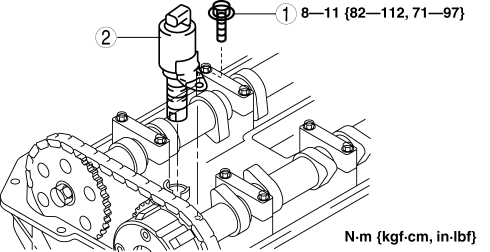
|
1 |
OCV installation bolt |
|
2 |
OCV |
 Oil Control Valve (OCV) Inspection [Skyactiv G 2.0]
Coil Resistance Inspection
1. Remove the battery cover..
2. Disconnect the negative battery cable..
3. Remove the plug hole plate..
4. Disconnect the OCV connector.
5. Measure the resistance ...
 Oil Control Valve (OCV) Removal/Installation [Mzr 2.3 Disi Turbo]
1. Remove the battery cover..
2. Disconnect the negative battery cable..
3. Remove the charge air cooler..
4. Remove the ignition coils..
5. Disconnect the ventilation hose from the cylinder h ...
Other materials:
Map Light Inspection
1. Disconnect the negative battery cable..
2. Remove the map light..
3. Verify that the continuity between the map light terminals is as indicated
in the table.
If not as indicated in the table, inspect the bulb. If there is no malfunction,
replace the map light.
4. ...
License Plate Light Removal/Installation
1. Disconnect the negative battery cable..
2. Remove the lens..
3. Insert a tape-wrapped fastener remover to the position shown in the figure,
release the tabs.
4. Pull the rear bumper in the direction of the arrow (1) in the figure, and
pull out the license plate lights in the directi ...
Map Light Bulb Removal/Installation
1. Disconnect the negative battery cable..
2. Insert a tape-wrapped fastener remover into the service hole and pry with
the screwdriver in the direction shown by the arrow to remove the lens.
3. Remove the map light bulb.
4. Install in the reverse order of removal. ...
