
Mazda 3 Owners Manual: Outside Mirrors
| WARNING Be sure to look over your shoulder before changing lanes: Changing lanes without taking into account the actual distance of the vehicle in the convex mirror is dangerous. You could have a serious accident. What you see in the convex mirror is closer than it appears. |
Mirror type
Flat type (driver's side)
Flat surface mirror.
Convex type (front passenger side)
The mirror has single curvature on its surface.
Power mirror adjustment
The ignition must be switched to ACC or ON position.
To adjust:
- Rotate the mirror switch to the left or right to choose the left or right side mirror.
- Press the mirror switch in the appropriate direction.
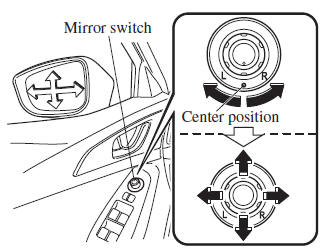
After adjusting the mirror, lock the control by rotating the switch in the center position.
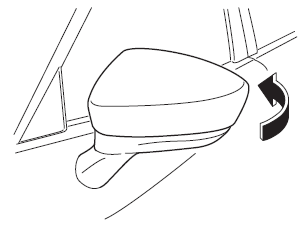
Folding mirror
| WARNING Always return the outside mirrors to the driving position before you start driving: Driving with the outside mirrors folded in is dangerous. Your rear view will be restricted, and you could have an accident. |
Fold the outside mirror rearward until it is flush with the vehicle.
 Mirrors
Before driving, adjust the inside and
outside mirrors. ...
 Rearview Mirror
WARNING
Do not stack cargo or objects higher
than the seatbacks:
Cargo stacked higher than the
seatbacks is dangerous. It can block
your view in the rearview mirror, which
mig ...
Other materials:
RCTA (Rear Cross Traffic Alert)
The Subaru Solterra RCTA (Rear Cross Traffic Alert) system utilizes
rear side radar sensors integrated behind the rear bumper. This advanced feature
is designed to assist the driver by monitoring areas that are difficult to see while
reversing, significantly improving situational awareness.
W ...
Wheel Hub, Steering Knuckle Inspection
Wheel Bearing Excessive Play Inspection
1. Install the magnetic base and dial gauge as shown in the figure and measure
the wheel bearing axial excessive play.
If it exceeds the maximum specification, replace the wheel hub bearing.
Maximum front wheel bearing play
0.05 mm ...
Parking Brake Lever Removal/Installation
1. Remove the following parts:
a. Upper panel.
b. Shift knob (MTX).
c. Selector lever knob (ATX).
d. Shift panel.
e. Side wall.
f. Console.
2. Remove in the order indicated in the table.
3. Install in the reverse order of removal.
4. After installation, inspect the parking brake le ...
