
Subaru Solterra 2023-2026 Owner's Manual: RCTA (Rear Cross Traffic Alert)
The Subaru Solterra RCTA (Rear Cross Traffic Alert) system utilizes rear side radar sensors integrated behind the rear bumper. This advanced feature is designed to assist the driver by monitoring areas that are difficult to see while reversing, significantly improving situational awareness.
WARNING
■ Cautions regarding the use of the system
The driver remains fully responsible for the safe operation of the Subaru Solterra. Always maintain awareness of the surrounding environment and drive carefully.
The Subaru Solterra RCTA system is intended as a supportive function only, providing alerts when a vehicle approaches from either the left or right side behind your vehicle.
Because the Subaru Solterra RCTA system may not perform optimally under all conditions, visual confirmation by the driver is essential at all times.
Excessive reliance on the Subaru Solterra RCTA function may increase the risk of accidents that could result in serious injury or loss of life.
System components
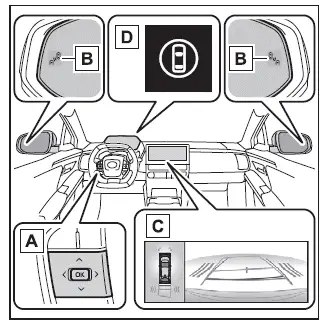
- Meter control switches
Use the meter control switches within the Subaru Solterra to activate or deactivate the RCTA system through the multi-information display interface.
- Outside rear view mirror indicators
When the Subaru Solterra detects a vehicle approaching from either side behind, both exterior mirror indicators will flash and an audible warning will be emitted to alert the driver.
- Multimedia display
If a vehicle is detected approaching from the rear-left or rear-right side of the Subaru Solterra, a corresponding RCTA icon will appear on the multimedia display, indicating the direction of the approaching vehicle.
This illustration* represents a situation where vehicles are approaching from both sides.
*: Depending on the Subaru Solterra configuration and installed options, the displayed interface may differ slightly.
- Driving assist information indicator
This indicator illuminates when the Subaru Solterra RCTA function is turned off. At the same time, a notification message will appear on the multi-information display.
Turning the RCTA function on/off
The Subaru Solterra RCTA system can be enabled or disabled through the vehicle’s customization settings.
When deactivated, the driving assist information indicator will illuminate and a message will inform the driver on the display.
Each time the Subaru Solterra power switch is turned to ON, the RCTA system is automatically reactivated.
■ Outside rear view mirror indicator visibility
Under bright sunlight conditions, the mirror indicators on the Subaru Solterra may be less visible. Drivers should remain attentive to surrounding traffic conditions.
■ Hearing the RCTA buzzer
The RCTA warning sound in the Subaru Solterra may be difficult to hear if there is significant ambient noise or if the audio system volume is set high.
RCTA function
■ Operation of the RCTA function
The Subaru Solterra RCTA system continuously monitors traffic approaching from the rear-left and rear-right sides using rear radar sensors. When a potential hazard is detected, the system alerts the driver through flashing mirror indicators and an audible buzzer, helping to prevent collisions while reversing.
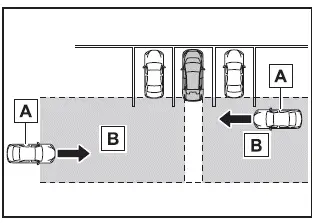
- Approaching vehicles
- Detection areas of approaching vehicles
■ RCTA icon display
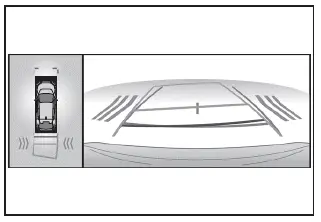
When the Subaru Solterra detects vehicles approaching from either side at the rear, a visual indication appears on the multimedia display to clearly show the direction of potential danger.
- Example (Panoramic view monitor): Vehicles approaching simultaneously from both sides of the Subaru Solterra are displayed to enhance driver awareness.
The Subaru Solterra Rear Cross Traffic Alert system provides valuable assistance during reversing maneuvers, especially in crowded parking areas, but it should always be used together with careful observation and responsible driving practices for maximum safety.
■ RCTA function detection areas
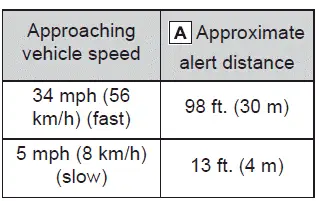
The Subaru Solterra RCTA system monitors specific zones behind the vehicle where cross traffic may appear. These detection areas are designed to cover the most critical blind spots when reversing.
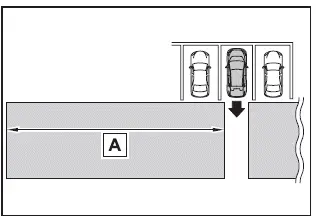
The Subaru Solterra system is capable of identifying faster approaching vehicles at greater distances, allowing earlier warnings and giving the driver more time to react safely.
Example:
■ The RCTA function is operational when
The Subaru Solterra RCTA system will operate only when all of the following conditions are satisfied:
- The power switch of the Subaru Solterra is in the ON position.
- The RCTA system is activated.
- The shift position is set to R (reverse).
- The vehicle speed is below approximately 9 mph (15 km/h).
- The speed of an approaching vehicle falls within approximately 5 mph (8 km/h) to 34 mph (56 km/h).
■ Setting the buzzer volume
The alert sound level for the Subaru Solterra RCTA system, along with SUBARU Parking Assist and RCD (if equipped), can be adjusted simultaneously via the vehicle’s customization settings.
■ Muting a buzzer temporarily
When the Subaru Solterra detects an approaching object, a temporary mute option may appear on the multimedia display.
Selecting this option will silence the buzzer for the Parking Assist, RCTA, and RCD systems at once.
The mute function will automatically deactivate in the following situations:
- When the shift position is changed
- When the Subaru Solterra exceeds a certain speed threshold
- When a system malfunction or temporary unavailability is detected
- When the system is manually turned off
- When the power switch is turned off
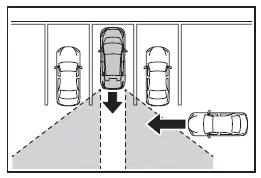
■ Conditions under which the system will not detect a vehicle
The Subaru Solterra RCTA system is not designed to detect the following types of vehicles or objects:
- Vehicles approaching directly from behind the Subaru Solterra
- Vehicles reversing within adjacent parking spaces
- Vehicles that are obscured by obstacles blocking the sensor’s line of detection
- Stationary objects such as guardrails, walls, signs, or parked vehicles*
- Small vehicles, bicycles, motorcycles, pedestrians, or similar objects*
- Vehicles moving away from the Subaru Solterra
- Vehicles approaching from within adjacent parking spaces*
- Objects that are too close to the sensors for proper detection
*: Depending on specific conditions, the Subaru Solterra system may still detect some of these objects.
■ Situations in which the system may not operate properly
The Subaru Solterra RCTA system may experience reduced detection accuracy or performance in the following conditions:
- If the sensor alignment has been altered due to a collision or external impact
- If dirt, snow, ice, stickers, or debris cover the sensors near the rear bumper
- When driving in adverse weather conditions such as heavy rain, fog, or snow with standing water on the road
- When multiple vehicles approach simultaneously with minimal spacing between them
- When a vehicle approaches at high speed, reducing reaction time
- When accessories such as towing hooks, bumper guards, bicycle racks, or snow plows obstruct the sensors
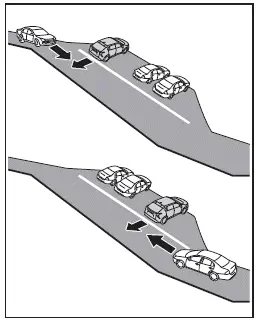
- When reversing on steep inclines or uneven slopes where detection angles change
The Subaru Solterra Rear Cross Traffic Alert system significantly improves safety during reversing maneuvers by identifying cross traffic risks early, but it should always be used in conjunction with direct visual checks and careful driving habits.
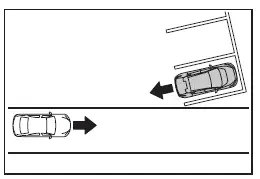
- When reversing out of a sharply angled parking space with limited rear visibility, the Subaru Solterra RCTA system may have delayed or reduced detection performance
- Immediately after activating the RCTA function in the Subaru Solterra
- Right after starting the EV system while the Subaru Solterra RCTA is already enabled
- When objects or vehicles cannot be detected due to physical obstructions blocking the radar sensors
- When towing a trailer or additional equipment with the Subaru Solterra
- When there is a large height difference between the Subaru Solterra and an approaching vehicle
- When the sensor area is exposed to extreme temperatures, either very hot or very cold
- When the Subaru Solterra suspension has been modified or non-standard tire sizes are installed
- When the front or rear of the Subaru Solterra is raised or lowered due to heavy cargo load
- When steering input is applied while reversing
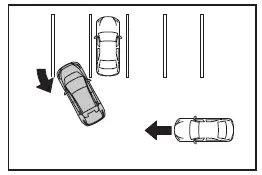
- When another vehicle suddenly enters the detection area of the Subaru Solterra from the side
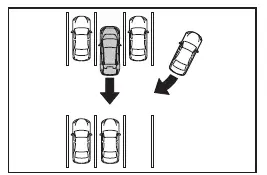
■ Situations in which the system may operate even if there is no possibility of a collision
In certain environments, the Subaru Solterra RCTA system may generate alerts even when there is no real collision risk. These false detections can occur more frequently under the following conditions:
- When the Subaru Solterra is parked facing a road with passing traffic, causing the system to detect vehicles that are not on a collision course
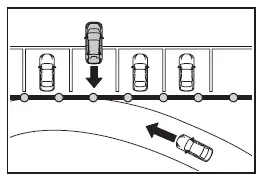
- When the Subaru Solterra is close to reflective metallic objects such as guardrails, walls, road signs, or parked vehicles that can reflect radar signals
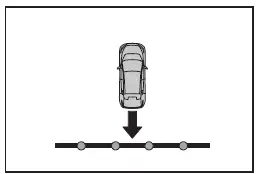
- When additional equipment is installed on the Subaru Solterra that may interfere with sensor performance, including towing hooks, bumper trims, bike racks, or snow attachments
- When a vehicle passes close to the side of the Subaru Solterra
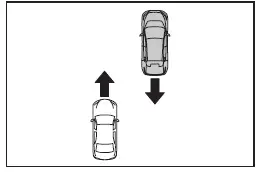
- When an approaching vehicle changes direction while entering the detection zone of the Subaru Solterra
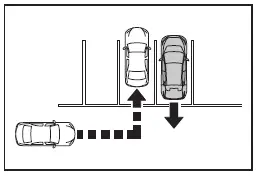
- When rotating or moving objects are nearby, such as ventilation fans or machinery
- When water is sprayed or splashed toward the rear bumper, for example from sprinklers or wet road conditions
- When environmental motion is present, such as flags, exhaust gases, heavy rain, snowflakes, or water reflections on the road surface
- When the Subaru Solterra is very close to guardrails, walls, or similar structures within the detection zone
- When driving over metal gratings, drainage covers, or uneven surfaces that may affect sensor readings
- When sensor temperature conditions are extreme
- When the Subaru Solterra has been modified with non-standard suspension or tire configurations
- When the vehicle stance is altered due to uneven cargo distribution
- When towing with the Subaru Solterra
Even though the Subaru Solterra RCTA system is engineered to enhance safety while reversing, understanding these operational nuances helps ensure more accurate expectations and reinforces the importance of direct visual checks and cautious maneuvering in complex environments.
 SUBARU Parking Assist
The SUBARU Parking Assist system in the Subaru Solterra is engineered
to accurately estimate the distance between the vehicle and nearby obstacles, such
as walls or other objects, by utilizing adv ...
 RCD (Rear Camera Detection)
When reversing the Subaru Solterra, the rear camera detection system
actively monitors the area behind the vehicle and is capable of identifying pedestrians
within its coverage zone.
If a pedestr ...
Other materials:
If you think something is wrong
If you observe any unusual behavior while operating your Subaru Solterra,
it may indicate that the vehicle requires inspection, adjustment, or repair. Promptly
contacting an authorized SUBARU dealer is strongly recommended to ensure continued
safety and reliability.
Visible symptoms
Fluid ...
Oil Seal (Differential) Replacement [A26 M R]
1. On level ground, jack up the vehicle and support it evenly on safety stands.
2. Drain the oil from the transaxle..
3. Remove the front tires..
4. Remove the splash shield..
5. Remove the aerodynamic under cover No.2..
6. Separate the drive shaft and joint shaft from the transaxle..
7 ...
No.7 Bsm Indicator Light Does Not Flash While Under Bsm Indicator Light Flashing
Conditions (With Combination Switch Operation (Turn Signal Switch)) [Blind Spot
Monitoring (Bsm)]
7
BSM indicator light does not flash while under BSM indicator light-flashing
conditions (with combination switch operation (turn signal switch))
Description
The BSM indicator light does not flash or illuminate continuously,
...
