
Subaru Solterra 2023-2026 Owner's Manual: SUBARU Parking Assist
The SUBARU Parking Assist system in the Subaru Solterra is engineered to accurately estimate the distance between the vehicle and nearby obstacles, such as walls or other objects, by utilizing advanced ultrasonic sensors. The system then communicates this information to the driver through visual indicators on the multimedia display and audible alerts, improving parking precision and overall safety.
System components
■ Type of sensors
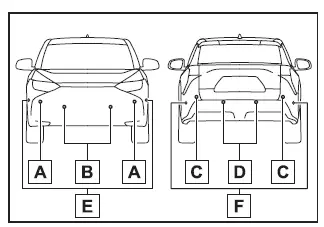
- Front corner sensors
- Front center sensors
- Rear corner sensors
- Rear center sensors
- Front side sensors (vehicles equipped with Advanced Park)
- Rear side sensors (vehicles equipped with Advanced Park)
■ Display
When the Subaru Solterra Parking Assist sensors identify an obstacle, a graphical representation is displayed on the multimedia screen indicating both the location and approximate distance to the object, allowing for precise maneuvering in tight spaces.
For Subaru Solterra models without a multimedia display or rear camera, the system uses a dedicated detection indicator that illuminates when a stationary object is detected.
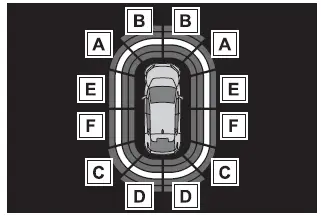
- Front corner sensor detection
- Front center sensor detection
- Rear corner sensor detection
- Rear center sensor detection
- Front side sensor detection (vehicles with Advanced Park)
- Rear side sensor detection (vehicles with Advanced Park)
Turning the SUBARU Parking Assist function ON/OFF
The Subaru Solterra Parking Assist feature can be activated or deactivated via the vehicle’s customization settings, giving the driver flexibility depending on driving conditions.
When the Subaru Solterra Parking Assist system is turned off, an OFF indicator appears on the multi-information display to clearly show its inactive status.
If the system is manually switched off, it will remain disabled even after restarting the Subaru Solterra until it is re-enabled through the settings menu.
(This means that cycling the power switch will not automatically reactivate the system.)
For Subaru Solterra vehicles without a multimedia display or rear camera, the system will automatically activate when the shift position is moved to R, ensuring rear detection assistance when reversing.
While the shift position is in R, the Subaru Solterra Parking Assist cannot be manually toggled on or off, although the stored system setting remains unchanged.
WARNING
■ Cautions regarding the use of the system
The Subaru Solterra Parking Assist system has inherent limitations in detection accuracy and response capability. It is designed as a supportive tool and must not be solely relied upon. The driver remains fully responsible for observing surroundings and ensuring safe maneuvering.
■ To ensure the system can operate properly
To maintain optimal performance of the Subaru Solterra Parking Assist system, follow these precautions carefully. Failure to do so may reduce system effectiveness and increase the risk of unexpected incidents.
If these conditions cannot be met, it is recommended to deactivate the system.
- Avoid damaging the sensors and keep all Subaru Solterra sensor surfaces clean and unobstructed.
- Do not place stickers or install accessories such as illuminated license plate frames, aftermarket lights, poles, or antennas near the sensor areas.
- Avoid strong impacts to the bumper or surrounding sensor areas. If impact occurs, have the Subaru Solterra inspected by an authorized SUBARU dealer.
- Do not modify, disassemble, or repaint the sensors.
- Avoid using license plate covers that may interfere with sensor operation.
- Ensure proper tire inflation at all times for accurate system performance.
- Do not install non-genuine suspension components, as they may affect sensor calibration.
■ Notes when washing the vehicle
- When cleaning the Subaru Solterra with a high-pressure washer, avoid directing water jets straight at the sensors to prevent malfunction.
- When using steam cleaning, maintain a safe distance from sensor areas to avoid damage or incorrect readings.
■ The system can be operated when
- The Subaru Solterra power switch is in the ON position.
- The Subaru Solterra Parking Assist system is enabled.
- The vehicle speed is below approximately 6 mph (10 km/h).
- The shift position is set to a position other than P.
- For Subaru Solterra models without multimedia display or rear camera: the system automatically activates when shifting into R, ensuring rear obstacle detection.
The Subaru Solterra Parking Assist system significantly enhances low-speed maneuvering confidence, especially in tight parking environments, but should always be combined with attentive driving and careful visual checks.
The configuration status of the Subaru Solterra SUBARU Parking Assist system remains unchanged even when operational modes are adjusted, ensuring consistent behavior across driving sessions.
■ Sensor detection information
- The Subaru Solterra ultrasonic sensors monitor only the areas immediately surrounding the front and rear bumpers, meaning their effective detection zones are limited to close-range proximity.
- Environmental conditions and vehicle-specific factors can influence how accurately the Subaru Solterra sensors identify nearby obstacles, potentially affecting system responsiveness.
- Objects positioned extremely close to the sensors may fall outside the optimal detection range and may not be recognized immediately.
- A slight delay can occur between the moment an object is detected and when
it is displayed on the screen.
Even at low speeds, this delay may allow an object to enter the detection area before the visual indication or audible warning is triggered, which is important to consider when maneuvering the Subaru Solterra.
- The warning buzzer may be difficult to hear if the audio system volume is high or if there is significant airflow noise from the climate control system.
- Additional system alerts within the Subaru Solterra may overlap, making it harder to distinguish the Parking Assist warning tones.
- If there is a malfunction in the instrument cluster, the audible alert may not function as expected.
■ Objects which the system may not be properly detected
The design and physical characteristics of certain objects may prevent accurate detection by the Subaru Solterra Parking Assist sensors.
Exercise increased caution when approaching the following:
- Thin or narrow objects such as wires, fences, ropes, or chains
- Soft materials like snow, cotton, or foam that absorb ultrasonic signals
- Objects with sharp or irregular angles
- Low-profile obstacles close to the ground
- Tall structures with overhanging upper sections extending toward the Subaru Solterra
Additionally, pedestrians wearing specific types of clothing may not always be clearly detected by the system.
■ Situations in which the system may not operate properly
Various driving conditions and environmental factors may reduce the effectiveness of the Subaru Solterra Parking Assist system. The following scenarios should be carefully considered:
- Sensors are covered with dirt, snow, water droplets, or ice (cleaning the sensors typically restores normal operation)
- Sensors are frozen due to low temperatures, which may lead to incorrect displays or failure to detect obstacles
- Extreme temperature conditions affecting the sensor area
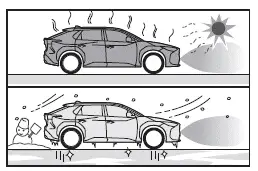
- Driving on uneven terrain such as rough roads, slopes, gravel, or grass surfaces
- Presence of external ultrasonic interference from nearby vehicles, machinery, or detection systems
- Heavy rain or water spray covering the sensor surface
- Objects moving extremely close to the Subaru Solterra sensors
- Pedestrians wearing clothing that does not reflect ultrasonic waves effectively
- Objects that are angled, uneven, flexible, or moving unpredictably
- Strong wind conditions affecting sensor readings
- Driving in harsh weather such as fog, snowstorms, or sandstorms
- Objects obstructed by another object between the Subaru Solterra and the target
- Sudden appearance of vehicles, bicycles, or pedestrians from the side
- Sensor misalignment caused by impact or collision
- Installation of accessories near sensors such as towing hooks, bumper guards, bicycle racks, or snow plows
- Changes in vehicle height due to load distribution
- Unstable driving conditions caused by damage or malfunction
- Use of tire chains, compact spare tires, or puncture repair kits
- When towing with the Subaru Solterra
■ Situations in which the system may operate even if there is no possibility of a collision
In some cases, the Subaru Solterra Parking Assist system may generate alerts even when there is no actual collision risk.
- Driving through narrow roads or confined spaces
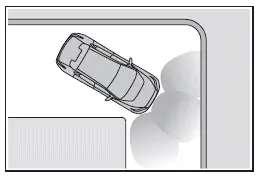
- Approaching flexible or hanging objects such as banners, flags, tree branches, or barriers
- Driving over uneven road surfaces including potholes or depressions
- Passing over metal grates or drainage covers
- Ascending or descending steep inclines
- Exposure of sensors to large volumes of water, such as flooded roads
- Accumulation of dirt, snow, or ice on sensors
- Continuous exposure to heavy rain or spray
- Driving in low visibility or extreme weather conditions
- Strong winds affecting sensor readings
The Subaru Solterra Parking Assist system enhances low-speed maneuvering safety, but optimal results are achieved only when the driver remains attentive and actively monitors the surroundings, combining technology with careful driving awareness.
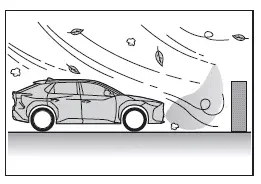
- When external sources such as vehicle horns, detection systems, motorcycle engines, air brake systems of heavy trucks, or other ultrasonic-emitting devices are present near the Subaru Solterra, sensor performance may be affected.
- If the front or rear height of the Subaru Solterra is altered due to load distribution, the sensor detection angles and effectiveness may change.
- If the alignment of any sensor has shifted due to an impact or collision, detection accuracy may be reduced.
- When approaching high or curved curbs, the system may not correctly evaluate distance or object shape.
- Driving close to structural elements such as steel columns or beams in parking garages or construction environments may interfere with sensor readings.
- If the Subaru Solterra is not operating in a stable condition, such as after an accident or due to mechanical issues, the system may not function reliably.
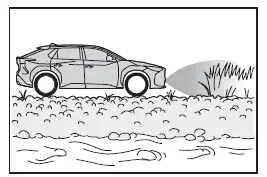
- Driving over uneven terrain such as rough roads, inclines, gravel, or grassy surfaces can also impact detection performance.
Sensor detection display, object distance
■ Detection range of the sensors
Vehicles without Advanced Park
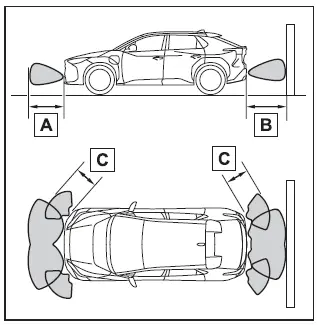
- Approximately 3.3 ft. (100 cm)
- Approximately 4.9 ft. (150 cm)
- Approximately 2.0 ft. (60 cm)
This diagram illustrates the standard detection zones of the Subaru Solterra parking sensors. Keep in mind that objects positioned extremely close to the vehicle may not be detected immediately or at all.
The effective detection range can vary depending on the shape, material, and orientation of surrounding objects.
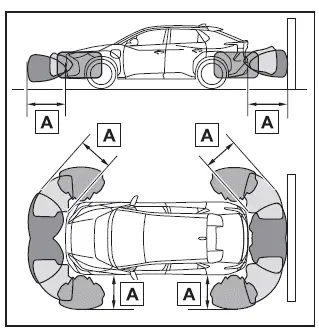
Vehicles with Advanced Park
■ The distance and buzzer
Vehicles without Advanced Park
- Approximately 6.6 ft. (200 cm)
The diagram demonstrates how the Subaru Solterra indicates object proximity through sensor detection. Note that very close objects may still fall outside the effective sensing range.
Detection distances may vary based on environmental factors and object characteristics.
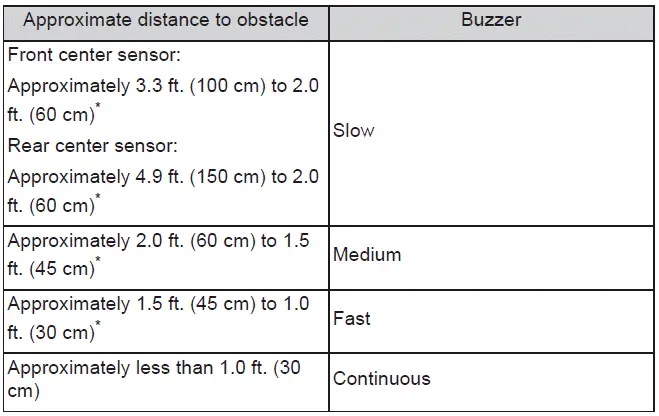
*: Automatic buzzer mute function is enabled.
Vehicles with Advanced Park
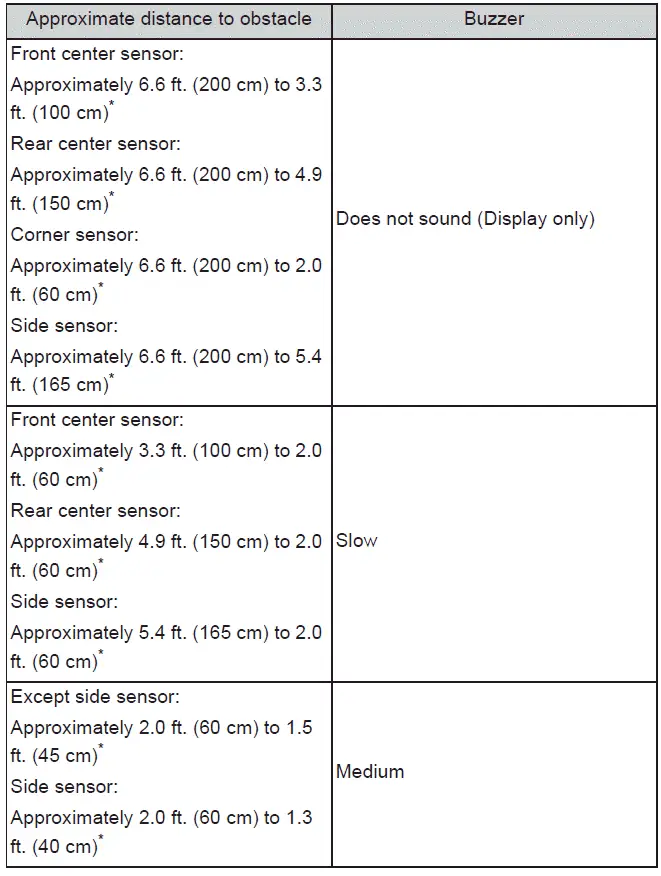
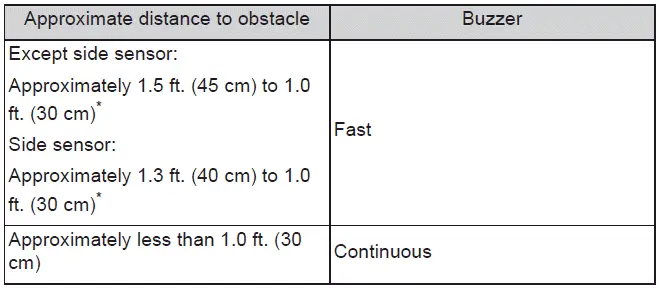
*: Automatic buzzer mute function is enabled.
SUBARU Parking Assist buzzer
The Subaru Solterra Parking Assist system uses audible alerts to notify the driver when nearby objects are detected.
- The frequency of the buzzer increases as the Subaru Solterra gets closer
to a stationary object.
Once the distance is reduced to approximately 1.0 ft. (30 cm), the buzzer transitions into a continuous tone, indicating immediate proximity.
- If multiple sensors detect objects simultaneously, the system prioritizes the closest detected object and emits the corresponding alert.
- After the buzzer has started, if the distance between the Subaru Solterra and the detected object remains unchanged, the system may automatically mute the buzzer to prevent unnecessary noise (automatic buzzer mute function).
■ Adjusting the buzzer volume
The volume level of the Subaru Solterra Parking Assist buzzer, along with RCTA and RCD (if equipped), can be adjusted simultaneously through the vehicle’s customization settings menu.
*: If equipped
■ Muting a buzzer
When a temporary mute option appears on the multimedia display of the Subaru Solterra, it can be selected to silence the buzzer for the current situation.
This function mutes alerts for Parking Assist, RCTA, and RCD systems collectively.
- The mute function will automatically deactivate under the following conditions:
- When the shift position is changed
- When the vehicle exceeds a certain speed threshold
- If a sensor malfunction is detected or the system becomes temporarily unavailable
- When the relevant driving assist system is manually turned off
- When the power switch of the Subaru Solterra is turned off
Proper understanding of the Subaru Solterra Parking Assist feedback system, including visual indicators and audible alerts, allows drivers to maneuver more precisely and confidently, especially in tight or complex parking environments.
*: If equipped
SUBARU Parking Assist object warning function (vehicles with Advanced Park)
The Subaru Solterra Parking Assist object warning function is engineered to notify the driver about obstacles located along the sides of the vehicle. By combining visual alerts on the display with audible signals, the Subaru Solterra enhances awareness whenever an object is positioned within the predicted driving trajectory.
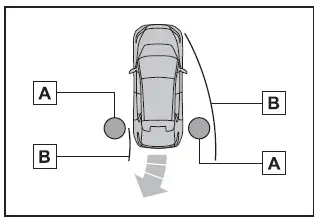
- Detected object
- Calculated path of the Subaru Solterra
While the Subaru Solterra is in motion, side-mounted sensors and cameras actively scan the surrounding environment. If an object was previously detected but temporarily disappears from sensor visibility, the system intelligently estimates its position relative to the vehicle. If this estimated position intersects with the predicted driving path, the object warning function will activate to alert the driver.
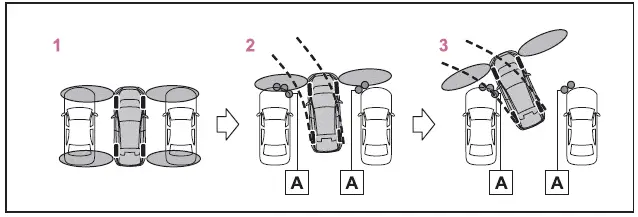
- Object detected by side sensors or side cameras
- When the Subaru Solterra is stationary, side objects may not yet be recognized.
- As the vehicle begins to move, nearby objects are detected and tracked.
- Even after objects leave the immediate detection zone, warnings may continue if they remain within the projected path of the Subaru Solterra.
■ Object warning function operating conditions
- The Subaru Solterra must travel approximately 23.0 ft.
(7 m) after the EV system has been activated to complete initial scanning.
- The shift position is set to R.
- After selecting D, the Subaru Solterra has moved no more than approximately 23.0 ft. (7 m).
-
 switch is pressed and the multimedia display is active.
 - Front or rear sensors detect a stationary object.
■ Detection of objects along the sides of the vehicle
- Side object detection in the Subaru Solterra is not instantaneous. Objects must first be identified by front or rear side sensors or cameras before their position is calculated relative to the vehicle. As a result, immediately after switching the power ON, objects located along the sides may not be detected until the Subaru Solterra has moved slightly and completed a full environmental scan.
- If an object such as another vehicle, pedestrian, or animal is initially detected but then leaves the detection zone, the system may assume the object remains stationary relative to the Subaru Solterra’s last known position.
WARNING
■ Side sensors and side cameras
In certain conditions, the Subaru Solterra Parking Assist system may not function as intended, which could increase the risk of an accident. Always proceed with caution and visually confirm surroundings.
- When the Subaru Solterra begins moving shortly after the power is switched ON and a small object or low-profile vehicle is positioned beside it, especially if it cannot be detected by front side sensors.
In the situation illustrated below, the adjacent vehicle may not be detected, and the object warning system may not activate as expected.
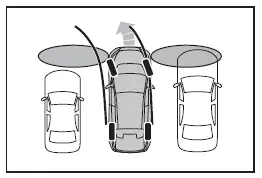
- When an object or person is positioned outside the effective detection range of the side sensors or cameras.
- When, after completing a scan, a new object approaches the Subaru Solterra from the side and is not immediately detected.
- If the outside rear view mirrors are folded, side sensors and cameras cannot properly monitor surrounding areas.
- After a 12-volt battery reset or replacement, the mirrors should be folded and extended again to ensure proper system calibration.
The Subaru Solterra object warning system significantly enhances low-speed maneuvering safety by predicting potential conflicts along the vehicle’s path, but it should always be used in combination with attentive driving and direct visual checks for maximum safety.
 Safe Exit Assist
The Subaru Solterra Safe Exit Assist is an advanced safety feature
that utilizes rear side radar sensors mounted inside the rear bumper to monitor
approaching vehicles and bicycles. This intellige ...
 RCTA (Rear Cross Traffic Alert)
The Subaru Solterra RCTA (Rear Cross Traffic Alert) system utilizes
rear side radar sensors integrated behind the rear bumper. This advanced feature
is designed to assist the driver by monitoring ...
Other materials:
Oil Seal (Differential) Replacement [A26 M R]
1. On level ground, jack up the vehicle and support it evenly on safety stands.
2. Drain the oil from the transaxle..
3. Remove the front tires..
4. Remove the splash shield..
5. Remove the aerodynamic under cover No.2..
6. Separate the drive shaft and joint shaft from the transaxle..
7 ...
Electric Vehicle system features
The Subaru Solterra represents a new generation of mobility, where
battery electric vehicle technology significantly differs from traditional gasoline-powered
vehicles in both operation and driving experience.
Instead of relying on internal combustion, the Subaru Solterra uses
energy stored i ...
Schedule 1
Chart symbols:
I: Inspect: Inspect and clean, repair, adjust, fill up, or replace if
necessary.
R: Replace
L : Lubricate
T: Tighten
Remarks:
*1 Use of FL-22 is recommended when replacing engine coolant. Using engine
coolant other than FL-22 may
cause serious damage to the engine and c ...
