
Mazda 3 Service Manual: Rear Seat Cushion Trim Removal/Installation
1. Remove the rear seat cushion..
2. Remove rings C, then remove the seat cushion trim from the seat cushion pad.
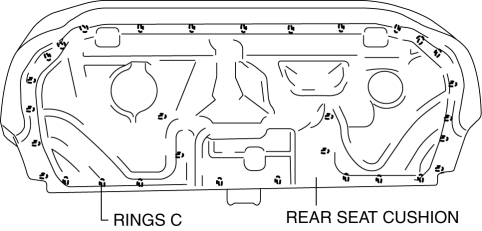
3. Install in the reverse order of removal.
 Rear Seat Cushion Removal/Installation
1. Detach the hooks from the grommets by pulling the rear seat cushion in the
order of (1), (2) in the direction of the arrow shown in the figure, while remove
the wire.
2. Install in the re ...
 Rear Tilt Motor Inspection
1. Remove the battery cover..
2. Disconnect the negative battery cable and wait 1 min or more..
3. Disconnect the rear tilt motor connector.
4. Apply battery positive voltage to the rear tilt mo ...
Other materials:
No.7 Bsm Indicator Light Does Not Flash While Under Bsm Indicator Light Flashing
Conditions (With Combination Switch Operation (Turn Signal Switch)) [Blind Spot
Monitoring (Bsm)]
7
BSM indicator light does not flash while under BSM indicator light-flashing
conditions (with combination switch operation (turn signal switch))
Description
The BSM indicator light does not flash or illuminate continuously,
...
Rear Tilt Motor Inspection
1. Remove the battery cover..
2. Disconnect the negative battery cable and wait 1 min or more..
3. Disconnect the rear tilt motor connector.
4. Apply battery positive voltage to the rear tilt motor terminals and inspect
the rear tilt motor operation
If not as specified, replace t ...
Declaration of Conformity
Keyless Entry System/Immobilizer System
Blind Spot Monitoring (BSM) System
NOTE
During printing time of this user manual the approvals listed above are granted.
WARNING
Change or modifi cations not expressively approved by the party
responsible for
compliance could voi ...
