
Mazda 3 Service Manual: Front Beltline Molding Removal/Installation
1. Fully open the front door glass.
2. Disconnect the negative battery cable..
3. Remove the inner garnish..
4. Remove the front door trim..
5. Remove the power outer mirror..
6. Remove clip A using a fastener remover and pull the front beltline molding in the direction of the arrow (1) shown in the figure.
7. Rotate the front beltline molding in the direction of the arrow (2) shown in the figure and remove it while detaching tab B.
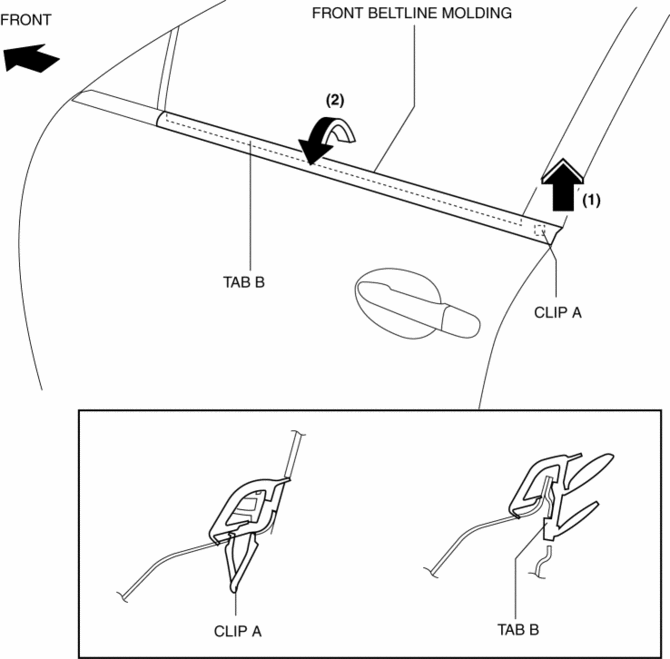
8. Install in the reverse order of removal.
 Floor Under Cover Removal/Installation
1. Lift up the vehicle.
2. Remove the cap nuts.
3. Remove the nus.
4. Pull the floor under covers in the direction of arrow (1), (2), (3) shown
in the figure, and then remove it.
5. ...
 Front Bumper Disassembly/Assembly
Standard Type
Except SKYACTIV-G 2.0
1. Disassemble in the order indicated in the table.
1
Screw A
2
Guard cover
3
...
Other materials:
Washer Tank Removal/Installation
Vehicles with the washer fluid-level sensor
1. Disconnect the negative battery cable..
2. Remove the front bumper..
3. Remove in the order indicated in the table.
1
Washer motor connector
2
Windshield washer hose
3
...
Fuel Economy Monitor
For vehicles with type B audio, the Control Status and Fuel Consumption are
switched and
displayed by operating each icon in the display.
In addition, after completing a trip, the total energy efficiency to date is
displayed in the
ending display when the ending display is turned on.
Se ...
PCM Removal/Installation [Mzr 2.0, Mzr 2.5]
1. Remove the battery cover..
2. Disconnect the negative battery cable..
3. Remove the following items:.
Battery
PCM cover No.1
4. Disconnect the PCM connector..
5. Remove the battery tray and PCM component..
6. Remove in the order indicated in the table.
...
