
Mazda 3 Service Manual: Compression Inspection [Mzr 2.3 Disi Turbo]
WARNING:
-
Hot engines and oil can cause severe burns. Be careful not to burn yourself during removal/installation of each component.
-
Fuel vapor is hazardous. It can very easily ignite, causing serious injury and damage. Always keep sparks and flames away from fuel.
-
Fuel line spills and leakage are dangerous. Fuel can ignite and cause serious injuries or death and damage. Fuel can also irritate skin and eyes. To prevent this, always complete the “Fuel Line Safety Procedure”..
1. Verify that the battery is fully charged..
-
Recharge it if necessary..
2. Warm up the engine to normal operating temperature.
3. Remove the charge air cooler..
4. Remove the ignition coils..
5. Remove all the spark plugs..
6. Remove the fuel pump relay..
7. Remove the fuel injector relay.
8. Measure the compression pressure using the following procedure.
a. Press a compression gauge into the spark plug hole.
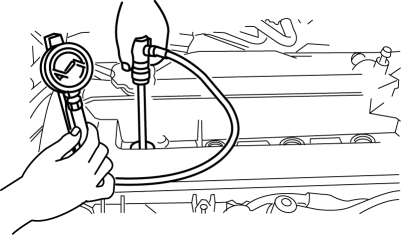
b. Fully depress the accelerator pedal and crank the engine.
c. Note down the maximum gauge reading.
d. Perform Steps (1) to (3) for all cylinders.
-
Compression
-
Standard: 1,280 kPa {13.05 kgf/cm2, 185.6 psi} [250 rpm]
-
Minimum: 896 kPa {9.14 kgf/cm2, 130 psi} [250 rpm]
-
Maximum difference between cylinders: 196.1 kPa {2.000 kgf/cm2, 28.44 psi}
e. If the measured value is less than the minimum value, or there is a cylinder whose compression value varies from that of other cylinders by 196.1 kPa {2.000 kgf/cm2, 28.44 psi}
or more, add a small amount of engine oil through the spark plug hole. Then measure the compression pressure and perform the respective operations for the following cases.
-
If the compression increases, the piston, the piston rings, or cylinder wall may be worn and overhaul is required.
-
If the compression stays low, a valve may be stuck or improperly seated and overhaul is required.
-
If the compression in adjacent cylinders stays low, the cylinder head gasket may be damaged or the cylinder head distorted and overhaul is required.
9. Install the fuel injector relay.
10. Install the fuel pump relay..
11. Install the spark plugs..
12. Install the ignition coils..
13. Install the charge air cooler..
 Compression Inspection [Mzr 2.0, Mzr 2.5]
WARNING:
Hot engines and oil can cause severe burns. Be careful not to burn yourself
during removal/installation of each component.
Fuel vapor is hazardous. It can very easily ignit ...
 Compression Inspection [Skyactiv G 2.0]
WARNING:
Hot engines and oil can cause severe burns. Be careful not to burn yourself
during removal/installation of each component.
Fuel vapor is hazardous. It can very easily ignit ...
Other materials:
If your vehicle needs to be towed
If your Subaru Solterra requires towing, it is strongly recommended
to use an authorized SUBARU dealer or a professional towing service equipped with
a wheel-lift or flatbed truck for safe transportation.
Always ensure that a proper safety chain system is used during towing,
and strictly foll ...
Operation
System triggering conditions
The horn sounds intermittently and the
hazard warning lights flash for about 30
seconds when the system is triggered by
any one of the following:
Unlocking a door with the key, door
lock switch, or an inside door-lock knob.
Forcing open a door, the hood or th ...
Front Shock Absorber Disposal
1. Place the front shock absorber on a level surface or with the piston pointing
downwards.
2. Drill a 2—3 mm {0.08—0.11 in} hole at the point A shown in the figure
so that the gas can escape.
WARNING:
Whenever drilling into a shock absorber, wear protective eye wear. The gas ...
