
Subaru Solterra 2023-2026 Owner's Manual: Side doors
In the Subaru Solterra, the side doors can be securely locked and unlocked through multiple convenient methods, including the smart entry system, wireless remote control, door lock switches, and interior lock buttons, ensuring flexibility and ease of access in any situation.
Unlocking and locking the doors from the outside
■ Using the entry function
To use the smart entry system of the Subaru Solterra, carry the electronic key with you to enable seamless hands-free operation.
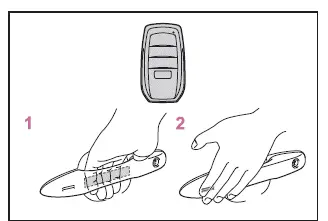
- Grip the driver’s door handle to unlock the door. Holding the handle for
approximately 2 seconds will unlock all doors of the Subaru Solterra.
Gripping the front passenger or rear door handle (on vehicles equipped with a lock sensor) will unlock all doors simultaneously, depending on system configuration.*
Ensure that you touch the sensor located on the inner side of the handle for proper operation.
After locking, the Subaru Solterra temporarily disables unlocking for approximately 3 seconds to prevent unintended operation.
- Touch the lock sensor (indentation on the outer side of the door handle) to lock all doors securely.
Always confirm that the doors of the Subaru Solterra are fully locked before leaving the vehicle.
*: The door unlocking behavior can be customized according to user preference.
■ Using the wireless remote control
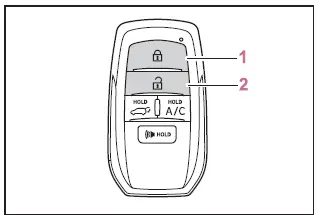
- Locks all doors of the Subaru Solterra
Ensure all doors are securely locked after pressing the button.
- Unlocks all doors
Pressing the unlock button once releases only the driver’s door. Pressing it again within 5 seconds unlocks the remaining doors.
Press and hold the button to open the side windows.*
*: This function must be enabled through customization at your SUBARU dealer.
■ Switching the door unlock function
The Subaru Solterra allows customization of which doors are unlocked via the entry function or remote control. This adjustment can be performed inside the vehicle or within approximately 3.2 ft. (1 m) of it.
1. Turn the power switch to OFF.
2. When the key indicator light is off, press and hold
 ,
,
 (if equipped) or
 for approximately 5 seconds while pressing and holding
 .
.
The Subaru Solterra will cycle through available unlocking configurations each time this operation is performed. To continue switching settings, release the buttons, wait at least 5 seconds, and repeat the process.
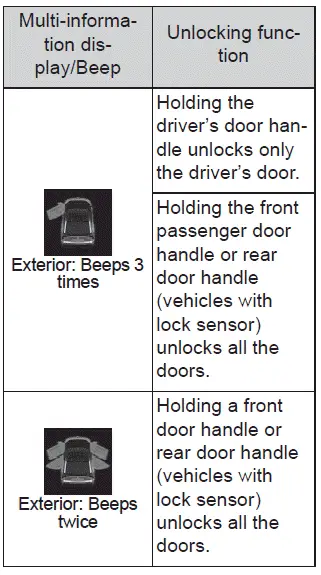
To avoid unintended alarm activation in the Subaru Solterra, unlock the doors
using the remote and open and close one door after changing the settings. If no
door is opened within 60 seconds after pressing
 ,
the system will automatically relock the doors and arm the alarm. If the alarm is
triggered, stop it immediately using the key.
,
the system will automatically relock the doors and arm the alarm. If the alarm is
triggered, stop it immediately using the key.
■ Locking the front doors from the outside without a key
1. Move the inside lock button to the locked position.
2. Close the door of the Subaru Solterra.
The doors cannot be locked if the power switch is in ACC or ON mode, or if the electronic key remains inside the vehicle.
Depending on the location of the electronic key within the Subaru Solterra, it may not be detected accurately, which could allow the door to lock unintentionally. Always verify key location before locking.
■ Impact detection door lock release system
In the Subaru Solterra, the impact detection system is designed to enhance safety by automatically unlocking all doors if the vehicle experiences a significant collision. This function helps occupants exit the vehicle quickly in emergency situations. However, depending on the severity, angle, or nature of the impact, the system may not always activate.
■ Operation signals
Doors: In the Subaru Solterra, an audible buzzer combined with flashing hazard lights confirms door locking and unlocking operations. (Locked: one signal; Unlocked: two signals)
Side windows: A separate buzzer tone indicates that the side windows are currently being operated.
■ Security feature
For added protection, the Subaru Solterra is equipped with an automatic relocking feature. If no door is opened within approximately 60 seconds after unlocking, the vehicle will lock itself again. In certain cases, if the electronic key is detected inside the vehicle, the system may not relock as expected.
■ When the door cannot be locked by the lock sensor on the surface of the door handle
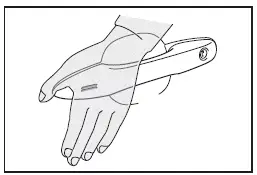
If the Subaru Solterra door does not lock when touching the sensor with a finger, try using the palm of your hand to ensure proper contact with the sensor surface.
When wearing gloves, remove them to improve sensor detection accuracy.
■ Open door warning buzzer
If an attempt is made to lock the Subaru Solterra while a door is not fully closed, a continuous buzzer will sound for approximately 5 seconds.
Ensure all doors are completely shut, then attempt to lock the vehicle again to stop the warning signal.
■ Setting the alarm
Locking the doors of the Subaru Solterra automatically activates the integrated anti-theft alarm system, providing an additional layer of security.
■ If the smart key system or the wireless remote control does not operate properly
- Use the mechanical key to manually lock or unlock the Subaru Solterra doors.
- If the issue is caused by a weak battery, replace the electronic key battery with a new one.
■ If the 12-volt battery is discharged
When the 12-volt battery of the Subaru Solterra is depleted, electronic locking systems will not function. In this case, use the mechanical key to access the vehicle.
■ Rear seat reminder function
- The Subaru Solterra is equipped with a rear seat reminder system designed
to help prevent leaving items or passengers behind. When the power is turned
OFF after certain conditions are met, a buzzer sounds and a notification appears
on the display for approximately 6 seconds.
- If the EV system was started within 10 minutes after opening and closing a rear door.
- If any rear door was opened and closed after the EV system was activated.
However, if a rear door is opened and closed very quickly (within about 2 seconds), the Subaru Solterra may not register the action, and the reminder may not activate.
- The system determines the presence of items based on door usage rather than actual detection. Therefore, it may occasionally fail to alert or may trigger unnecessarily depending on the situation.
- The rear seat reminder function in the Subaru Solterra can be enabled or disabled through vehicle settings.
■ Customization
The Subaru Solterra allows various settings—such as door unlocking behavior—to be adjusted according to user preferences for improved convenience and personalization.
WARNING
■ To prevent an accident
Always follow safe driving practices when operating the Subaru Solterra and ensure all doors are properly secured before driving.
Ignoring these precautions in the Subaru Solterra may lead to a door opening unexpectedly while driving, which could result in an occupant being ejected from the vehicle and suffering severe or fatal injuries.
- Always confirm that every door of the Subaru Solterra is completely closed and securely locked before starting to drive.
- Do not pull the interior door handles while the Subaru Solterra is in
motion.
Pay particular attention to the front doors, as they may open even when the internal lock buttons are set to the locked position.
- When children are seated in the rear seats of the Subaru Solterra, activate the child-protector locks to prevent accidental door opening.
■ When opening or closing a door
Before operating any door on the Subaru Solterra, carefully check the surrounding environment. Ensure the vehicle is stable (especially on inclines), confirm there is sufficient space for the door to open, and be aware of wind conditions. Always hold the door firmly to prevent sudden or unexpected movement.
■ When using the wireless remote control or mechanical key and operating the power windows
Before activating the power windows of the Subaru Solterra, ensure that no passengers are in a position where body parts could become trapped. Children should never be allowed to operate the remote control or mechanical key, as improper use may lead to injury.
Unlocking and locking the doors from the inside
■ Using the door lock switches
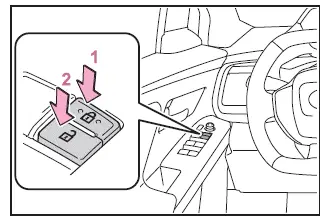
- Locks all doors of the Subaru Solterra simultaneously
- Unlocks all doors of the Subaru Solterra
■ Using the inside lock buttons
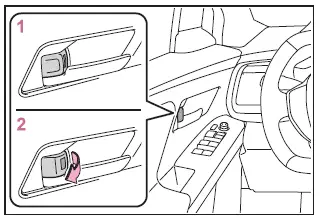
- Locks the individual door
- Unlocks the individual door
In the Subaru Solterra, even when the lock button is engaged, the front doors can still be opened by pulling the interior handle, which is a safety feature.
■ Open door warning buzzer
If the Subaru Solterra reaches a speed of approximately 3 mph (5 km/h) while any door or the hood is not fully closed, a warning buzzer will sound to alert the driver.
The specific door or hood status will also be displayed on the multi-information screen.
■ When all the doors are locked with the entry function or wireless remote control
- In the Subaru Solterra, the door lock switches inside the cabin will not unlock the doors once they have been locked externally.
- To restore functionality, unlock all doors using the entry function or wireless remote control.
Rear door child-protector lock
When activated, the rear doors of the Subaru Solterra cannot be opened from inside the vehicle, enhancing safety for child passengers.
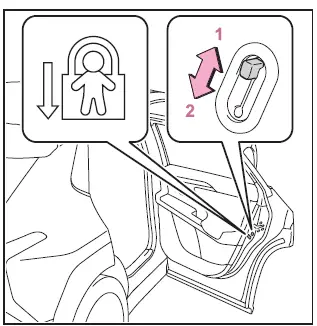
- Unlock position
- Lock position
Enable these locks by pushing down the switch on each rear door, ensuring that children cannot accidentally open the doors while the Subaru Solterra is in motion.
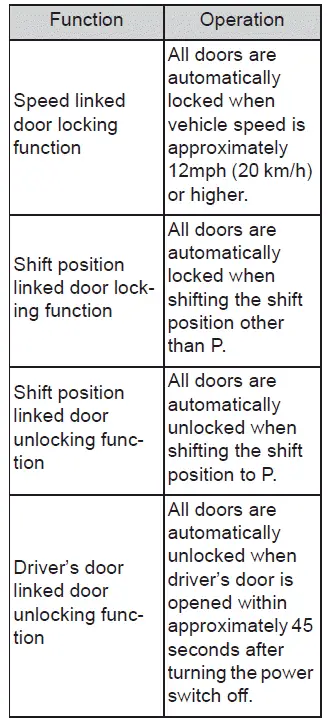
Automatic door locking and unlocking systems
The Subaru Solterra offers configurable automatic door lock and unlock functions that can be activated or deactivated according to user preferences. These settings help enhance both convenience and safety during daily driving.

 Back door
In the Subaru Solterra, the back door can be conveniently locked,
unlocked, opened, and closed using several intuitive methods, ensuring both ease
of use and a high level of safety during everyday ...
Other materials:
PDA (Proactive driving assist)
In the Subaru Solterra, the Proactive Driving Assist (PDA) system
continuously monitors the surroundings and, when a detectable object is identified,
it can automatically apply gentle braking and subtle steering input to help maintain
a safe distance and reduce the likelihood of getting too cl ...
Wheel Balance Adjustment
CAUTION:
Adjust the outer wheel balance first, then the inner wheel balance.
Be careful not to scratch the wheels.
Adhesive-type Balance Weight (Outer)
1. Remove the old balance weight from the wheel.
2. Remove the double-sided adhesive tape remaining on the wheel, then clea ...
Aerodynamic Under Cover No.2 Removal/Installation
Except SKYACTIV-G 2.0
1. Lift up the vehicle.
2. Remove the fasteners and bolts.
3. Move the aerodynamic under cover No.2 in the direction of the arrow shown
in the figure and remove it.
CAUTION:
Be careful not to damage the aerodynamic under cover No.2 during removal.
4. ...
