
Mazda 3 Service Manual: Steering Switch Inspection
Without Bluetooth System
WARNING:
-
Handling the air bag module improperly can accidentally deploy the air bag module, which may seriously injure you. Read the air bag system service warnings and cautions before handling the air bag module..
1. Disconnect the negative battery cable and wait for 1 min or more
..
2. Remove the driver-side air bag module..
3. Disconnect the steering switch connector.
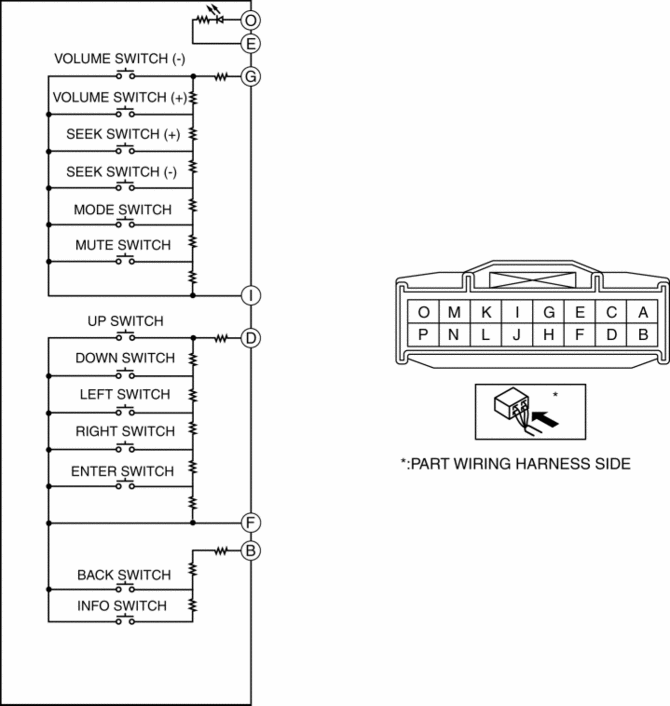
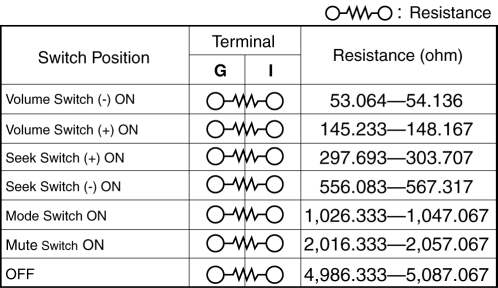
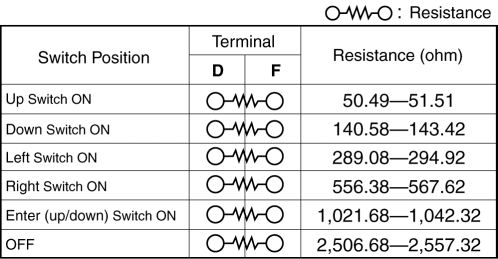
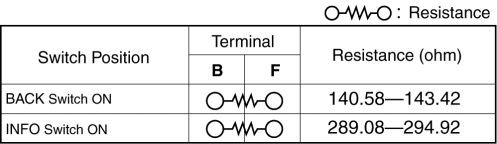
4. Verify the resistance between the steering switch terminals.
-
If not within the specification, replace the steering switch.
5. Apply battery positive voltage to steering switch terminal O, and connect terminal E to ground.
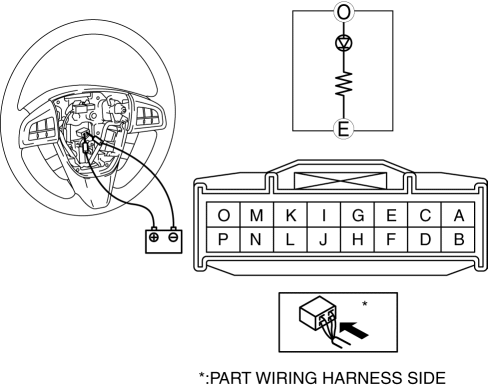
6. Verify that the LED illuminates.
-
If the LED does not illuminate, replace the steering switch.
With Bluetooth System
WARNING:
-
Handling the air bag module improperly can accidentally deploy the air bag module, which may seriously injure you. Read the air bag system service warnings and cautions before handling the air bag module..
1. Disconnect the negative battery cable and wait for 1 min or more
..
2. Remove the driver-side air bag module..
3. Disconnect the steering switch connector.
4. Verify the resistance between the steering switch terminals.
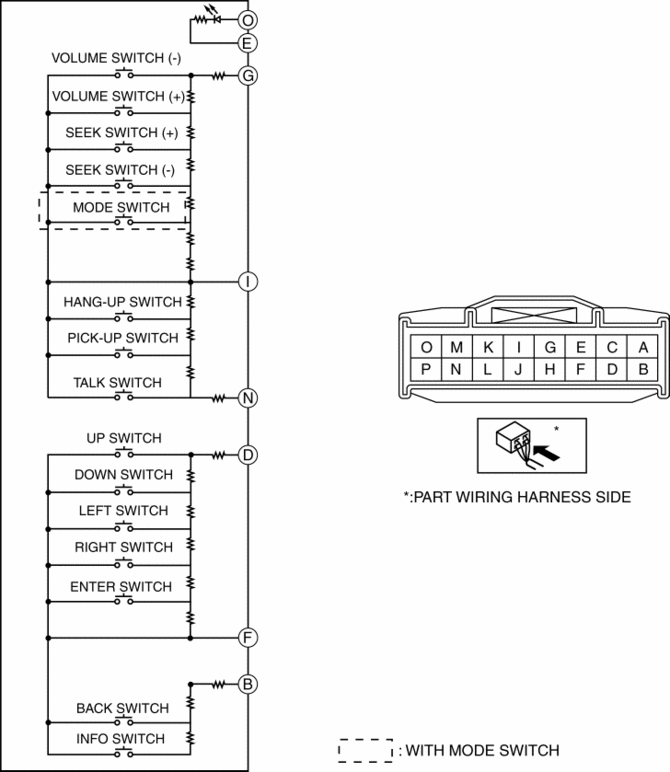
-
If not within the specification, replace the steering switch.
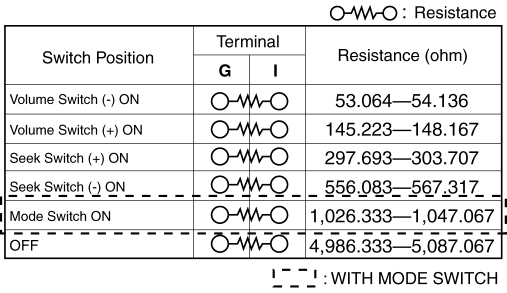
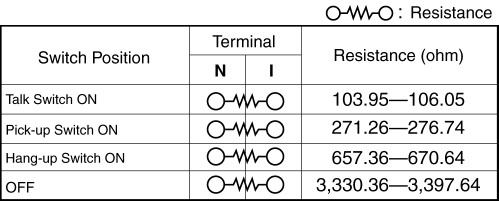
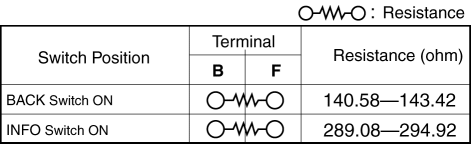
5. Apply battery positive voltage to steering switch terminal O, and connect terminal E to ground.
6. Verify that the LED illuminates.
-
If the LED does not illuminate, replace the steering switch.
 Steering SST
49 H032 301
Wrench
49 F017 1A0
Universal wrench
49 F032 303
Handle
49 B032 323
Rod seal ...
 Steering Switch Removal/Installation
WARNING:
Handling the air bag module improperly can accidentally deploy the air bag
module, which may seriously injure you. Read the air bag system service warnings
and cautions before h ...
Other materials:
Air Bleeding
CAUTION:
If the strainer is removed, impurities may penetrate the power steering system
and damage it. To prevent this, always bleed air with the strainer installed.
Do not maintain the steering wheel fully turned for 5 s or more. The oil
temperature could rise and damage ...
B Pillar Upper Trim Removal/Installation
1. Remove the following parts:
a. Adjuster anchor cover.
b. Upper anchor installation bolts on the front seat belt.
c. Front scuff plate.
d. Rear scuff plate.
2. Partially peel back the seaming welt.
3. Remove the B-pillar lower trim..
4. Grasp the lower end of the B-pillar upper trim, ...
Manifold Absolute Pressure (Map) Sensor/Boost Air Temperature Sensor Removal/Installation
[Mzr 2.3 Disi Turbo]
NOTE:
Because the boost air temperature sensor is integrated in the MAP sensor,
replacing the boost air temperature sensor includes replacement of the MAP sensor/boost
air temperature sensor.
1. Remove the battery cover..
2. Disconnect the negative battery cable..
3. Remove t ...
