
Mazda 3 Service Manual: High Mount Brake Light Bulb Removal/Installation
4SD
1. Disconnect the negative battery cable..
2. Remove the trunk lid trim..
3. Remove in the order indicated in the table.
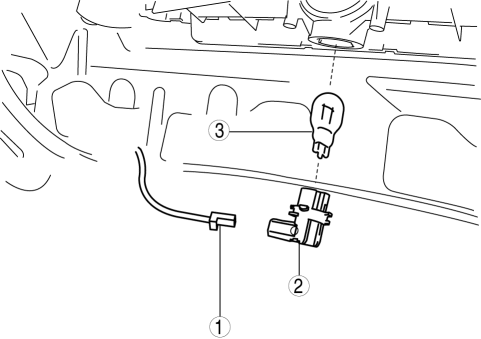
|
1 |
Connector |
|
2 |
Socket |
|
3 |
High-mount brake light bulb |
4. Install in the reverse order of removal.
5HB
1. Disconnect the negative battery cable..
2. Remove the liftgate upper trim..
3. Remove the high-mount brake light..
4. Remove in the order indicated in the table.
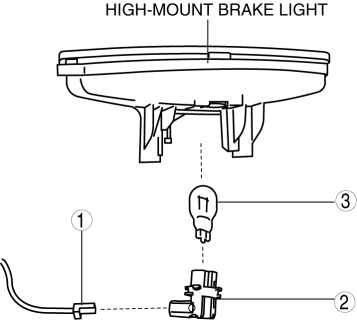
|
1 |
Connector |
|
2 |
Socket |
|
3 |
High-mount brake light bulb |
5. Install in the reverse order of removal.
 Headlight Leveling Actuator Inspection
NOTE:
Headlight leveling actuator are integrated with the front combination light.
For the actuator inspection of the headlight auto leveling system, perform
the headlight leveling ...
 High Mount Brake Light Disassembly/Assembly
4SD
1. Disconnect the negative battery cable..
2. Remove the trunk lid trim..
3. Remove the high-mount brake light..
4. Remove the high-mount brake light outer lens.
5. Remove the high-mo ...
Other materials:
Applications
NOTE
Depending on the grade and specification,
the screen display may differ.
Select the icon on the home screen to
display the Applications screen. The
following information can be verified.
Top screen
Item
Function
HD
Radio™
Traffic
Map
— ...
Check Valve (One Way) Inspection [Mzr 2.3 Disi Turbo]
1. Disconnect the vacuum hose connected between the check valve and the purge
solenoid valve from the purge solenoid valve..
2. Disconnect the vacuum hose connected between the check valve (one-way) and
the intake manifold from the intake manifold..
3. Blow through the check valve (one-way) ...
Dynamic radar cruise control
In the Subaru Solterra, the Dynamic Radar Cruise Control system continuously
monitors traffic ahead using radar and camera technology. It detects vehicles in
front, evaluates the current following distance, and automatically adjusts speed
to maintain a safe and comfortable gap. The Subaru Solt ...
