
Subaru Solterra 2023-2026 Owner's Manual: Steering wheel
Adjustment procedure
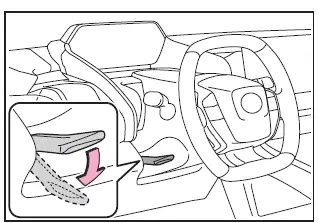
1. Firmly hold the Subaru Solterra steering wheel and push the adjustment lever downward to release the lock.
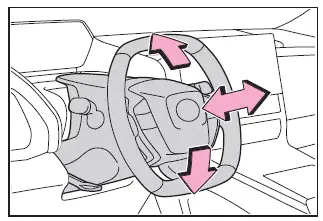
2. Move the steering wheel vertically and horizontally to achieve the most comfortable driving position.
Once the desired position is reached, pull the lever upward to securely lock the Subaru Solterra steering wheel.
WARNING
■ Caution while driving
Never adjust the Subaru Solterra steering wheel while the vehicle is in motion.
This may result in loss of control and lead to serious injury or fatal accidents.
■ After adjusting the steering wheel
Ensure that the steering wheel is firmly locked in place before driving.
If it is not secured, the steering wheel may move unexpectedly, and even the horn may fail to operate properly.
Sounding the horn
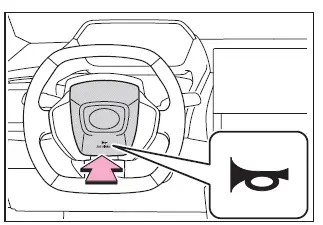
To activate the horn in the Subaru Solterra, press the area marked with
 .
.

 Inside rear view mirror
In the Subaru Solterra, the inside rear view mirror is designed to
provide a clear and accurate view of the area behind the vehicle, allowing the driver
to maintain full awareness of surrounding t ...
Other materials:
Clutch Pedal Inspection [C66 M R]
NOTE:
For the clutch pedal inspection, note the followings and measure each inspection
location.
Measure the center of the upper surface of the pedal pad for each inspection.
If the distance from the pedal pad to the floor covering is measured,
measure the shor ...
Instrument Cluster Removal/Installation
CAUTION:
When replacing the instrument cluster, the configuration procedure must be
performed before removing the instrument cluster. Replacing the instrument cluster
without performing the configuration procedure will result in system malfunction.
1. Perform the instrument clust ...
Ignition Coil Inspection [Mzr 2.0, Mzr 2.5]
Ignition Coil Inspection
1. Perform the spark test and identify the malfunctioning cylinder..
2. Replace the ignition coil of the malfunctioning cylinder with that of a normal
cylinder, and perform the spark test again..
If the spark is not normal due to a malfunctioning ignition coil, ...
