
Mazda 3 Owners Manual: Troubleshooting
Mazda Bluetooth ® Hands-Free Customer Service
If you have any problems with Bluetooth ® , contact our toll-free customer service center.
- U.S.A.
- Canada
- Mexico
Bluetooth ® Device pairing, connection problems
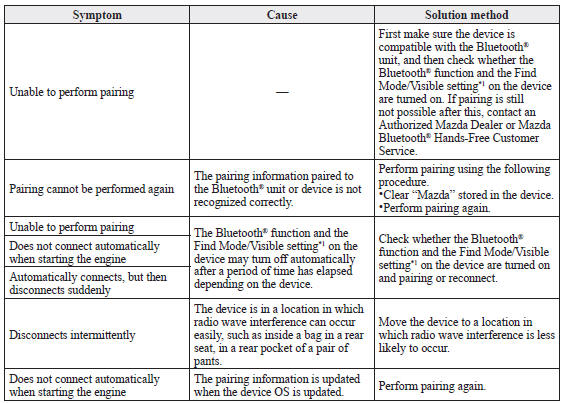
*1 Setting which detects the existence of a device external to the Bluetooth ® unit
NOTE
- When the OS of the device is updated, the pairing information may be deleted. If this happens, reprogram the pairing information to the Bluetooth ® unit.
- If you pair your phone which has already been paired to your vehicle more than once in the past, you need to delete “Mazda” on your mobile device. Then, execute the Bluetooth ® search on your mobile device once again, and pair to a newly detected “Mazda”.
- Before you pair your device, make sure that Bluetooth ® is “ON”, both on your phone and on the vehicle.
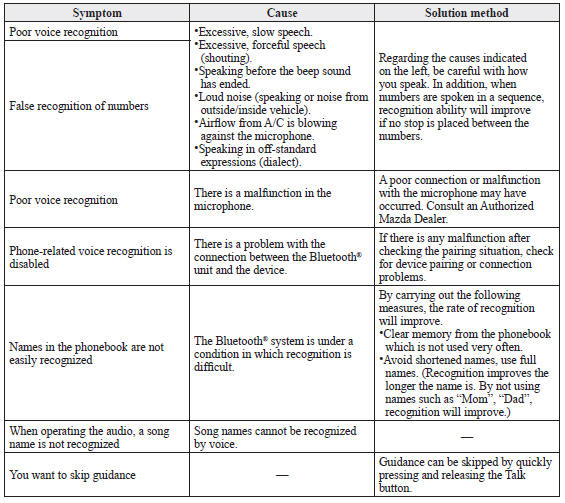
Voice recognition related problems
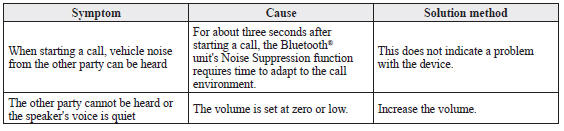
Regarding problems with calls
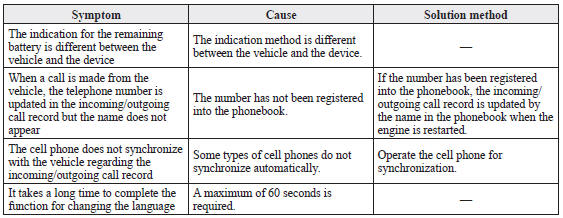
Other problems
 How to Use Stitcher™* Radio
What is Stitcher™ Radio?
Stitcher™ radio is an application which can be used to listen to Internet radio
or stream
podcasts.
Recommended content is automatically selected by registering con ...

Other materials:
Joint Shaft Assembly [Skyactiv G 2.0]
1. Assemble in the order indicated in the table.
1
Dust cover
.
2
Bearing
.
3
Snap ring
4
Dust seal
.
5
Joint shaft
Dust Cover Assembly N ...
Unfastening the Seat Belt
Depress the button on the seat belt buckle.
If the belt does not fully retract, pull it out
and check for kinks or twists. Then make
sure it remains untwisted as it retracts.
NOTE
If a belt does not fully retract, inspect
it for kinks and twists. If it is still not
retracting properly, ...
Maintenance data
Dimensions and weights
*: Unladen vehicle
Seating capacity
Vehicle identification
■ Vehicle identification number
The vehicle identification number (VIN) of your Subaru Solterra serves as its
official legal identifier and is essential for registration, ownership documentation,
...
