
Subaru Solterra 2023-2026 Owner's Manual: Warning lights and indicators
The Subaru Solterra is equipped with a comprehensive set of warning lights and indicators located on the instrument cluster and exterior mirrors, designed to clearly communicate the current condition and operational status of various vehicle systems to the driver in real time.
Warning lights and indicators displayed on the instrument cluster
For clarity and demonstration purposes, the following visuals for the Subaru Solterra show all warning lights and indicators illuminated simultaneously, even though under normal driving conditions only specific lights will be active.
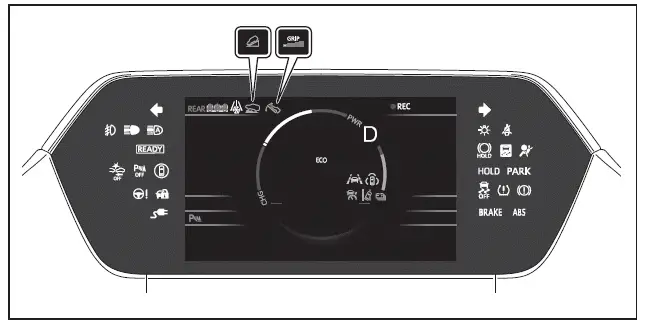
The measurement units and certain display elements in the Subaru Solterra may vary depending on the destination market or regional specifications.
Warning lights
Warning lights in the Subaru Solterra are critical alerts that notify the driver about potential malfunctions or irregularities in essential vehicle systems that may require attention.

(U.S.A.) Brake system warning light*1

(Canada)
(Red) Brake system warning light*1

(Yellow) Brake system warning light*1
 Charging system warning light*2
 SRS warning light*1

(U.S.A.) ABS warning light*1

(Canada) ABS warning light*1
 Inappropriate pedal operation warning light*2

(Red) Electric power steering system warning light*1

(Yellow) Electric power steering system warning light*1

(Yellow) Traction battery charge warning light
 Driver's
and front passenger's seat belt reminder light
Driver's
and front passenger's seat belt reminder light
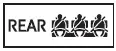 Rear passengers' seat belt reminder lights
 Tire pressure warning light*1 (if equipped)

(Yellow) LDA indicator

(Yellow) LTA indicator
 Driving assist information indicator*1
 OFF indicator*1

(Yellow) PDA indicator

(Yellow) Cruise control indicator

(Yellow) Dynamic radar cruise control indicator

(Flashes or illuminates) PCS warning light*1
 Slip indicator*1

(U.S.A.)
(Flashes) Parking brake indicator

(Canada)
(Flashes) Parking brake indicator

(Flashes) Brake hold operated indicator* 1
*1: These indicators in the Subaru Solterra illuminate when the
power is switched ON to confirm that system diagnostics are running correctly. They
should turn off shortly after the EV system starts. If any light fails to illuminate
or remains on, it may indicate a malfunction requiring inspection by a SUBARU dealer.
*2: This indicator is displayed on the multi-information display of the Subaru Solterra.
WARNING
■ If a safety system warning light does not come on
If safety-related indicators such as ABS or SRS fail to illuminate when starting the Subaru Solterra, these systems may not function properly in an emergency situation. This significantly increases the risk of serious injury or fatal consequences. Immediate inspection by an authorized SUBARU service provider is strongly recommended.
Indicators
Indicators in the Subaru Solterra provide information about the active status of various features and assist systems rather than signaling faults.
 Turn signal indicator

(U.S.A.)

(Canada) Tail light indicator
 Headlight high beam indicator
 AHB indicator
 Front fog light indicator (if equipped)
 PCS warning light*1, 2

(*3) PDA indicator

(*3) Cruise control indicator

(*3) Dynamic radar cruise control indicator
 Outside rear view mirror indicators*4

(*3) LDA indicator
 LDA OFF indicator*2

(*3) LTA indicator
 Driving assist information indicator*1, 2
 SUBARU Parking Assist OFF indicator*1, 2
 SUBARU Parking Assist detection indicator*5

(Flashes) Slip indicator*1
 VSC OFF indicator*1, 2
 Charging cable indicator
 Smart key system indicator* 6
 "READY" indicator

(U.S.A.) Parking brake indicator

(Canada) Parking brake indicator
 Brake hold standby indicator* 1
 Brake hold operated indicator* 1
 Low outside temperature indicator*7
 Security
indicator
Security
indicator
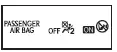 "AIR
BAG ON/OFF" indicator*1, 8
"AIR
BAG ON/OFF" indicator*1, 8
 Eco drive mode indicator
 Power mode indicator
 Downhill assist control system indicator
 Grip control indicator
 Grip control set speed indicator
 "S PEDAL DRIVE" indicator

(*9) SNOW/DIRT mode indicator

(*9) D.SNOW/MUD mode indicator
 Stop lights indicator* 10
 REC indicator
*1: In the Subaru Solterra, these indicators illuminate when the
power is switched ON to confirm that system self-diagnostics are in progress. They
should turn off shortly after the EV system becomes ready. If any light does not
illuminate or remains active, a system malfunction may be present and professional
inspection is required.
*2: This indicator appears when the corresponding system has been manually switched
off.
*3: Depending on the current operating conditions of the Subaru Solterra, the color
and flashing pattern of the indicator may vary.
*4: These indicators are also displayed on the exterior mirrors of the Subaru Solterra
for enhanced driver awareness.
*5: Applies to vehicles without a multimedia display or rear-view camera system.
*6: This notification appears on the multi-information display along with a detailed
message.
*7: When the ambient temperature drops to approximately 37°F (3°C) or lower, the
indicator will flash briefly before remaining illuminated.
*8: This indicator is located within the overhead console of the Subaru Solterra.
*9: Indicator color may change depending on the selected driving mode and terrain
conditions.
*10: This indicator activates when the brake lights are engaged either by driver
input or by advanced driver assistance systems.
■ SUBARU Parking Assist OFF indicator
In Subaru Solterra models without a multimedia display, these indicators will automatically turn off when the shift lever is moved into the R position, regardless of whether the SUBARU Parking Assist system is enabled or disabled.

 Gauges and meters
In the Subaru Solterra, the gauges and meters are designed to provide
the driver with clear, real-time driving information, helping to maintain awareness
of vehicle performance, battery condition, ...
Other materials:
Power Outer Mirror Inspection
Mirror Glass Adjustment Motor
1. Disconnect the negative battery cable..
2. Remove the inner garnish..
3. Disconnect the power outer mirror connector.
4. Remove the front door trim..
5. Apply battery positive voltage and connect the ground to the power outer mirror
terminals and inspect t ...
Fastening the Seat Belt
Pull the seat belt tongue to the desired
length.
Insert it into the seat belt buckle until
you hear a click sound.
Adjust the belt length.
To lengthen the belt, hold the seat belt
tongue at a right angle to the webbing
and pull. To shorten, pull the loose end
of the webbin ...
Front Door Key Cylinder Removal/Installation
1. To access the glass installation bolt, position the front door glass so that
the distance from the top of the front door glass to the upper part of the front
beltline molding is approx. 80 mm {3.1 in}.
2. Disconnect the negative battery cable..
3. Remove the following parts:
a. Inne ...
