
Mazda 3 Service Manual: Electric Power Steering Oil Pump Component Removal/Installation
CAUTION:
-
Be careful not to drop the electric power steering oil pump component as the internal parts of the EHPAS CM could be damaged. Replace the electric power steering oil pump component if it is subjected to an impact.
1. Remove the front mudguard (RH)..
2. Remove the aerodynamic under cover NO.2..
3. Remove the splash shield (RH).
4. Remove in the order indicated in the table.
5. Install in the reverse order of removal.
6. After installation, perform the EHPAS CM configuration procedure..
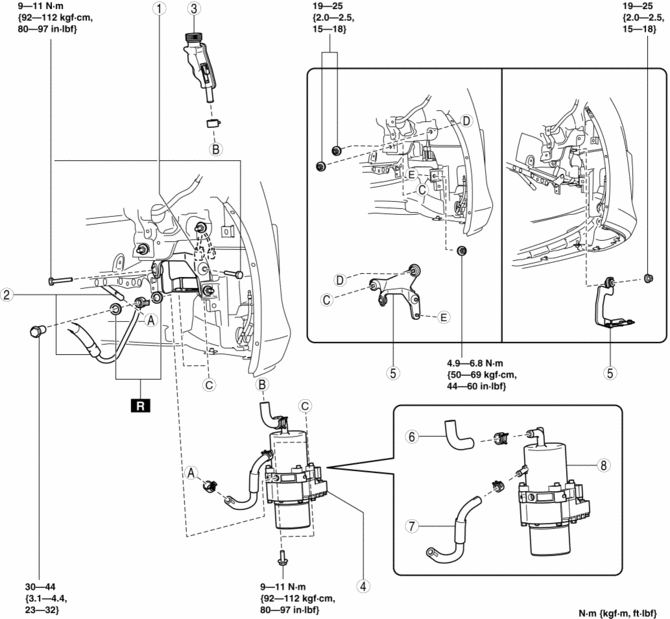
|
1 |
Connector (See Connector Removal Note.) |
|
2 |
Power steering pipe component (See Power Steering Pipe Component Removal Note.) |
|
3 |
Sub tank |
|
4 |
Electric power steering oil pump component (with hoses) |
|
5 |
Brackets |
|
6 |
Suction hose |
|
7 |
Return hose |
|
8 |
Electric power steering oil pump component |
Connector Removal Note
1. Before disconnecting the connector, clean the connector with a brush or cloth to remove foreign matter.
2. Disconnect the connector.
3. After removing the connector, install the cap included in the new pump kit package being careful that fluid or foreign matter does not penetrate the connector area of the control module.
NOTE:
-
If a new pump kit is not available, adhere protective tape to the connector.
Power Steering Pipe Component Removal Note
1. Disconnect the power steering pipe component and then drain the power steering fluid.
 Electric Power Steering Oil Pump Component Disassembly/Assembly
CAUTION:
The internal parts of the EHPAS control module and motor could be damaged
if they receive an impact. Be careful when handling the EHPAS control module
and motor to prevent the c ...
 Initial Learning [Fw6 A EL]
Introduction
If the control valve body and oil pressure switch are replaced, always perform
the initial learning. If the initial learning is not completed, engine rev-up
may occur or shif ...
Other materials:
Side Turn Light Inspection
Side turn light illumination inspection
1. Disconnect the negative battery cable..
2. Remove the outer mirror glass..
3. Remove the outer mirror garnish..
4. Remove the side turn light..
5. Connect the battery voltage as shown in the figure.
If the side turn light does illuminat ...
Gps Antenna Feeder Inspection
With Audio Unit (Without Display)
1. Verify that the continuity is as indicated in the table.
If not as indicated in the table, replace the GPS antenna feeder.
With Audio Unit (With Display)
NOTE:
GPS antenna feeder is integrated with the antenna feeder No.4.
1. ...
Battery
WARNING
Wash hands after handling the battery and related accessories:
Battery posts, terminals and related accessories contain lead and lead
compounds,
chemicals known to the State of California to cause cancer and
reproductive harm.
Read the following
precautions ...
