
Mazda 3 Service Manual: Windshield Removal
1. Disconnect the negative battery cable.
2. Remove the following parts:
a. Windshield wiper arm and blade.
b. Cowl grille.
c. Rain sensor (Vehicles with auto light/wiper system).
d. Auto-dimming mirror (Vehicles with auto-dimming mirror).
e. Rear view mirror (Vehicles without auto-dimming mirror).
f. A-pillar trim.
g. Sunvisor.
h. Assist handle.
3. Set the headliner out of the way.
4. Apply protective tape along the edge of the body.
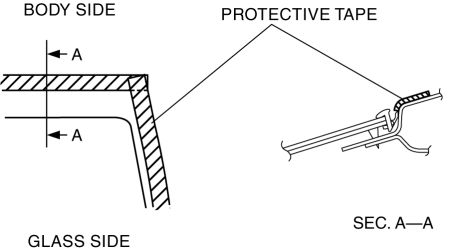
NOTE:
-
Overlap and adhere the protective tape to the corners to prevent damage.
5. Remove the windshield molding by pulling it outward.
NOTE:
-
If the windshield molding is difficult to remove, warm the windshield molding using a hot air blower.
-
The windshield molding is a replacement part.
Not Reusing Windshield
NOTE:
-
If it is difficult to cut sealant, use piano wire and follow the procedure under “Reusing Windshield”.
WARNING:
-
Using piano wire with bare hands can cause injury. Always wear gloves when using piano wire.
1. Cut out the sealant all around the glass using a sealant remover.
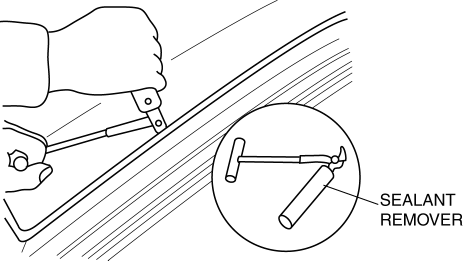
2. Remove the windshield.
Reusing Windshield
WARNING:
-
Using piano wire with bare hands can cause injury. Always wear gloves when using piano wire.
CAUTION:
-
Because the lens for rainfall/illumination level detection is integrated with the windshield, the auto wiper/auto light systems may not operate correctly if the lens is damaged. When removing the windshield, be careful not to damage the lens. If the lens is damaged, replace the windshield.
NOTE:
-
Before removing the windshield from the body, mark the position of the windshield by affixing tape to the windshield and body panel.
1. Avoiding the pin on the inside of the vehicle, insert piano wire which has been cut to sufficient length.
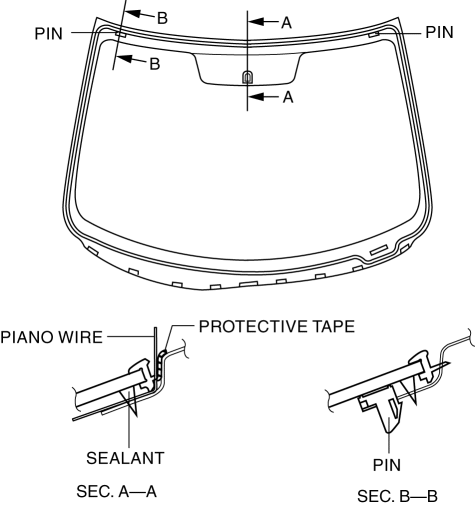
2. Wind each end of piano wire around a bar.
NOTE:
-
Use a long sawing action to spread the work over the whole length of piano wire to prevent it from breaking due to localized heating.
3. Secure one end of piano wire, and while pulling the other end, cut the sealant around the windshield.
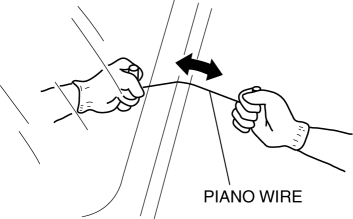
4. Pinch the pin from the inside of the vehicle and detach it.
5. Remove the windshield.
6. If the pin is damaged, remove the pin.
NOTE:
-
Before removing the pin from the windshield glass, place an alignment mark on the windshield.
 Windshield Installation
WARNING:
Using a utility knife with bare hands can cause injury. Always wear gloves
when using a utility knife.
CAUTION:
If a door is opened or closed when all the window glas ...
 Horn
Horn
...
Other materials:
Traction Control System (TCS)
The Traction Control System (TCS)
enhances traction and safety by controlling
engine torque and braking. When the TCS
detects driving wheel slippage, it lowers
engine torque and operates the brakes to
prevent loss of traction.
This means that on a slick surface, the
engine adjusts automatic ...
Warranties for Your Mazda
New Vehicle Limited Warranty
Powertrain Limited Warranty
Safety Restraint System Limited Warranty
Anti-perforation Limited Warranty
Federal Emission Control Warranty/California Emission Control Warranty
Emission Defect Warranty
Emission Performance Warranty
Emission Control ...
Auto Lock/Unlock Function
WARNING
Do not pull the inner handle on a front
door:
Pulling the inner handle on a front
door while the vehicle is moving
is dangerous. Passengers can fall
out of the vehicle if the door opens
accidentally , which could result in
death or serious injury.
When ...
