
Mazda 3 Service Manual: Wiper And Washer Switch Removal/Installation
1. Disconnect the negative battery cable..
2. Remove the column cover.
3. Disconnect the wiper and washer switch connector.
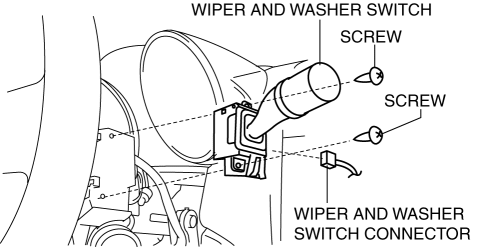
4. Remove the screws.
5. Remove the wiper and washer switch.
6. Install in the reverse order of removal.
 Rain Sensor Removal/Installation
1. Disconnect the negative battery cable..
2. Spread open the rain sensor cover in the direction of the arrows and disengage
tabs A to remove it.
3. Disconnect the rain sensor connector.
...
 Washers
...
Other materials:
Relay Inspection [Skyactiv G 2.0]
Relay Type
Connector type
Part name
Type A
Front fog light relay
Headlight relay (HI)
Headlight relay (LO)
Horn relay
TNS relay
A/C relay
Start ...
Recording of Vehicle Data
This vehicle is equipped with a computer which records the following main
vehicle data
related to vehicle controls, operation, and other driving conditions.
Recorded data
Vehicle conditions such as engine speed and vehicle speed
Driving operation conditions such as accelerator and brake pe ...
Rear Door Checker Removal/Installation
1. Fully close the rear door glass.
2. Disconnect the negative battery cable..
3. Remove the rear door trim..
4. Remove the rear door speaker..
5. Remove the bolt A.
6. Remove the bolts B.
7. Pull out the rear door checker from the rear door speaker installation hole.
8. Insta ...
