
Mazda 3 Service Manual: Accessory Socket Removal/Installation
Front
1. Disconnect the negative battery cable..
2. Remove the upper panel..
3. Remove the shift lever knob. (MTX).
4. Remove the selector lever knob. (ATX).
5. Remove the shift panel.
6. Remove in the order indicated in the table.
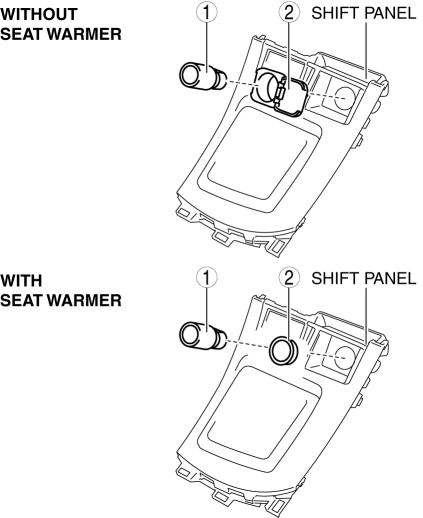
|
1 |
Socket (See Socket Removal Note.) |
|
2 |
Cap (See Cap Removal Note.) |
7. Install in the reverse order of removal.
Rear
1. Disconnect the negative battery cable..
2. Remove the following parts:
a. Upper panel.
b. Shift lever knob (MTX).
c. Selector lever knob (ATX).
d. Shift panel.
e. Side wall.
f. Console.
3. Remove in the order indicated in the table.
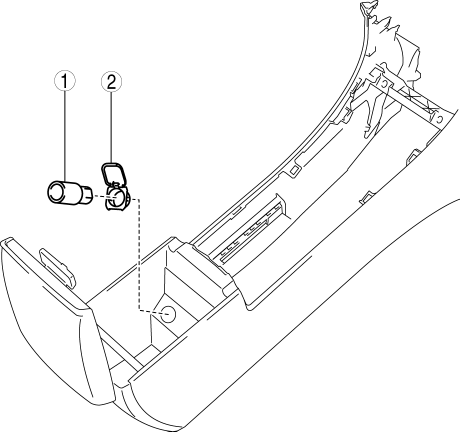
|
1 |
Socket (See Socket Removal Note.) |
|
2 |
Cap (See Cap Removal Note.) |
4. Install in the reverse order of removal.
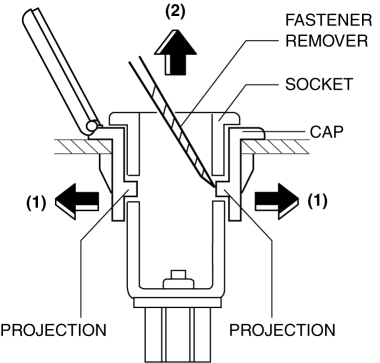
Socket Removal Note
1. Remove the socket in the direction of the arrow (2) shown in the figure while opening the caps in the direction of the arrow (1) using a tape-wrapped fastener remover.
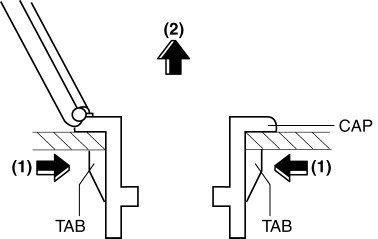
Cap Removal Note
1. Remove the cap in the direction of the arrow (2) shown in the figure while pressing the cap tabs in the direction of the arrow (1).
 Accessory Socket Inspection
Front
1. Disconnect the negative battery cable..
2. Remove the upper panel..
3. Remove the shift lever knob. (MTX).
4. Remove the selector lever knob. (ATX).
5. Remove the shift panel.
6. R ...
 Safety Systems
...
Other materials:
Glove Compartment Removal/Installation
CAUTION:
If the glove compartment is closed without being joined to the stay damper,
the stay damper may be damaged. Verify that the stay damper is joined to the
glove compartment before closing the glove compartment.
1. Pull the stay damper in the direction (1) shown in the figu ...
Rear Door Speaker Inspection
1. Disconnect the negative battery cable..
2. Remove the rear door trim..
3. Remove the rear door speaker..
4. Verify the resistance between the rear door speaker terminals.
If not within the specification, replace the rear door speaker.
Resistance
Without Bose ...
Front Door Latch And Lock Actuator Removal/Installation
1. To access the glass installation bolt, position the front door glass so that
the distance from the top of the front door glass to the upper part of the front
beltline molding is approx. 80 mm {3.1 in}.
2. Disconnect the negative battery cable..
3. Remove the following parts:
a. Inne ...
