
Mazda 3 Service Manual: Bass Box Removal/Installation
1. Disconnect the negative battery cable..
2. Disconnect the connector.
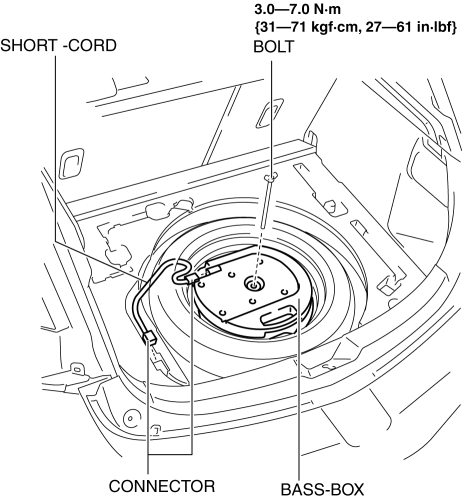
3. Remove the short-cord.
4. Remove the bolt.
5. Remove the bass-box.
6. Install in the reverse order of removal.
 Bass Box Inspection
1. Disconnect the negative battery cable..
2. Disconnect the connector..
3. Verify the resistance between bass-box terminals.
If not within the specification, replace the bass-box.
...
 Center Roof Antenna Inspection
4SD
1. Disconnect the negative battery cable..
2. Remove the rain sensor cover. (Vehicles with auto light/wiper system).
3. Disconnect the rain sensor connector. (Vehicles with auto light/wiper s ...
Other materials:
Trailer towing
SUBARU does not recommend using the Subaru Solterra for towing purposes.
The vehicle is not engineered to support trailer towing, nor is it suitable for
installing a tow hitch or carrying loads such as bicycles, wheelchairs, or scooters
on hitch-mounted carriers.
Dinghy towing
The Suba ...
Rear Tilt Motor Inspection
1. Remove the battery cover..
2. Disconnect the negative battery cable and wait 1 min or more..
3. Disconnect the rear tilt motor connector.
4. Apply battery positive voltage to the rear tilt motor terminals and inspect
the rear tilt motor operation
If not as specified, replace t ...
Lighting System Personalization Features Setting Procedure
Auto Light System
1. Connect the M-MDS (IDS) to the DLC-2.
2. After the vehicle is identified, select the following items from the initial
screen of the IDS.
Select the “Module Programming”
Select the “Programmable Parameters”.
Select menu in the Exterior Li ...
