
Mazda 3 Service Manual: Camshaft Position (CMP) Sensor Removal/Installation [Mzr 2.0, Mzr 2.5]
CAUTION:
-
When replacing the CMP sensor, make sure there is no foreign material on it such as metal shavings. If it is installed with foreign material, the sensor output signal will malfunction resulting from fluctuation in magnetic flux and cause a deterioration in engine control.
1. Remove the battery cover..
2. Disconnect the negative battery cable..
3. Remove the plug hole plate..
4. Disconnect the CMP sensor connector.
5. Remove the CMP sensor.
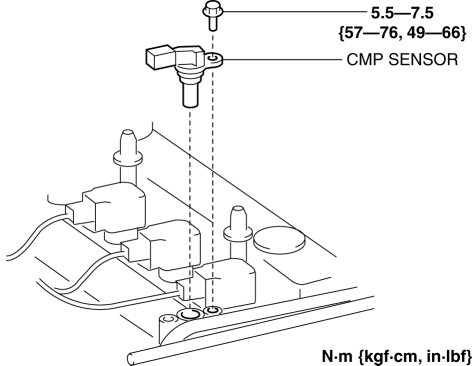
6. Install in the reverse order of removal.
 Camshaft Position (CMP) Sensor Inspection [Mzr 2.0, Mzr 2.5]
Visual Inspection
CAUTION:
When replacing the CMP sensor, make sure there is no foreign material on
it such as metal shavings. If it is installed with foreign material, the sensor
outpu ...
 Crankshaft Position (CKP) Sensor Inspection [Mzr 2.0, Mzr 2.5]
Visual Inspection
CAUTION:
When foreign material such as an iron chip is on the CKP sensor, it can cause
abnormal output from the sensor because of flux turbulence and adversely affect
...
Other materials:
Cruise Control
With cruise control, you can set and automatically maintain any speed of more
than about
25 km/h (16 mph).
WARNING
Do not use the cruise control under the following conditions:
Using the cruise control under the following conditions is dangerous and
could result in
loss of ve ...
Control Switches
Temperature control dial
This dial controls temperature. Turn it
clockwise for hot and counterclockwise
for cold.
NOTE
When the mode is set to or
with the
fan control dial in a position other than 0
and the temperature control dial in the
maximum cold position, the air intake
selector ...
Variance Between Actual Road Conditions and Displayed Image
Some variance occurs between the actual road and the displayed road. Such
variance in
distance perspective could lead to an accident. Note the following conditions
that may cause
a variance in distance perspective.
When the vehicle is tilted due to the weight of passengers and load
When the ...
