
Mazda 3 Service Manual: Crankshaft Position (CKP) Sensor Inspection [Mzr 2.0, Mzr 2.5]
Visual Inspection
CAUTION:
-
When foreign material such as an iron chip is on the CKP sensor, it can cause abnormal output from the sensor because of flux turbulence and adversely affect the engine control. Be sure there is no foreign material on the CKP sensor when replacing.
-
Do not assemble the CKP sensor or change the installation position using any method other than the following. Otherwise, it could negatively affect engine controls, such as the ignition timing and fuel injection.
1. Remove the battery cover..
2. Disconnect the negative battery cable..
3. Perform the following procedure for easier access.
a. Remove the aerodynamic under cover No.2..
b. Remove the front splash shield (RH)..
4. Disconnect the CKP sensor connector.
5. Remove the CKP sensor..
6. Verify that there are no metal shavings on the sensor.
-
If there is a malfunction, remove any metal shavings that are adhering.
Air Gap Inspection
1. Verify that the CKP sensor is securely installed..
2. Using a thickness gauge, measure the air gap between the plate projections at the back of crankshaft pulley and the CKP sensor.
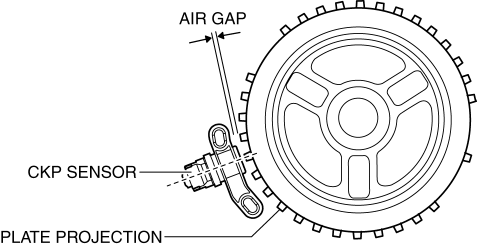
-
If not within the specification, inspect the plate projections for cracks or bending.
-
If there is any malfunction, replace the crankshaft pulley..
-
CKP sensor air gap
-
0.5—1.5 mm {0.02—0.05 in}
Voltage Inspection
CAUTION:
-
When foreign material such as an iron chip is on the CKP sensor, it can cause abnormal output from the sensor because of flux turbulence and adversely affect the engine control. Be sure there is no foreign material on the CKP sensor when replacing.
-
Do not assemble the CKP sensor or change the installation position using any method other than the following. Otherwise, it could negatively affect engine controls, such as the ignition timing and fuel injection.
-
If the wiring harnesses or waterproof connectors are damaged, water penetrating the connector will cause a sensor malfunction. To prevent this, be careful not to damage wiring harnesses or waterproof connectors.
1. Idle the engine.
2. Measure the CKP signal and verify that rectangular waves are produced..
-
If not as specified, replace the CKP sensor..
 Camshaft Position (CMP) Sensor Removal/Installation [Mzr 2.0, Mzr 2.5]
CAUTION:
When replacing the CMP sensor, make sure there is no foreign material on
it such as metal shavings. If it is installed with foreign material, the sensor
output signal will malfu ...
 Crankshaft Position (CKP) Sensor Removal/Installation [Mzr 2.0, Mzr 2.5]
Removal
CAUTION:
When foreign material such as an iron chip is on the CKP sensor, it can cause
abnormal output from the sensor because of flux turbulence and adversely affect
the engine ...
Other materials:
Transmitter
NOTE
(With theft-deterrent system)
The hazard warning lights flash when
the theft-deterrent system is armed or
turned off.
Refer to Theft-Deterrent System on .
(With the advanced keyless function)
A beep sound can be heard for
confirmation when the doors and the
l ...
Customer Assistance (U.S.A.)
Your complete and permanent satisfaction is our business. We are here to
serve you. All
Authorized Mazda Dealers have the knowledge and the tools to keep your Mazda
vehicle in
top condition.
If you have any questions or recommendations for improvement regarding the
service of
your Mazda ...
Engine Oil Level Inspection [Mzr 2.0, Mzr 2.5]
1. Position the vehicle on level ground.
2. Warm up the engine.
3. Stop the engine and allow at least 5 min before continuing.
4. Remove the dipstick, wipe it cleanly, and reinstall it fully.
5. Remove the dipstick and verify that the oil level is between the F and L marks
on the dipstick. ...
