
Mazda 3 Service Manual: Cargo Compartment Light Removal/Installation
1. Disconnect the negative battery cable..
2. Insert a tape-wrapped fastener remover into the service hole and pry with the screwdriver in the direction shown by the arrow to remove the cargo compartment light.
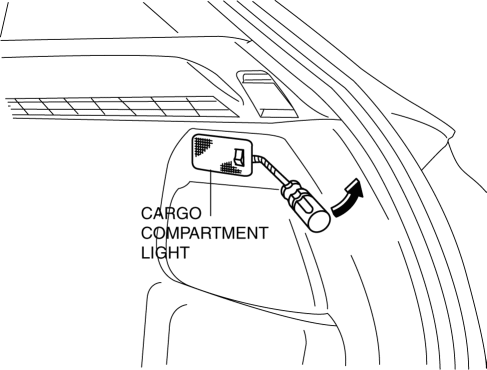
3. Disconnect the connector.
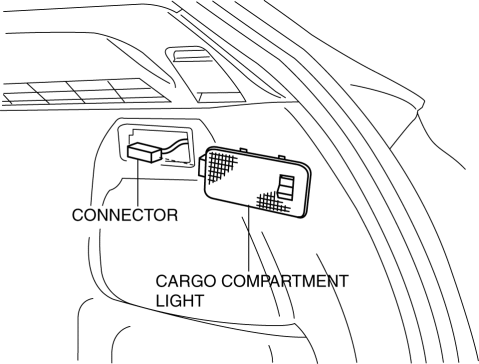
4. Remove the cargo compartment light.
5. Install in the reverse order of removal.
 Cargo Compartment Light Inspection
1. Disconnect the negative battery cable..
2. Remove the cargo compartment light..
3. Verify that the continuity between the cargo compartment light terminals is
as indicated in the table.
...
 Ignition Key Illumination Removal/Installation
1. Disconnect the negative battery cable..
2. Remove the column cover upper..
3. Remove the ignition key illumination bulb.
4. Install in the reverse order of removal. ...
Other materials:
On Board Diagnostic System PID/Data Monitor Inspection [Fw6 A EL]
1. Connect the M-MDS (IDS) to the DLC-2.
2. After the vehicle is identified, select the following items from the initialization
screen of the IDS.
a. Select “DataLogger”.
b. Select “Modules”.
c. Select “TCM”.
3. Select the applicable PID from the PID table.
4. Verify th ...
Seat Belt Precautions
Seat belts help to decrease the possibility of severe injury during accidents
and sudden
stops. Mazda recommends that the driver and all passengers always wear seat
belts.
(U.S.A. and Canada)
All of the seat belt retractors are designed to keep the lap/shoulder belts
out of the way when
no ...
DRL (Daytime Running Light) Bulb Removal/Installation
MZR 2.0, MZR 2.5, MZR 2.3 DISI Turbo
1. Disconnect the negative battery cable..
2. Disconnect the connector.
3. Rotate the DRL bulb in the direction of the arrow shown in the figure to remove
it.
4. Remove the DRL bulb.
5. Install in the reverse order of removal.
SKYACTIV-G 2.0
...
