
Mazda 3 Service Manual: Clock Spring Inspection [Two Step Deployment Control System]
1. Disconnect the negative battery cable..
2. Remove the driver–side air bag module..
3. Remove the steering wheel..
4. Remove the column cover.
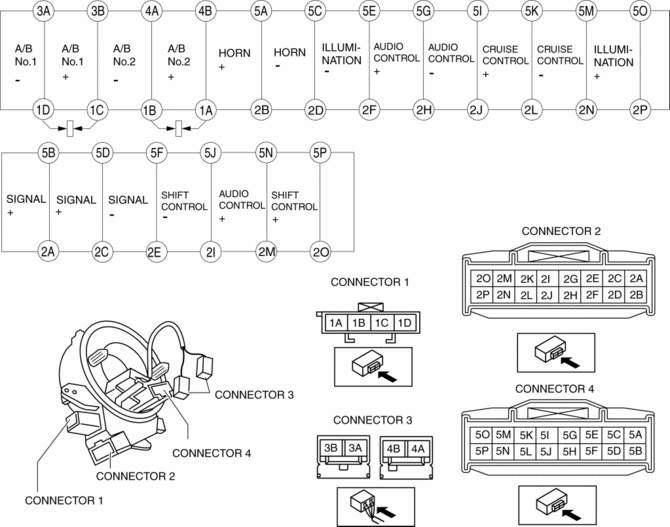
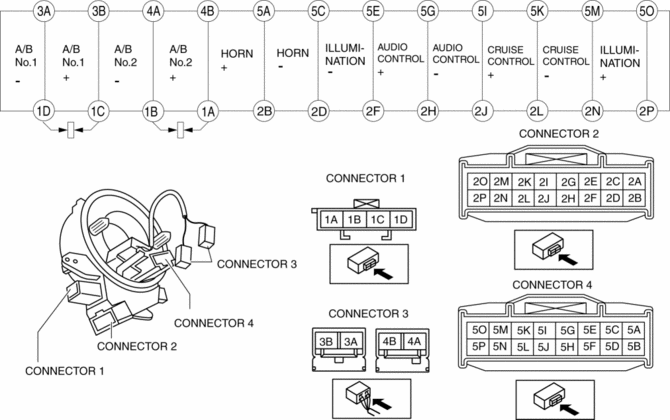
5. Remove the clock spring..
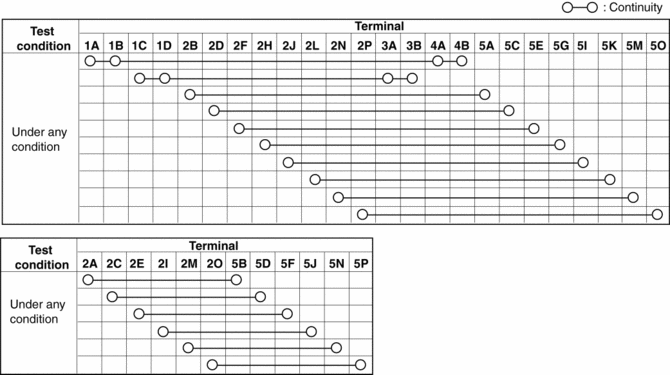
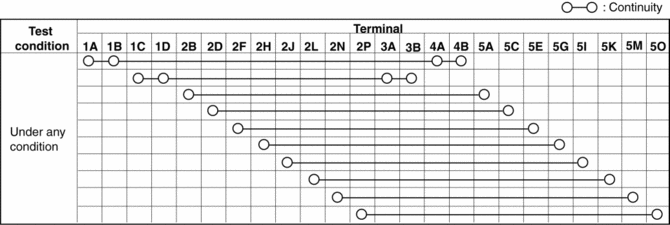
6. Verify that the continuity is as indicated in the table.
-
If not as indicated in the table, replace the clock spring.
NOTE:
-
When the vehicle-side connector for the clock spring is disconnected, terminals 1A, 1B, 1C and 1D are shorted to prevent unexpected operation (deployment) of the air bag module.
Vehicles with steering switch
Vehicles without steering switch
 Clock Spring Inspection [Standard Deployment Control System]
1. Disconnect the negative battery cable..
2. Remove the driver–side air bag module..
3. Remove the steering wheel..
4. Remove the column cover.
5. Remove the clock spring..
6. Verify that ...
 Control System Personalization Features Setting Procedure
1. Connect the M-MDS to the DLC-2.
2. After the vehicle is identified, select the following items from the initial
screen of the M-MDS.
When using the IDS (laptop PC)
Sele ...
Other materials:
Anchor Bracket
Anchor brackets for securing childrestraint
systems are equipped in the
vehicle. Locate each anchor position using
the illustration.
To install a child-restraint system,
always follow the instruction manual
accompanying the child-restraint system.
Anchor bracket location
Use the indicated ...
Engine Exhaust (Carbon monoxide)
WARNING
Do not drive your vehicle if you smell exhaust gas inside the
vehicle:
Engine exhaust gas is dangerous. This gas contains carbon monoxide (CO),
which is
colorless, odorless, and poisonous. When inhaled, it can cause loss of
consciousness and
death. If you smell ...
Clutch Disc Inspection [C66 M R]
Operation Inspection
1. Inspect the lining surface for discoloration and grease adhesion.
2. Inspect the torsion spring for weakness and the rivet for looseness.
3. Using a vernier caliper, measure the depth between the lining surface and
the rivet head.
Minimum clutch disc thickness ...
