
Mazda 3 Owners Manual: Schedule 1
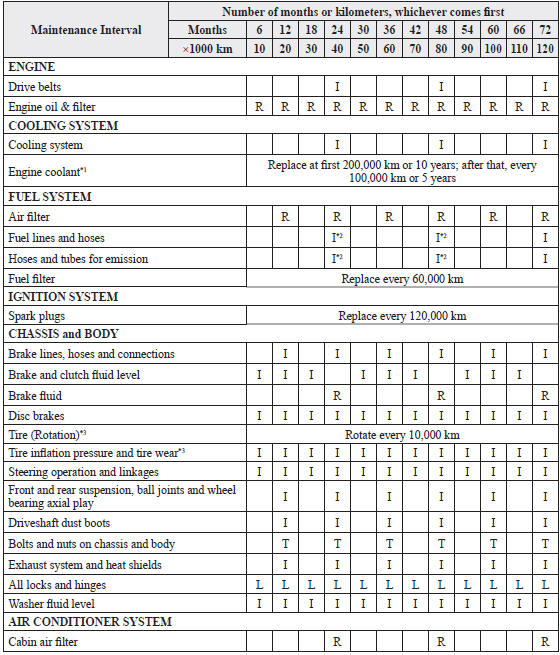
Chart symbols:
I: Inspect: Inspect and clean, repair, adjust, fill up, or replace if
necessary.
R: Replace
L : Lubricate
T: Tighten
Remarks:
*1 Use of FL-22 is recommended when replacing engine coolant. Using engine
coolant other than FL-22 may
cause serious damage to the engine and cooling system.
*2 According to state/provincial and federal regulations, failure to perform maintenance on these items will not void your emissions warranties. However, Mazda recommends that all maintenance services be performed at the recommended time or kilometer period to ensure long-term reliability.
*3 The Tire Pressure Monitoring System (TPMS) initialization must be performed so that the system operates normally (if equipped).
 Scheduled Maintenance (Mexico)
Follow Schedule 1 if the vehicle is operated mainly where none of the
following conditions
(severe driving conditions) apply.
Repeated short-distance driving
Driving in dusty conditions
Dri ...
 Schedule 2
Chart symbols:
I: Inspect: Inspect and clean, repair, adjust, fill up, or replace if
necessary.
R: Replace
L : Lubricate
C: Clean
T: Tighten
Remarks:
*1 Use of FL-22 is recommended when r ...
Other materials:
Variable Valve Timing Actuator Removal/Installation [Mzr 2.3 Disi Turbo]
WARNING:
Fuel vapor is hazardous. It can very easily ignite, causing serious injury
and damage. Always keep sparks and flames away from fuel.
Fuel line spills and leakage are dangerous. Fuel can ignite and cause serious
injuries or death and damage. Fuel can also irritate skin ...
Inside Trunk Release Lever
(4-Door)
Your vehicle is equipped with an inside
trunk release lever that provides a means
of escape for children and adults in the
event they become locked inside the trunk.
No matter how careful adults might be
with keys and locking their cars, parents
should be aware that children may be
tempted ...
Slide Motor Inspection
1. Remove the battery cover..
2. Disconnect the negative battery cable and wait 1 min or more..
3. Disconnect the slide motor connector.
4. Apply battery positive voltage to the slide motor terminals and inspect the
slide motor operation
If not as specified, replace the front sea ...
