
Mazda 3 Service Manual: Clutch Fluid Replacement/Air Bleeding [C66 M R]
CAUTION:
-
Do not allow clutch fluid get on a painted surface. Clutch fluid contains properties which can dissolve the paint. If clutch fluid gets on a painted surface, wash it off with water immediately and wipe the area off completely.
-
Do not mix different types of clutch fluid, otherwise the clutch may not operate normally.
-
Do not reuse old clutch fluid, otherwise the clutch may not operate normally.
NOTE:
-
A common reserve tank is used for the clutch system and brake system.
1. Remove the aerodynamic under cover No.2..
2. Drain the clutch fluid from bleeder screw.
3. Add new clutch fluid to the MAX mark of the reserve tank.
-
Clutch fluid
-
SAE J1703 or FMVSS116 DOT-3
4. Bleed the air from the clutch system.
CAUTION:
-
Keep the clutch fluid level in the reserve tank at 3/4 full or more during air bleeding.
a. Connect a vinyl tube to the bleeder screw.
b. Place the other end of the vinyl tube in a clear container, and fill clutch fluid in the container during air bleeding.
c. Working with two people, one loosens the bleeder screw.
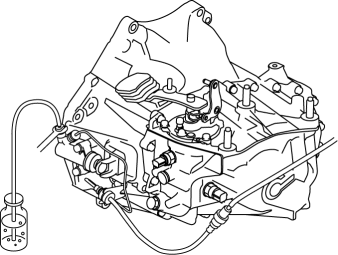
d. The other person depresses the clutch pedal to full stroke taking approx. 3 s or more, and then holding the pedal depressed.
e. After waiting approx. 5 s or more, tighten the bleeder screw.
f. Return the clutch pedal slowly taking 3 s or more while suppressing the spring force.
g. Wait approx. 5 s or more.
h. Continue to perform air bleeding (Steps (3) - (7)) until no air comes from the vinyl tube.
i. Fill the reserve tank to MAX mark with the clutch fluid.
-
Clutch fluid
-
SAE J1703 or FMVSS116 DOT-3
5. Install the aerodynamic under cover No.2..
 Clutch Fluid Leakage Inspection [C66 M R]
CAUTION:
Do not allow clutch fluid get on a painted surface. Clutch fluid contains
properties which can dissolve the paint. If clutch fluid gets on a painted surface,
wash it off with wa ...
 Clutch Master Cylinder Removal/Installation [C66 M R]
CAUTION:
Secure the steering wheel using tape or a cable to prevent the steering shaft
from rotating after disconnecting the steering shaft. If the steering wheel
rotates after the steer ...
Other materials:
Battery Recharging [Skyactiv G 2.0]
Using GR8-1291:
(See GR8-1291 INSTANT TRAINING MODULE (VIDEO) .)
WARNING:
Keep all flames away from the battery, otherwise evaporated gas from the
battery fluid may catch fire and cause serious injury.
1. Remove the battery filler caps and check the water level. If necessary, add ...
Fastening the Seat Belt
Pull the seat belt tongue to the desired
length.
Insert it into the seat belt buckle until
you hear a click sound.
Adjust the belt length.
To lengthen the belt, hold the seat belt
tongue at a right angle to the webbing
and pull. To shorten, pull the loose end
of the webbin ...
Electric Vehicle system features
The Subaru Solterra represents a new generation of mobility, where
battery electric vehicle technology significantly differs from traditional gasoline-powered
vehicles in both operation and driving experience.
Instead of relying on internal combustion, the Subaru Solterra uses
energy stored i ...
