
Mazda 3 Service Manual: Clutch Release Cylinder Removal/Installation [C66 M R]
CAUTION:
-
Do not allow clutch fluid get on a painted surface. Clutch fluid contains properties which can dissolve the paint. If clutch fluid gets on a painted surface, wash it off with water immediately and wipe the area off completely.
1. Remove the aerodynamic under cover No.2..
2. Disconnect the clutch pipe and hose No.2 from clutch release cylinder, and plug it to avoid clutch fluid leakage..
3. Remove the clutch release cylinder.
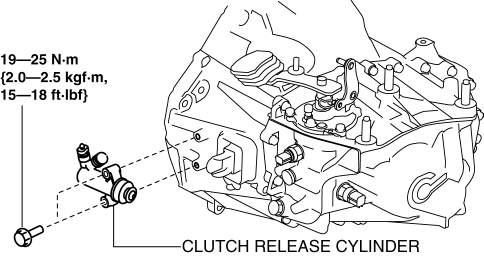
4. Install in the reverse order of removal.
5. Bleed the air from the clutch system..
 Clutch Release Collar Inspection [C66 M R]
CAUTION:
Do not clean the clutch release collar with cleaning fluids or a steam cleaner
because it is filled with grease.
Operation Inspection
1. Turn the collar while applying force ...
 Clutch Unit Removal/Installation [C66 M R]
1. Remove the battery cover..
2. Disconnect the negative battery cable..
3. Remove the aerodynamic under cover No.2 and the splash shield as a single
unit..
4. Drain the manual transaxle oil.. ...
Other materials:
Side Step Molding Installation
NOTE:
Double-sided adhesive tape has already been adhered to a new side step molding
for installation.
When a side step molding is to be reused, perform the following procedure:
1. Remove any grease or dirt from the affixing surface of the side step molding.
2. Affix double-si ...
Rear Door Hinge Removal/Installation
1. Disconnect the negative battery cable..
2. Remove the following parts:
a. Rear door.
b. Front scuff plate.
c. Rear scuff plate.
d. B-pillar lower trim.
3. Remove in the order indicated in the table.
1
Bolt
2
Nut
...
Blind Spot Monitoring (Bsm) Off Switch Removal/Installation
1. Disconnect the negative battery cable..
2. Remove the switch panel in the direction of the arrow shown in the figure.
3. Disconnect the connector.
4. Remove the BSM OFF switch in the direction of the arrow (2) shown in the figure
while pressing the tabs in the direction of the arrow ...
