
Mazda 3 Service Manual: Cowl Panel Removal/Installation
1. Disconnect th negative battery cable..
2. Remove the windshield wiper arm and blade..
3. Remove the front fender molding..
4. Remove the cowl grille..
5. Remove the washer hose grommet from the cowl panel and disconnect the front washer hose.
6. Remove the windshield wiper motor..
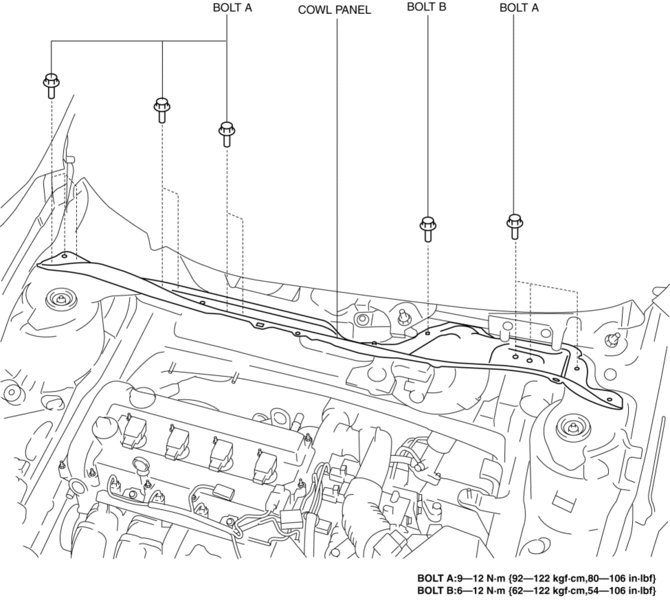
7. Remove the bolts A and bolt B.
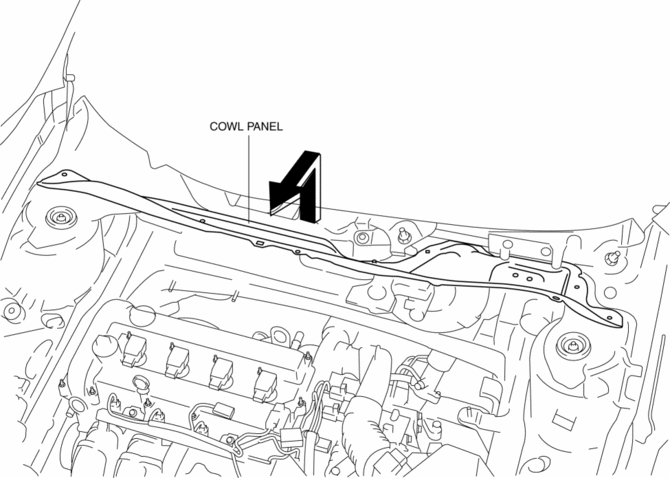
8. Remove the cowl panel in the direction of the arrow shown in the figure.
9. Install in the reverse order of removal.
 Cowl Grille Removal/Installation
1. Remove the windshield wiper arm and blade..
2. Remove the fastener A.
3. Pull the front fender molding in the direction of the arrow shown in the figure
and remove it while remove the tab B a ...
 Energy Absorbing Form Removal/Installation
1. Disconnect the negative battery cable..
2. Remove the rear combination light..
3. Remove the rear bumper..
4. Remove the fasteners.
5. Remove the rear energy-absorbing form.
6. Instal ...
Other materials:
Clutch Pedal Position Switch Removal/Installation [C66 M R]
1. Remove the battery cover..
2. Disconnect the negative battery cable..
3. Disconnect the clutch pedal position switch connector.
4. Remove the clutch pedal position switch from the pedal bracket.
5. Insert a new clutch pedal position switch into the pedal bracket hole until
the switc ...
Camshaft Position (CMP) Sensor Inspection [Mzr 2.0, Mzr 2.5]
Visual Inspection
CAUTION:
When replacing the CMP sensor, make sure there is no foreign material on
it such as metal shavings. If it is installed with foreign material, the sensor
output signal will malfunction resulting from fluctuation in magnetic flux and
cause a deterioration i ...
Turning the Engine Off
WARNING
Do not stop the engine while the vehicle
is moving:
Stopping the engine while the vehicle
is moving for any reason other than in
an emergency is dangerous. Stopping
the engine while the vehicle is moving
will result in reduced braking ability
due to the loss of ...
