
Mazda 3 Service Manual: Disc Pad (Front) Replacement [Mzr 2.3 Disi Turbo]
1. Remove in the order indicated in the table.
2. Install in the reverse order of removal.
3. After installation, pump the brake pedal a few times and verify that the brakes do not drag.
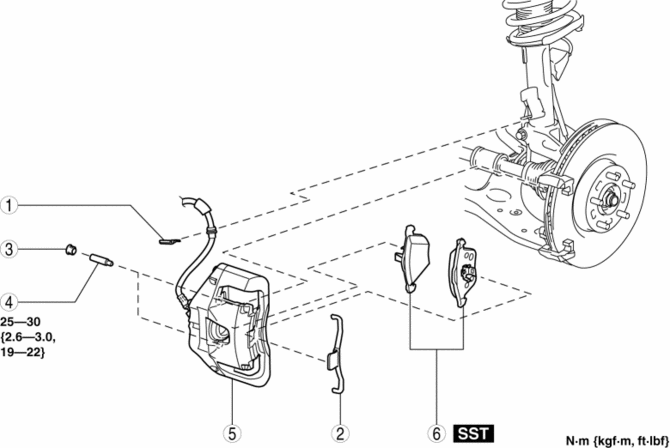
|
1 |
Clip |
|
2 |
Retaining clip (See FRONT BRAKE (DISC) REMOVAL/INSTALLATION [MZR 2.3 DISI Turbo].) |
|
3 |
Cap |
|
4 |
Bolt |
|
5 |
Caliper |
|
6 |
Disc pad (See FRONT BRAKE (DISC) REMOVAL/INSTALLATION [MZR 2.3 DISI Turbo].) |
 Disc Pad (Front) Replacement [Mzr 2.0, Skyactiv G 2.0, Mzr 2.5]
1. Remove in the order indicated in the table.
2. Install in the reverse order of removal.
3. After installation, pump the brake pedal a few times and verify that the brakes
do not drag.
...
 Disc Pad (Rear) Replacement
1. Remove in the order indicated in the table.
2. Install in the reverse order of removal.
3. After installation, pump the brake pedal a few times and inspect the following:
Parking brake ...
Other materials:
Assist Handle Removal/Installation
Assist Handle Removal
1. Insert a flathead screwdriver into the service hole and remove the assist
handle covers.
2. Remove the assist handle in the direction of the arrow (1) and (2), while
detach the clip.
NOTE:
Remove the assist handle by shaking it up and down.
Ass ...
How to Use the Bluetooth ® Audio
System
Switching to Bluetooth ® audio mode
To listen to music or voice audio recorded
to a Bluetooth ® audio device, switch to
the Bluetooth ® audio mode to operate
the audio device using the audio system
control panel. Any Bluetooth ® audio
device must be paired to the vehicle's
Bluetooth ® un ...
PCS (Pre-Collision System)
In the Subaru Solterra, the Pre-Collision System (PCS) utilizes advanced
sensors and monitoring technology to continuously scan the road ahead. When the
system detects a potential obstacle and determines that the likelihood of a frontal
collision is increasing, it first alerts the driver and e ...
