
Mazda 3 Service Manual: Drive Shaft Inspection
1. Inspect the connections for any looseness.
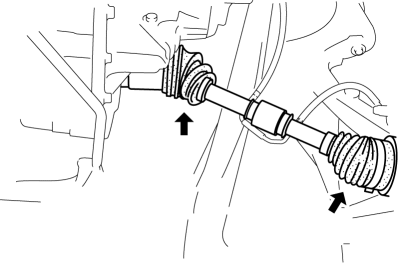
-
If there is any malfunction, tighten or replace the applicable part.
2. Inspect the dust boot for damage and cracks.
-
If there is any malfunction, replace the applicable part.
3. Move the spline and joint up and down, left and right by hand and verify that there is no excessive play.
-
If there is any malfunction, replace the applicable part.
 Drive Shaft (Tripod Joint) Disassembly/Assembly
1. Disassemble in the order indicated in the table.
2. Assemble in the reverse order of disassembly.
1
Boot band (transaxle side)
(See Boot Band (Transaxle Side) Dis ...
 Drive Shaft Removal/Installation
CAUTION:
Performing the following procedures without first removing the ABS wheel-speed
sensor may possibly cause an open circuit in the wiring harness if it is pulled
by mistake. Before ...
Other materials:
Side Turn Light Removal/Installation
1. Disconnect the negative battery cable..
2. Remove the outer mirror glass..
3. Remove the outer mirror garnish..
4. Remove the screw.
5. Disconnect the connector.
6. Remove the side turn light while detaching tab.
CAUTION:
If the tabs of the side turn light are detached, th ...
Automatic Transaxle Fluid (ATF) Inspection [Fw6 A EL]
CAUTION:
If the ATF level is not within the specification or ATF is not adhering to
the dipstick after warming up the engine, do not drive the vehicle. Otherwise,
the transaxle could be damaged.
ATF Level Inspection
1. Remove aerodynamic undercover No.2..
2. Remove the dipstic ...
Transaxle Oil Replacement [A26 M R]
1. Park the vehicle on level ground.
2. Remove the aerodynamic under cover No.2..
3. Remove the drain plug and gasket.
4. Drain the oil into a suitable container.
5. Install a new gasket and the drain plug.
Tightening torque
28—51 N·m {2.9—5.2 kgf·m, 21—37 ft·lbf}
...
