
Mazda 3 Service Manual: DSC Off Switch Inspection
1. Remove the DSC OFF switch..
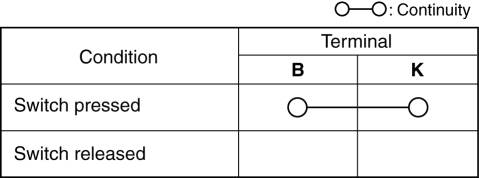
2. Verify that the continuity between the DSC OFF switch terminals is as indicated in the table.
-
If not as indicated in the table, replace the DSC OFF switch.
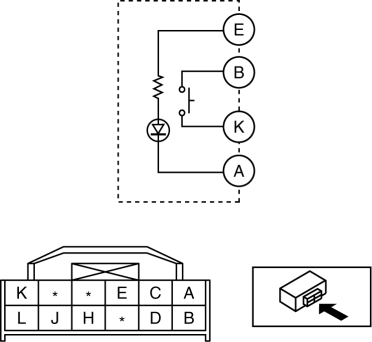
3. Apply battery voltage to DSC OFF switch terminal E, and connect terminal A to ground.
4. Verify that the LED illuminates.
-
If there is any malfunction, replace the DSC OFF switch.
 DSC HU/CM Removal/Installation
WARNING:
If the DSC HU/CM configuration is not completed, it could result in an unexpected
accident due to the DSC being inoperative. If the DSC HU/CM is replaced, always
use the automat ...
 DSC Off Switch Removal/Installation
1. Remove the switch panel in the direction of the arrow shown in the figure.
2. Disconnect the connector.
3. Remove the DSC OFF switch in the direction of the arrow (2) shown in the figure
...
Other materials:
Center Roof Antenna Removal/Installation
4SD
1. Disconnect the negative battery cable..
2. Remove the rain sensor cover. (Vehicles with auto light/wiper system).
3. Disconnect the rain sensor connector. (Vehicles with auto light/wiper system)
4. Partially peel back the seaming welts.
5. Remove the following parts:
a. Sunroof se ...
Clutch Disc Inspection [C66 M R]
Operation Inspection
1. Inspect the lining surface for discoloration and grease adhesion.
2. Inspect the torsion spring for weakness and the rivet for looseness.
3. Using a vernier caliper, measure the depth between the lining surface and
the rivet head.
Minimum clutch disc thickness ...
Operation of Automatic Air
Conditioning
Press the AUTO switch. Selection
of the airflow mode, air intake
selector and amount of airflow will be
automatically controlled.
Use the temperature control dial to
select a desired temperature.
Press the DUAL switch or turn the
front passenger temperature control
dial to control ...
