
Mazda 3 Service Manual: DSC Off Switch Removal/Installation
1. Remove the switch panel in the direction of the arrow shown in the figure.
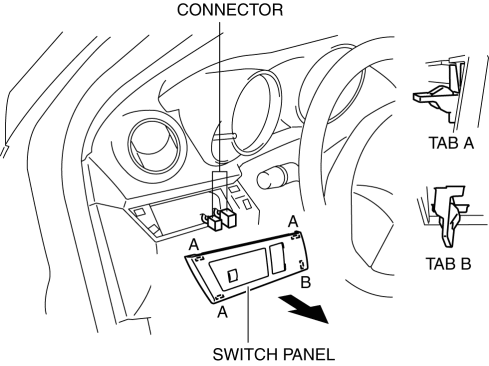
2. Disconnect the connector.
3. Remove the DSC OFF switch in the direction of the arrow (2) shown in the figure while pressing the tabs in the direction of the arrow (1).
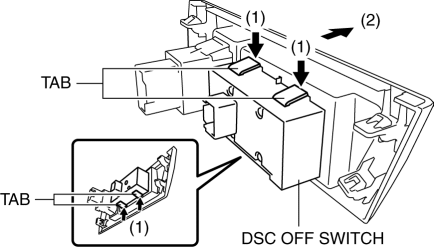
4. Remove the DSC OFF switch.
5. Install in the reverse order of removal.
 DSC Off Switch Inspection
1. Remove the DSC OFF switch..
2. Verify that the continuity between the DSC OFF switch terminals is as indicated
in the table.
If not as indicated in the table, replace the DSC OFF switch ...
 DSC Sensor Initialization Procedure
WARNING:
If the DSC sensor initialization procedure is not completed, the DSC will
not operate properly and it might cause an unexpected accident. Therefore, after
replacing or removing ...
Other materials:
Starter Interlock Switch Inspection [Mzr 2.0, Mzr 2.5]
CAUTION:
Do not reuse the starter interlock switch if it is removed from the vehicle
even once. Replace with a new starter interlock switch when installing.
1. Remove the battery cover..
2. Disconnect the negative battery cable..
3. Disconnect the starter interlock switch connec ...
Seat Belt Inspection
Belt
1. Verify that the belt is installed properly with no twists or kinks.
2. Verify that there is no damage to the seat belt and no deformation of the
metal fittings.
If there is any malfunction, replace the seat belt.
ELR
Except 5HB (rear center seat belt)
1. Verify tha ...
Ignition Switch Inspection [Without Advanced Keyless Entry And Push Button Start
System]
1. Disconnect the negative battery cable..
2. Remove the column cover..
3. Remove the ignition switch..
4. Verify that the continuity between the ignition switch terminals is as indicated
in the table.
If not as indicated in the table, replace the ignition switch.
...
