
Mazda 3 Service Manual: Electro Hydraulic Power Assist Steering (EHPAS) Control Module Inspection
Terminal Voltage Table (Reference)
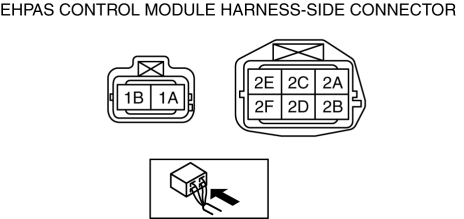
|
Terminal |
Signal name |
Connected to |
Measured item |
Measured terminal (measured condition) |
Standard |
Inspection item(s) |
|
1A |
Ground |
Ground point |
Voltage |
Under any condition |
1 V or less |
|
|
1B |
Battery power supply |
Battery |
Voltage |
Under any condition |
B+ |
|
|
2A |
— |
— |
— |
— |
— |
— |
|
2B |
CAN_L |
— |
Inspect under DTC inspection. |
— |
||
|
2C |
— |
— |
— |
— |
— |
— |
|
2D |
CAN_H |
— |
Inspect under DTC inspection. |
— |
||
|
2E |
— |
— |
— |
— |
— |
— |
|
2F |
Ignition power supply |
Ignition switch or IG1 relay |
Voltage |
Switch the ignition to ON |
B+ |
|
|
Switch the ignition to off |
1 V or less |
|||||
 Electro Hydraulic Power Assist Steering (EHPAS) Control Module Configuration
CAUTION:
If the EHPAS CM configuration is not completed, the EHPAS will not operate
properly. If the EHPAS CM is replaced, always carry out the EHPAS CM configuration
so that the EHPAS o ...
 Oil Control Valve (OCV) Inspection [Mzr 2.0, Mzr 2.5]
Coil Resistance Inspection
1. Remove the battery cover..
2. Disconnect the negative battery cable..
3. Remove the plug hole plate..
4. Disconnect the OCV connector.
5. Measure the resistance ...
Other materials:
Electric Power Steering Oil Pump Component Removal/Installation
CAUTION:
Be careful not to drop the electric power steering oil pump component as
the internal parts of the EHPAS CM could be damaged. Replace the electric power
steering oil pump component if it is subjected to an impact.
1. Remove the front mudguard (RH)..
2. Remove the aerod ...
Antilock Brake System (ABS)
The ABS control unit continuously
monitors the speed of each wheel. If
one wheel is about to lock up, the ABS
responds by automatically releasing and
reapplying that wheel's brake.
The driver will feel a slight vibration in
the brake pedal and may hear a chattering
noise from the brake syst ...
Disc Pad (Front) Replacement [Mzr 2.0, Skyactiv G 2.0, Mzr 2.5]
1. Remove in the order indicated in the table.
2. Install in the reverse order of removal.
3. After installation, pump the brake pedal a few times and verify that the brakes
do not drag.
1
Clip
2
Retaining clip
(See FRONT BRAKE (DISC ...
