
Mazda 3 Service Manual: Extractor Chamber Removal/Installation
1. Disconnect the negative battery cable..
2. Remove the rear combination light..
3. Remove the rear bumper..
4. Remove the clips.
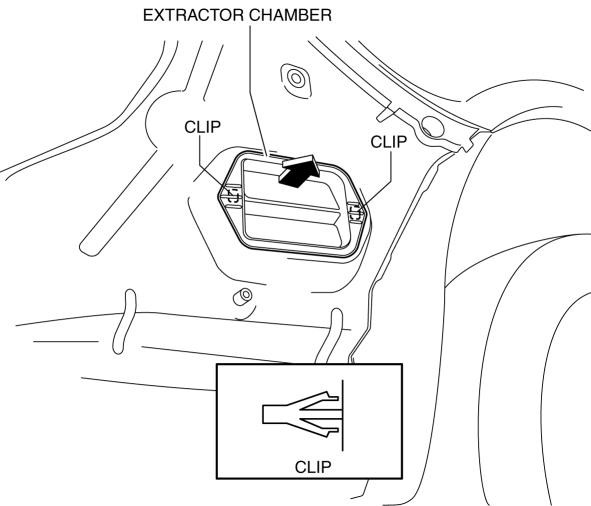
5. Install in the reverse order of removal.
 Energy Absorbing Form Removal/Installation
1. Disconnect the negative battery cable..
2. Remove the rear combination light..
3. Remove the rear bumper..
4. Remove the fasteners.
5. Remove the rear energy-absorbing form.
6. Instal ...
 Floor Under Cover Removal/Installation
1. Lift up the vehicle.
2. Remove the cap nuts.
3. Remove the nus.
4. Pull the floor under covers in the direction of arrow (1), (2), (3) shown
in the figure, and then remove it.
5. ...
Other materials:
Owner Maintenance Precautions
The owner or a qualified service technician should make these vehicle
inspections at the
indicated intervals to ensure safe and dependable operation.
Bring any problem to the attention of an Authorized Mazda Dealer or qualified
service
technician as soon as possible.
When Refueling
Bra ...
Manual Transaxle Oil Replacement [C66 M R]
1. Park the vehicle on level ground.
2. Remove the aerodynamic under cover No.2..
3. Remove the drain plug and gasket, and drain the manual transaxle oil.
4. Install a new gasket and the drain plug.
Tightening torque
39—59 N·m {4.0—6.0 kgf·m, 29—43 ft·lbf}
5. Remov ...
Rear Door Speaker Removal/Installation
1. Disconnect the negative battery cable..
2. Remove the rear door trim..
3. Disconnect the connector.
Without Bose®
With Bose®
4. Remove the screw.
5. Remove the rear door speaker in the direction of the arrow shown in the figure.
Without Bose®
With Bose®
6. Insta ...
