
Mazda 3 Service Manual: Front ABS Wheel Speed Sensor Removal/Installation
1. Remove in the order indicated in the table.
2. Install in the reverse order of removal.
3. After installation, verify that there is no twisting in the front ABS wheel-speed sensor.
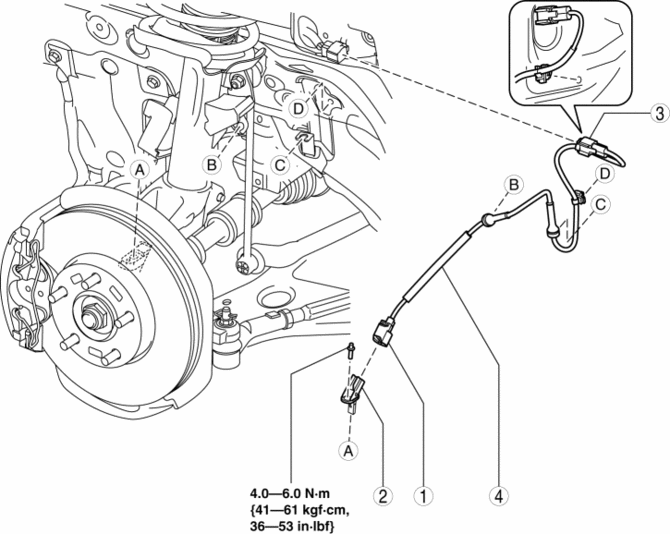
|
1 |
Connector |
|
2 |
Front ABS wheel-speed sensor |
|
3 |
Connector (See Connector Removal Note.) |
|
4 |
Front ABS wheel-speed sensor wiring harness |
Connector Removal Note
1. Pull aside the mudguard and disconnect the connector.
 Front ABS Wheel Speed Sensor Inspection
Sensor Output Value Inspection
CAUTION:
Resistance inspection using other testers may cause damage to the ABS wheel-speed
sensor internal circuit. Be sure to use the M-MDS to inspect the A ...
 Precaution [ABS]
1. Any one or a combination of the ABS warning and brake system warning lights
illuminates even when the system is normal.
Warning lights that may illuminate and/or flash
...
Other materials:
Brake Hose (Front) Removal/Installation [Mzr 2.0, Skyactiv G 2.0, Mzr 2.5]
1. Remove in the order indicated in the table.
2. Install in the reverse order of removal.
3. Add brake fluid, bleed the brakes, and inspect for leakage after the installation
has been completed..
1
Brake pipe
2
Clip
3
...
Wheel Hub, Steering Knuckle Disassembly/Assembly
1. Disassemble in the order indicated in the table.
1
Dust Cover
2
Wheel hub component
.
3
Retaining clip
4
Wheel bearing
(See Wheel Bearing Removal Note.)
(See Wheel Bearing In ...
Manual Transaxle Oil Inspection [C66 M R]
1. Park the vehicle on level ground.
2. Remove the aerodynamic under cover No.2..
3. Remove the oil level plug and gasket.
Tightening torque
39—59 N·m {4.0—6.0 kgf·m, 29—43 ft·lbf}
4. Verify that the manual transaxle oil is near the brim of the plug port.
Wh ...
