
Mazda 3 Service Manual: Tweeter Inspection
1. Disconnect the negative battery cable..
2. Remove the inner garnish..
3. Remove the tweeter..
4. Verify the resistance between tweeter terminals.
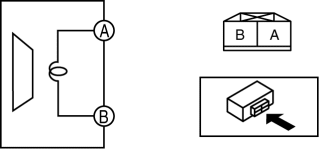
-
If not within the specification, replace the tweeter.
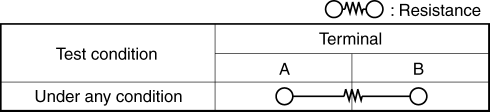
-
Resistance
-
Without Bose®: 3.4—4.6 ohms
-
With Bose®: 3.06—3.74 ohms
 Supplier Identification Procedure [Audio]
Identification Using the Label or Inscribed Lettering
1. Disconnect the negative battery cable..
2. Remove the center panel..
3. Remove the audio unit..
4. Verify the supplier by referring to t ...
 Tweeter Removal/Installation
1. Disconnect the negative battery cable..
2. Remove the inner garnish..
3. Remove the tweeter in the direction of the arrow shown in the figure.
4. Install in the reverse order of removal. ...
Other materials:
Cleaning the Window Interiors
If the windows become covered with an
oily, greasy, or waxy film, clean them with
glass cleaner. Follow the directions on the
container.
CAUTION
Do not scrape or scratch the inside of
the window glass. It could damage the
thermal fi laments and the antenna lines.
When wash ...
Front ABS Wheel Speed Sensor Inspection
Sensor Output Value Inspection
CAUTION:
Resistance inspection using other testers may cause damage to the ABS wheel-speed
sensor internal circuit. Be sure to use the M-MDS to inspect the ABS wheel-speed
sensor.
1. Switch the ignition to off.
2. Connect the M-MDS to the DLC-2. ...
Cruise Control Set Vehicle Speed Display
The vehicle speed preset using the cruise
control is displayed.
Trip Computer and INFO Switch
The following information can be selected
by pressing the up or down
part of the
INFO switch with the ignition switched
ON.
Approximate distance you can travel on
the available fuel
Ave ...
