
Mazda 3 Service Manual: Input/Turbine Speed Sensor Removal/Installation [FS5 A EL]
CAUTION:
-
Always use a new bolt. If the removed input/turbine speed sensor installation bolt is reused, it may cause oil leakage.
-
A sealant coating is applied to the input/turbine speed sensor installation bolt to prevent oil leakage from the installation bolt hole which passes through the component.
1. Perform the following procedures.
a. Remove the battery cover..
b. Disconnect the negative battery cable.
c. Remove the air cleaner component..
2. Remove in the order indicated in the table.
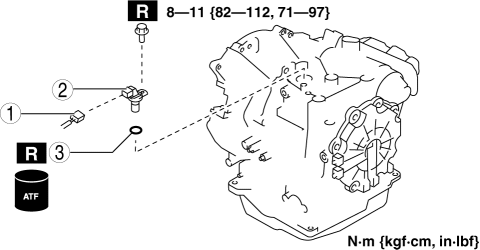
|
1 |
Connector |
|
2 |
Input/turbine speed sensor |
|
3 |
O-ring |
3. Install in the reverse order of removal.
 Input/Turbine Speed Sensor Inspection [FS5 A EL]
CAUTION:
Water or foreign objects entering the connector can cause a poor connection
or corrosion. Be sure not to drop water or foreign objects on the connector
when disconnecting it.
...
 Turbocharger Inspection [Mzr 2.3 Disi Turbo]
Compressor Wheel Inspection
1. Remove the turbocharger..
2. Visually inspect the compressor wheel from view A for the cracks, damage,
or bending on all the compressor wheel blades.
If ...
Other materials:
Sirius Satellite Radio Antenna Feeder Removal/Installation
SIRIUS Satellite Radio Antenna Feeder No.1
NOTE:
SIRIUS satellite radio antenna feeder No.1 is integrated with the dashboard
wiring harness.
1. Refer to DASHBOARD DISASSEMBLY/ASSEMBLY.
SIRIUS Satellite Radio Antenna Feeder No.2
NOTE:
SIRIUS satellite radio antenna feeder ...
X-MODE
The Subaru Solterra X-MODE system is engineered to significantly
enhance off-road stability, traction, and control, allowing the vehicle to confidently
handle challenging terrains beyond standard road conditions.
Within the Subaru Solterra, the driver can choose between two specialized drivin ...
Variable Intake Air Solenoid Valve Inspection [Mzr 2.0, Mzr 2.5]
Airflow Inspection
1. Remove the battery cover..
2. Disconnect the negative battery cable..
3. Remove the variable intake air solenoid valve..
4. Inspect airflow between the ports under the following conditions.
If not as specified, replace the variable intake air solenoid val ...
