
Mazda 3 Service Manual: Front Bumper Reinforcement Removal/Installation
1. Disconnect the negative battery cable..
2. Remove the following parts:
a. Front bumper.
b. Seal plate.
3. Remove the bolts A.
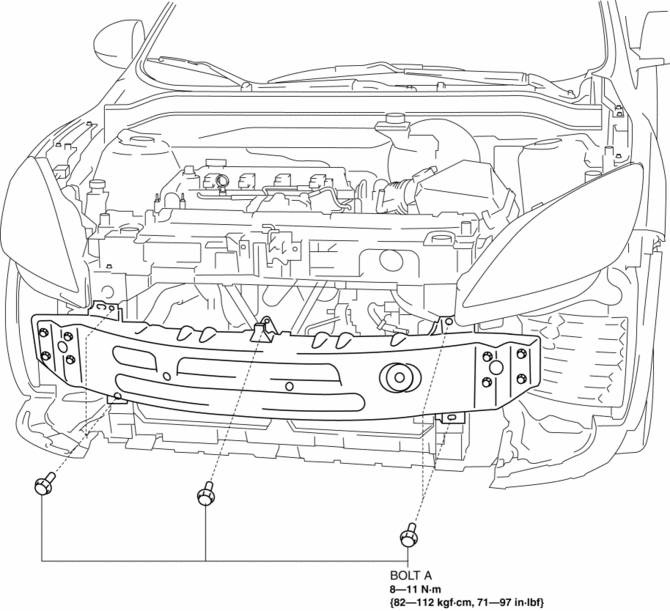
4. Remove the bolts B.
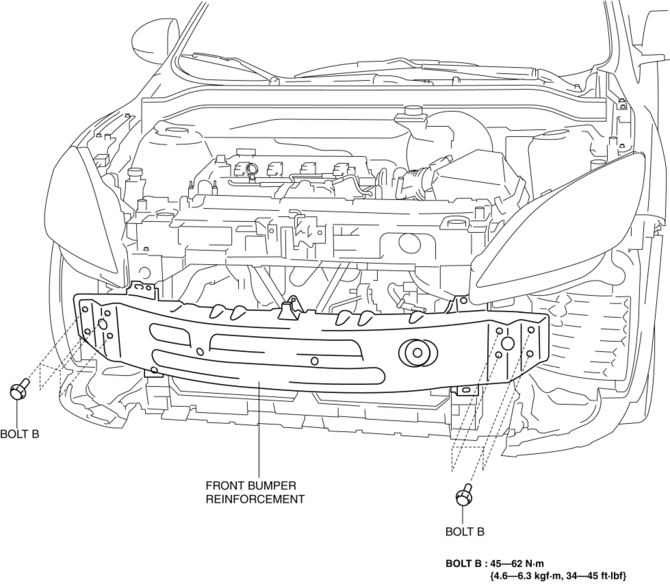
5. Remove the front bumper reinforcement.
6. Install in the reverse order of removal.
 Front Bumper Disassembly/Assembly
Standard Type
Except SKYACTIV-G 2.0
1. Disassemble in the order indicated in the table.
1
Screw A
2
Guard cover
3
...
 Front Bumper Removal/Installation
1. Disconnect the negative battery cable..
2. Remove the screw A and fasteners B.
3. Remove the screws C.
4. Remove the bolts D.
5. Remove the fasteners E, screw F and fastener G. ...
Other materials:
Rear Scuff Plate Removal/Installation
1. Detach tab A while pulling the rear scuff plate in the direction of the arrow
(1) shown in the figure, then detach hook B, clips C, pins D while pulling in the
direction of the arrow (2).
2. Detach tab E while pulling the rear scuff plate in the direction of the arrow
(3) shown in the fig ...
Console Removal/Installation
1. Disconnect the negative battery cable..
2. Remove the following parts:
a. Upper panel.
b. Shift knob (MTX).
c. Selector lever knob (ATX).
d. Shift panel.
e. Side wall.
3. Remove the bolts.
4. Remove the screws.
5. Pull the console in the direction of the arrow shown in t ...
Identification Numbers
Vehicle Identification Number
The vehicle identification number legally
identifies your vehicle. The number is on a
plate attached to the cowl panel located on
the left corner of the dashboard. This plate
can easily be seen through the windshield
Motor Vehicle Safety Standard Label (U.S.A. ...
