
Mazda 3 Owners Manual: Operating Tips for Audio System
| WARNING
Always adjust the audio while the
vehicle is stopped:
Do not adjust the audio control
switches while driving the vehicle. Adjusting the audio while driving the vehicle is dangerous as it could distract your attention from the vehicle operation which could lead to a serious accident. Even if the audio control switches are equipped on the steering wheel, learn to use the switches without looking down at them so that you can keep your maximum attention on the road while driving the vehicle. |
| CAUTION For the purposes of safe driving, adjust the audio volume to a level that allows you to hear sounds outside of the vehicle including car horns and particularly emergency vehicle sirens. |
NOTE
- To prevent the battery from being discharged, do not leave the audio system on for a long period of time when the engine is not running.
- If a cellular phone or CB radio is used in or near the vehicle, it could cause noise to occur from the audio system, however, this does not indicate that the system has been damaged.
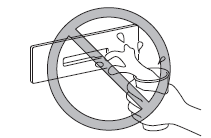
Do not spill any liquid on the audio system.
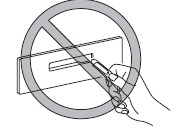
Do not insert any objects, other than CDs, into the slot.
- Radio Reception
- Operating Tips for CD Player
- Operating Tips for MP3
- Operating Tips for WMA
- Operating Tips for AAC
- Operating Tips for OGG
- Operating Tips for USB device
- Operating Tips for iPod
 Antenna (5-Door)
AM/FM Radio Antenna *
The AM/FM radio antenna receives both
AM and FM signals.
(Type A)
To remove the antenna, turn it
counterclockwise.
To install the antenna, turn it clockwise.
Make sure ...
 Radio Reception
AM characteristics
AM signals bend around such things as
buildings or mountains and bounce off the
ionosphere.
Therefore, they can reach longer distances
than FM signals.
Because of this, tw ...
Other materials:
PCM Removal/Installation [Mzr 2.0, Mzr 2.5]
1. Remove the battery cover..
2. Disconnect the negative battery cable..
3. Remove the following items:.
Battery
PCM cover No.1
4. Disconnect the PCM connector..
5. Remove the battery tray and PCM component..
6. Remove in the order indicated in the table.
...
Pre-programming the HomeLink
System
NOTE
It is recommended that a new battery be
placed in the hand-held transmitter of the
device being programmed to HomeLink
for quicker training and accurate
transmission of the radio-frequency signal.
Verify that there is a remote control
transmitter available for the device you
would ...
Settings
NOTE
Depending on the grade and specification, the screen display may differ.
Select the icon on the home
screen and display the Settings screen.
Switch the tab and select the setting item you want to change.
You can customize settings in the setup display as follows:
Tab
...
